RS20iInstallationandOperatingGuide
Page 66
RS20i Installation & Operating Guide Document # 9301H52900 Ver. 1.02
4.5.1 Edit Output Preset
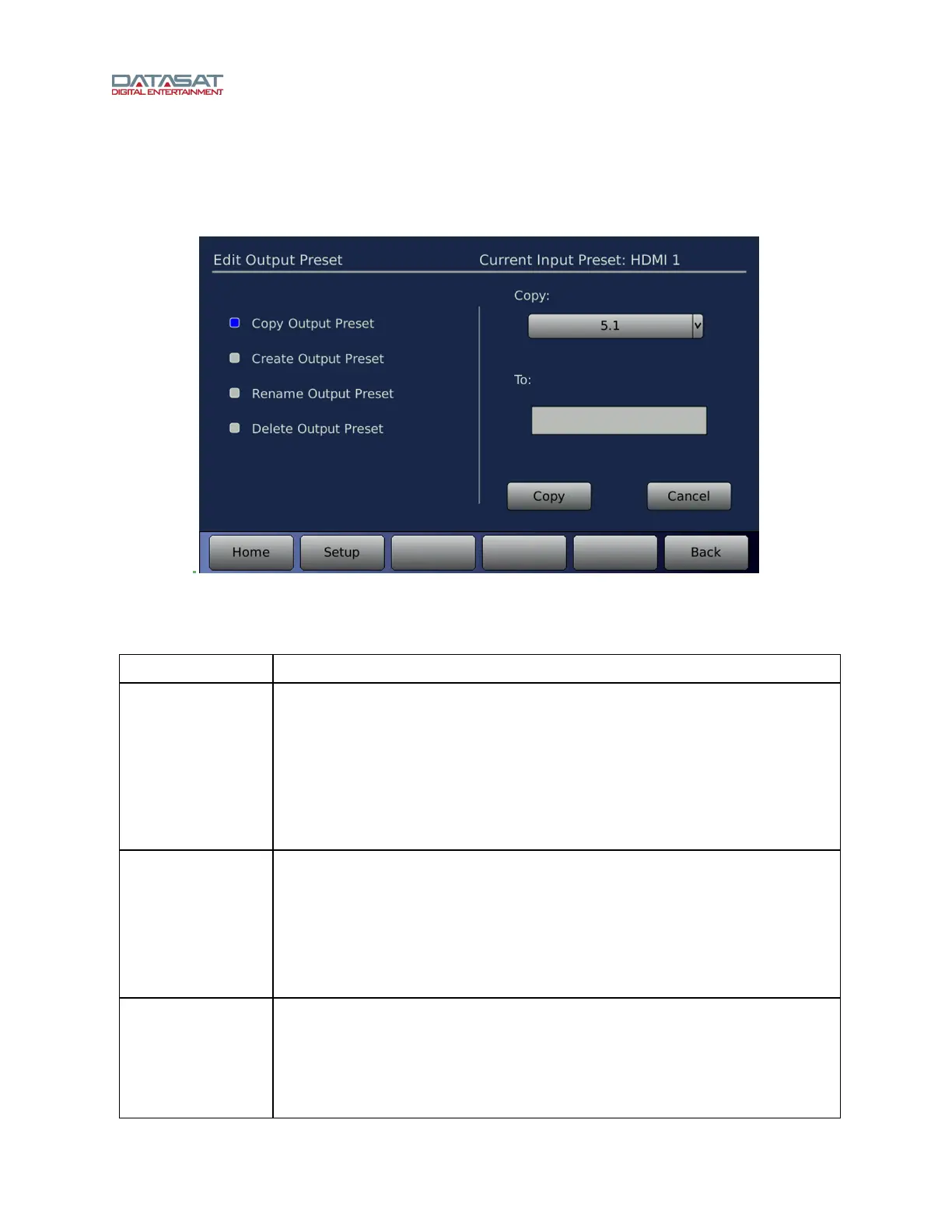
The Edit Output Preset screen permits copying, renaming, and deleting Output Presets. To access this
screen:
Setup > Out Prst > Edit Output Presets
Figure 44. Output Preset Edit
The functions available on this screen are described in this table.
Table 21. Edit Output Presets
Function Description
Copy Output
Preset
Copy an existing Output Preset to create a new one. See Table 22 Speaker
Configurations, page 77.
Select the Output Preset you wish to copy from by selecting it from the Copy
drop down list.
Then, touch the To box to bring up the virtual keyboard and enter a name for
the new Output Preset.
Press the Copy button to complete the process, or press Cancel to quit.
Create Output
Preset
Select an Output Preset template to use to create a new Output Preset.
Select the Output Preset you wish to copy from by selecting it in the Create
using template drop down box.
Then, touch the To box to bring up the virtual keyboard and enter a name for
the new Output Preset.
Press the Create button to complete the process, or press Cancel to quit.
Rename Output
Preset
Give an existing Output Preset a new name.
Select an existing Output Preset from the Rename drop-down list on the
right side of the screen.
Touch the To box to bring up the virtual keyboard and enter a new name for
the Output Preset.



 To Next Page