RS20iInstallationandOperatingGuide
Page 42
RS20i Installation & Operating Guide Document # 9301H52900 Ver. 1.02
4.3.2 Input Button Assignments
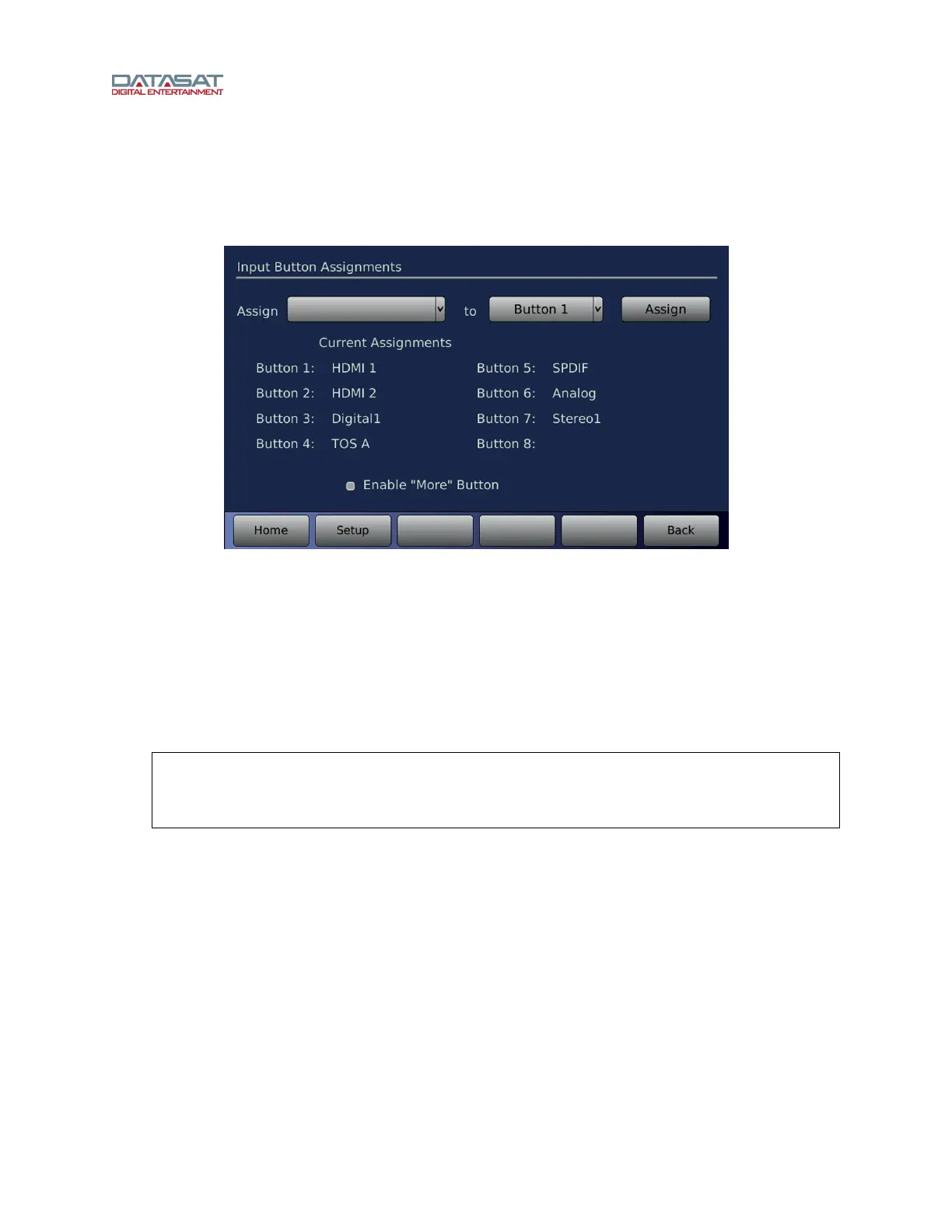
In the Input Button Assignments screen, you can assign specific Input Presets to buttons that appear on
the Home screen. Up to 8 Input Presets may be assigned.
Setup > Inputs > Assign Buttons
Figure 22. Input Button Assignments Screen
• Touch the Assign drop down list to open it, then select an input.
• Touch the Button drop down list to open it, then select a button number.
• Touch the Assign button.
• Enable “More” Button – see Enable “More” Button, page 43.
The button assignm
ent will
be listed in the Current Assignments listing in the screen above.
Additionally, the Input Preset will be assigned to the corresponding button location along the bottom of the
Home screen as shown in
Figure 23.
Note: To un-assig
n or delete a button assignment, select the button from the drop
down list, then select the blank option from the Assign drop down list, then
touch Assign. The Current Assignments listing will no longer show the button
assignment.



 To Next Page