RS20iInstallationandOperatingGuide
Page 94
RS20i Installation & Operating Guide Document # 9301H52900 Ver. 1.02
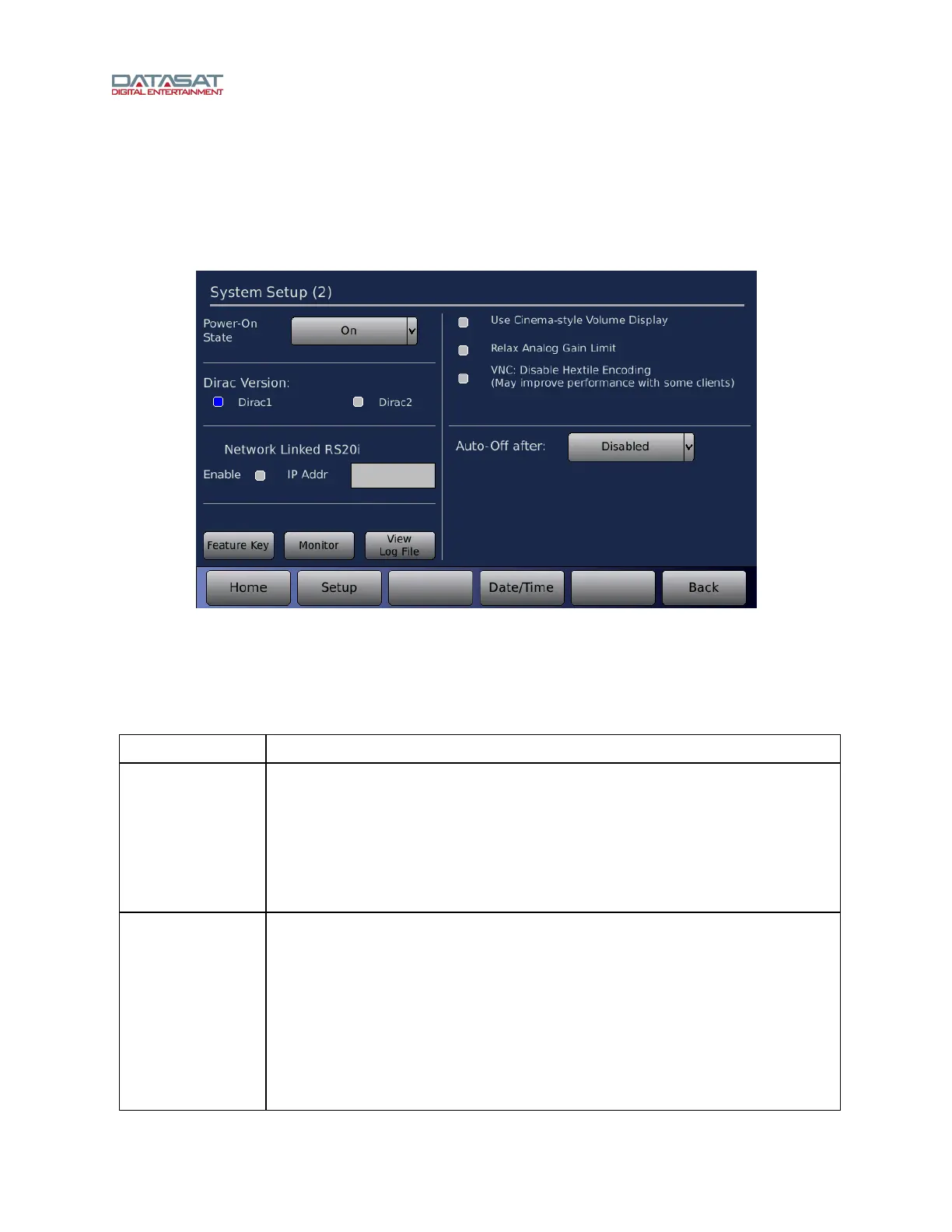
4.9 System Setup (2)
The second System Setup screen contains additional settings. To access this screen, touch the More
button in the Setup screen.
Setup > System > More
Figure 61. System Setup (2)
Date/Time – Touch this button to open the screen for setting the date and time. See 4.9.3 Date/Time,
page 97.
The setting
s available on this screen are described in this table.
Table 35. System Setup (2)
Setting Description
Power-On State
Determines whether Standby mode will be enabled after a power-on event either
from the back panel switch, or after a power interruption.
On – The unit remains in the on state.
Off – The unit will boot up as normal, then power off (standby Mode).
Last Power State – After power up, the unit returns to the mode it was in
before the power was turned off (On or standby mode).
Dirac Version
Select between the first (Dirac1) and second (Dirac2) version of Dirac filters for
all of the Dirac setups.
Select Dirac1 (default) if you are using that version of the Dirac Live setup
software for alignment. This version may be needed for installations that have
been setup before the Dirac 2 version was available. Refer to the Dirac Live
Installation Guide for information on how to use Dirac for RS20i setup.
Dirac 2 is recommended for all new installations provided that the installer
has Dirac 2 setup software.
After selecting the Dirac Version, the RS20i must be reset from the front



 To Next Page