RS20iInstallationandOperatingGuide
Page 44
RS20i Installation & Operating Guide Document # 9301H52900 Ver. 1.02
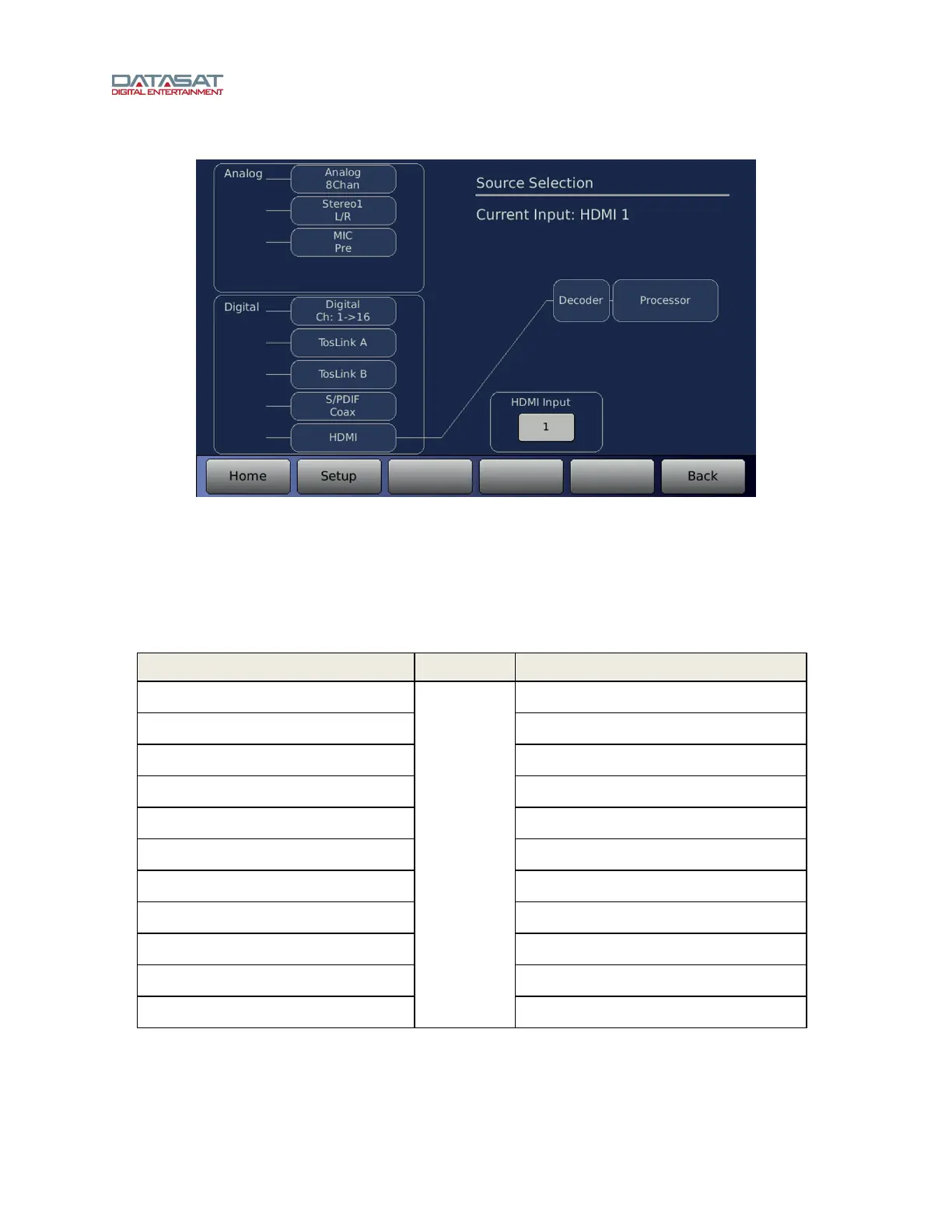
Setup > Inputs > Input Source
Figure 25. Input Source Screen
• If Stereo is selected, touching the button again toggles the selection between Stereo1 and Stereo2.
• If Digital is selected, touching the button again toggles the selection between Digital Ch: 1 > 8,
Digital Ch 9 > 16, Digital Ch: 1-2, Digital Ch: 9-10 and Digital Ch: 1 > 16.
Table 7 shows where input channels are mapped within the RS20i.
Table 7. Input Source Mapping
INPUT
OUTPUT
Analog 8 Channel Processor Channel 1 ¼ 8
Stereo1 L/R Processor Channel 1, 2 (L, R)
MIC Pre Processor Channel 3 (Center)
Digital Channel 1 ¼ 16 Processor Channel 1 ¼ 16
Digital Channel 1 ¼ 8 Processor Channel 1 ¼ 8
Digital Channel 9 ¼ 16 Processor Channel 1 ¼ 8
TosLink A Processor Channel 1 ¼ 2
1
TosLink B Processor Channel 1 ¼ 2
1
S/PDIF Coax Processor Channel 1 ¼ 2
1
HDMI Processor Channel 1 ¼ 8
HDMI Input
Maps to…
HDMI Audio/Video Input port selection
1. If a DTS or Dolby Digital bitstream is detected and decoded, the decoded stream will be routed to
the first eight channels internally on the RS20i. See section 4.3.6 Surround Decoder Setup on
page 48 for more information.



 To Next Page