RS20iInstallationandOperatingGuide
Page 63
RS20i Installation & Operating Guide Document # 9301H52900 Ver. 1.02
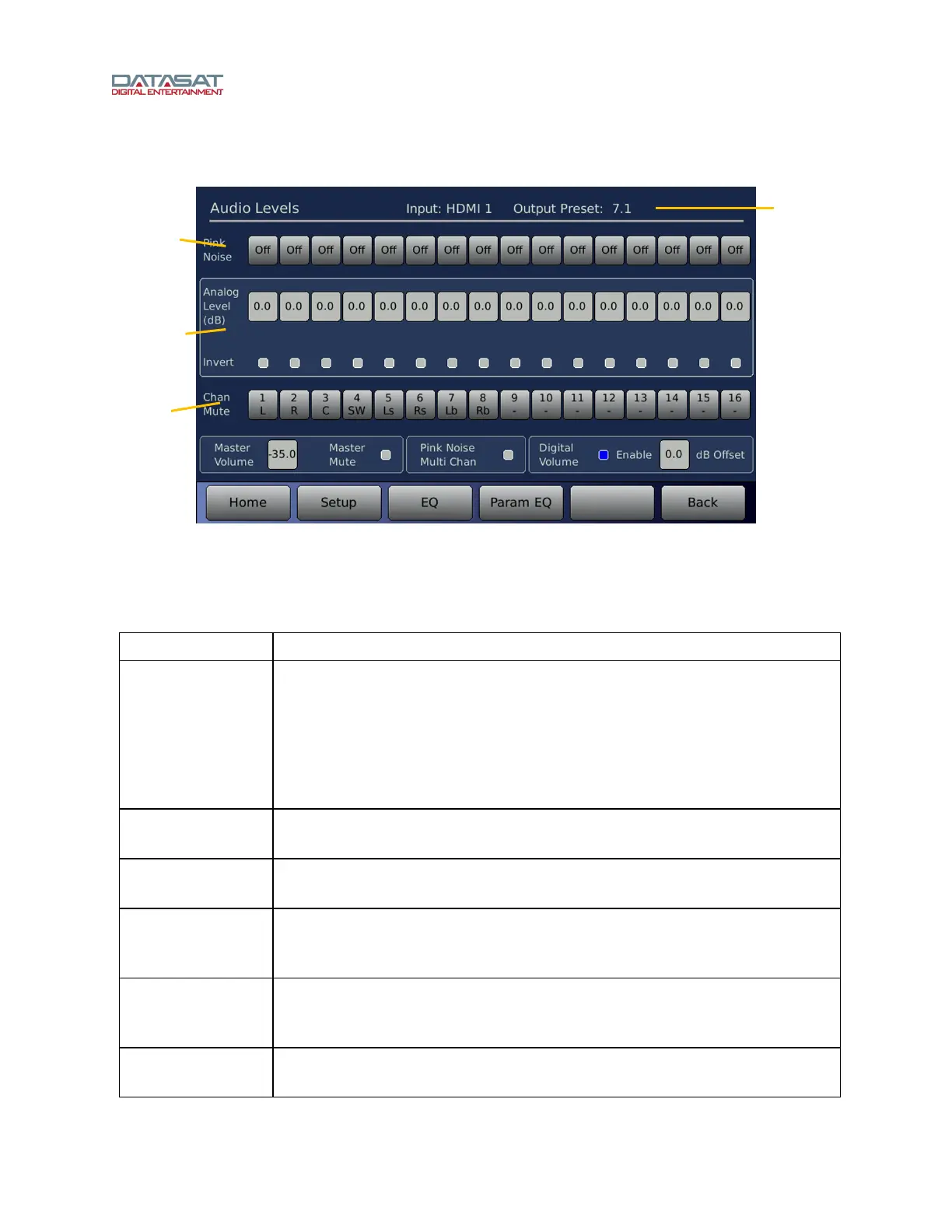
To access the Audio Levels screen:
Setup > Inputs > Audio Levels
Figure 42. Audio Levels
At the top of the screen, the current Input Preset and current Output Preset are displayed.
Audio Level functions on this screen are described in this table.
Table 19. Audio Level
Function Description
Pink Noise
Select one of the 16 buttons for channels 1 through 16 to enable pink noise for
that channel. Selecting pink noise also selects the Analog Level button
underneath so that level adjustments may be made just by turning the Volume
Control knob. Select the same number to disable pink noise on that channel, or
select another button on the same row to move the pink noise to another
channel. Selecting the Pink Noise Multi Chan option at the bottom of the
screen allows playing pink noise simultaneously on more than one channel.
Analog Level
Channel level -20dB to 10dB. To change, first select the control, then use the
front panel Volume Control knob to adjust up or down.
Invert
Select control to enable/disable channel invert. Box turns blue when invert is
enabled (Invert is used primarily for test purposes.)
Chan Mute
Select the control to mute or unmute the selected channel. Multiple channels
may be muted. Channels remain mute when exiting the screen. The mute will
reset after a power cycle.
Master Volume
Select control and use the Volume Control knob to change the master volume
control setting. Normally SPL meter readings are taken with the volume control
set to -15dB. This volume control is the same as the one in the Home screen.
Master Mute
On/off control will mute/unmute all channels. This mute enable is the same as
that on the Home screen. Use it in case of accidental loud noise.
Select to
change
level
channels
1-16
Current
Input and
Output
Preset
Enable Pink
Noise,
channels
1-16
Mute /
Unmute
channels
1-16



 To Next Page