RS20iInstallationandOperatingGuide
Page 74
RS20i Installation & Operating Guide Document # 9301H52900 Ver. 1.02
To access Bass Management Setup:
Setup > Output Prst > BassMan
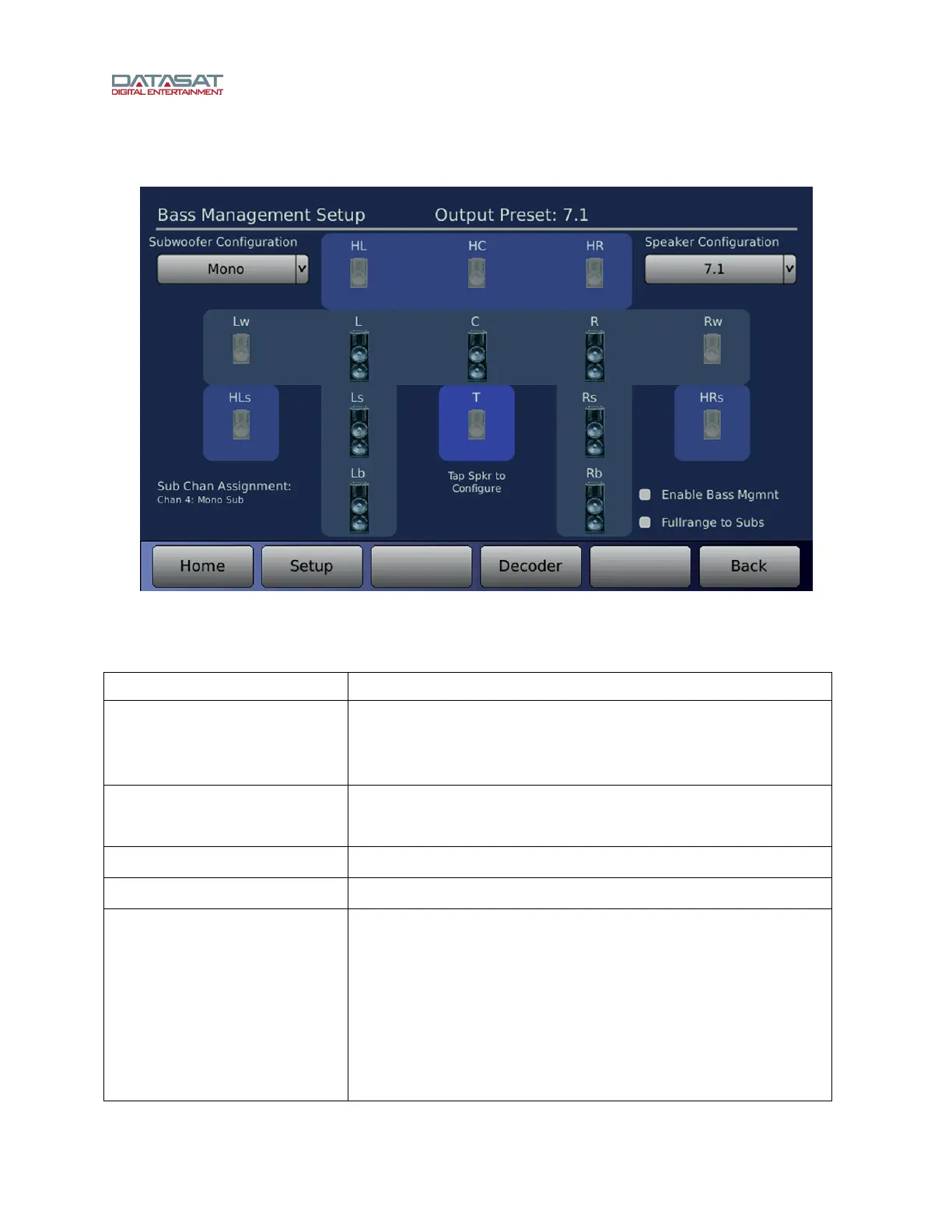
Figure 50. Bass Management Setup Screen
The screen above shows all available speakers for the selected Speaker Configuration.
Table 26. Bass Management Setup Screen
Controls Description
Speaker Configuration
Select speaker configuration that matches the installation. Only
the speakers available for the chosen configuration will be active
for setup. Unavailable speakers will be disabled and grayed out
on the screen.
Subwoofer Configuration
Select number and positions for subwoofers.
See Subwoofer Configuration Options table, below.
Enable Bass Management
On/Off— Enable all bass management functions.
Full Range to Subs
On/Off – Select to remove all low pass filters to the subwoofers.
Speaker icons
Touch an icon to open a speaker setup screen.
L/R – Left/Right speakers
C – Center speaker
Ls/Rs – Left/Right Surround speakers
Lb/Rb – Left/Right Back speakers
HL/HR – High Left / High Right speakers
Lw/Rw – Front Wide speakers
HLs/HRs – High Surround speakers
HC – High Center speaker
T – Top Center speaker



 To Next Page