ineo+ 650/550/451 2-103
Copy Operations
2
2.28 Inserting different paper into copies ("Insert Sheet" function)
Different paper (such as colored paper) can be inserted for specified pages in the copies.
There are settings ("Copy" and "Blank") for selecting whether or not the inserted pages are printed. When the
settings are combined with single-sided copying or double-sided copying, the copies are printed as shown
below.
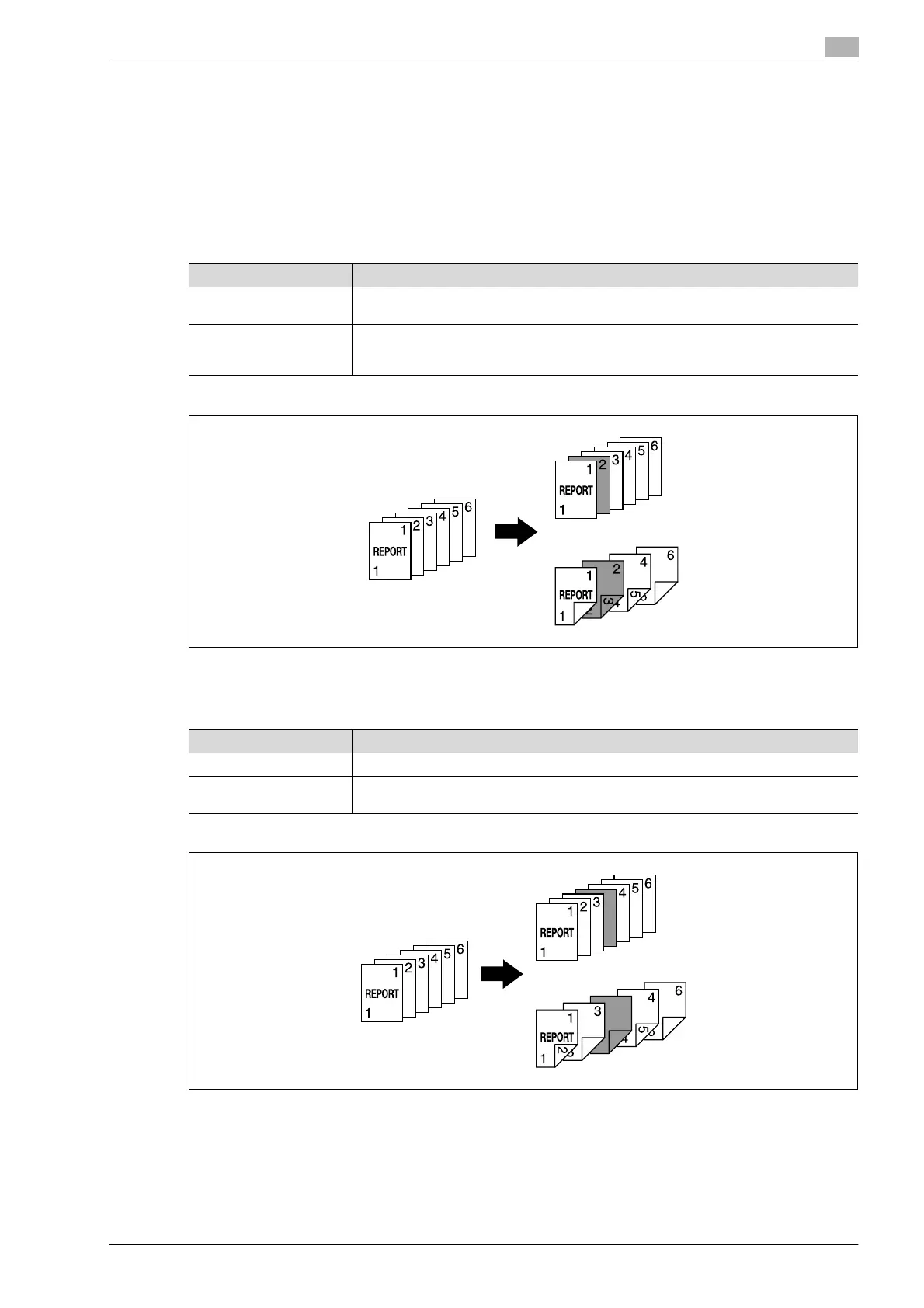
If "Copy" is selected, the document is copied with the specified paper inserted for the specified pages.
When page 2 is specified
Copy
If "Blank" is selected, the specified paper is inserted before the specified page.
When page 3 is specified
Blank
Finishing Description
Single-sided copies The specified paper is inserted for the 2nd sheet of the copy, and the 2nd sheet of the
document is copied onto it.
Double-sided copies The back side of the 1st sheet of the copy is left blank, the specified paper is inserted for
the 2nd sheet of the copy, and a double-sided copy of the 2nd and 3rd sheets of the doc-
ument are printed onto it.
Finishing Description
Single-sided copies The specified paper is inserted as the 4th sheet of the copy.
Double-sided copies The back side of the 2nd sheet of the copy is left blank, and the specified paper is insert-
ed for the 3rd sheet of the copy.












 To Next Page