ineo+ 650/550/451 7-9
Fax Operations (Option)
7
7.3 Specifying scanning conditions
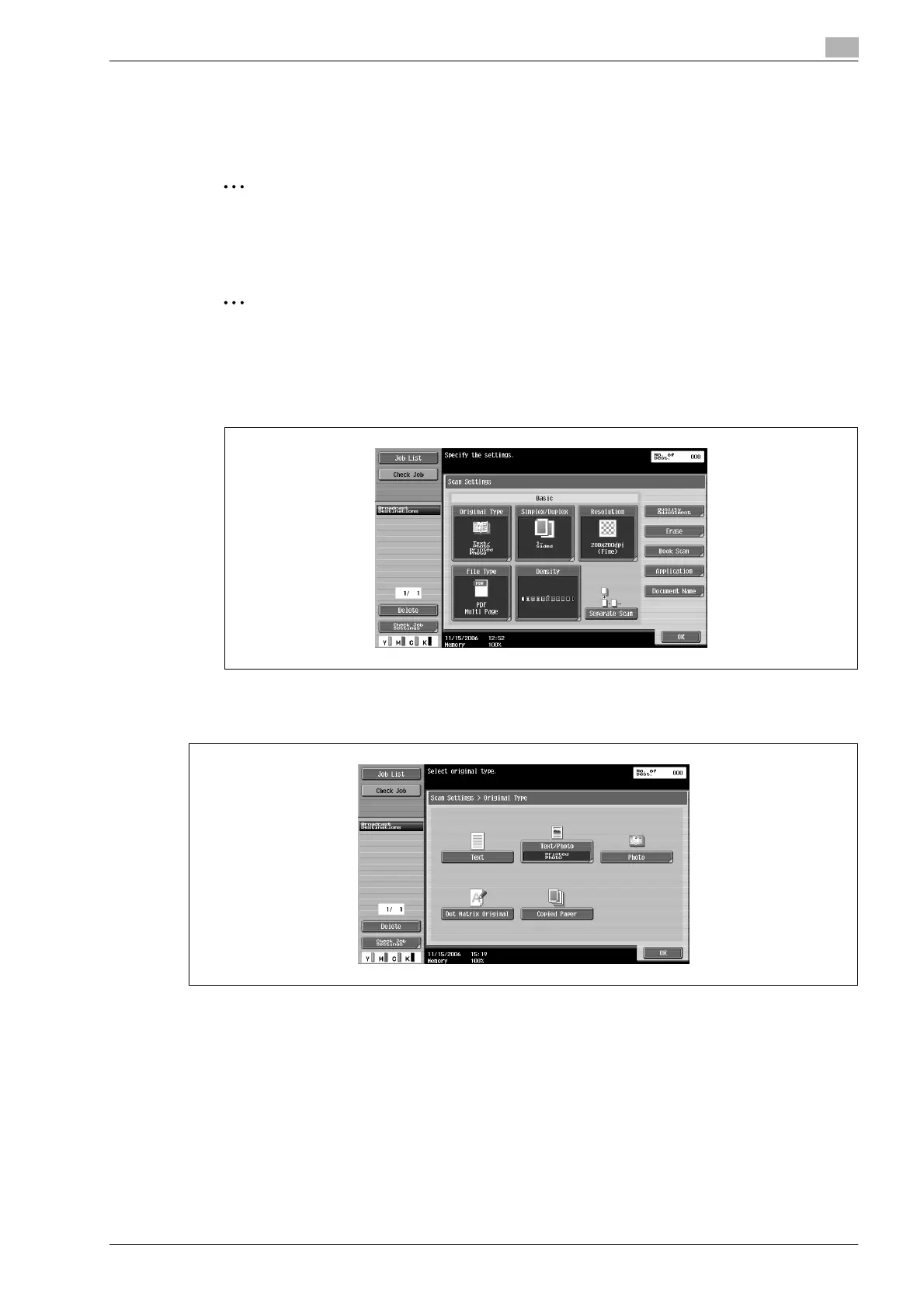
Touching [Scanning Settings] on the Fax/Scan screen displays [Original Type], [Simplex/Duplex], [Resolution]
and [Density], and enables you to specify transmission conditions for the original to be sent.
2
Note
[File Type] cannot be used in Fax mode.
Specifying scanning settings
2
Note
You cannot specify different transmission conditions for different pages within one original.
1 Touch [Scanning Settings] on the Fax/Scan screen.
2 Touch the button you wish to specify.
Original type
Set the original type according to the content of the original.
There are 5 types of original type settings.
At the time of purchase, original type is set to [Text/Photo].
- [Text]:
Touch when scanning text-only originals. If you select this mode for scanning originals with photos,
none of the image’s intermediate colors will be reproduced, and the image will darken.
- [Text/Photo]:
Touch when originals with text and photos (half tone) mixed together, are to be scanned. Select this
mode when text and photos are mixed together on 1 pages or when text and photos are mixed together
on multiple pages.
- [Photo]:
Touch when scanning photo-only (half tone) originals.












 To Next Page