3
Print Operations
3-48 ineo+ 650/550/451
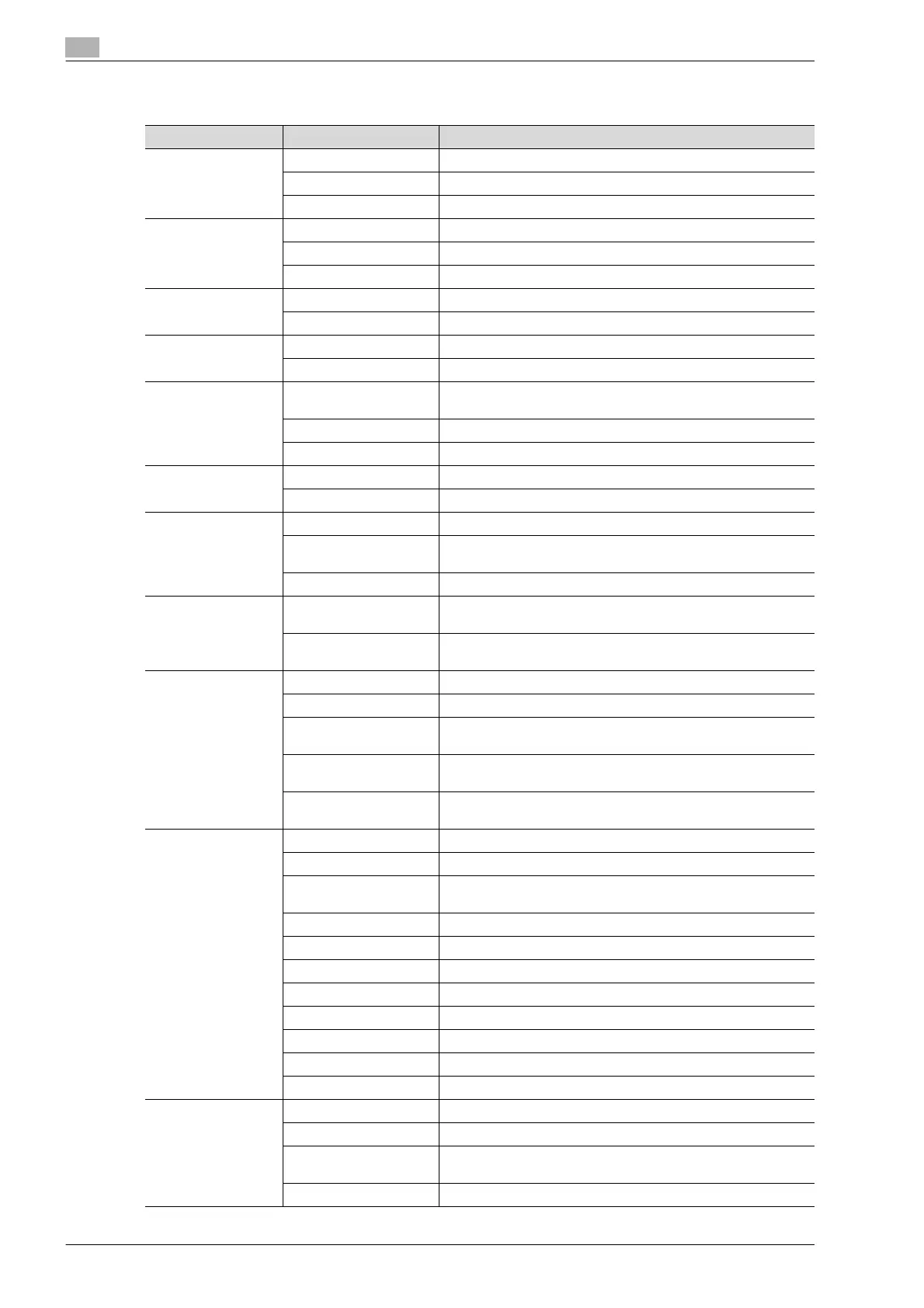
Print items
Menu Item Function
Copies & Pages Copies Specifies the number of copies to print.
Collated Prints multiple copies in sets.
Pages Specifies the print range to print.
Layout Pages per Sheet Specifies the number of pages to print on one page.
Layout Direction Specifies the document page order.
Border Specifies the borders around pages.
Output Options
*2
Save as File Saves data to a file.
Format Specifies the format for saving data to a file.
Scheduler
*1
Print Document Specifies the print time.
Priority Specifies the priority level.
Paper Handling
*1
Reverse Page Order
(Page Order)
Prints pages in the reverse order.
Print Selects the pages for printing.
Destination paper size
*3
Specifies the output paper size.
ColorSync
*1
Color Conversion Specifies the color conversion method.
Quartz Filter Specifies the color for printing.
Cover Page
*1
Print Cover Page Specifies whether to attach a cover page.
Cover Page Type Selects to print "Confidential" or other comments on the cover
page.
Billing Info Enters the user information used for billing.
Error Handling PostScript Errors Specifies whether to print an error report when a PostScript error
occurs.
Tray Switching Switches the paper source tray. (This function cannot be select-
ed on this machine.)
Output Method Collate Prints multiple copies in sets.
Offset Specifies offset.
Output Method Specifies output methods, such as "Secure Print" and "Save in
User Box".
User Authentication Select to perform user authentication and specify the user name
and password.
Account Track Select to perform account track and specify the department
name and password.
Layout/Finish Print Type Specifies duplex printing and booklet printing.
Binding Direction Specifies the binding position.
Poster Mode Prints one sheet of an original document divided on multiple pag-
es.
Overlap width line Prints an overlap width line on split pages.
Rotate 180 Prints the image rotated 180°.
Image Shift Prints by shifting the entire print image.
Chapter Specifies the page to be printed on the front side.
Staple Specifies stapling.
Punch Specifies hole punching.
Saddle Stitch/Fold Specifies to fold and saddle stitch a printed document.
Paper Arrangement Specifies the method for adjusting the binding position.
Paper Tray/Output
Tray
Paper Tray Selects the paper tray for printing.
Paper Type Selects the paper type for printing.
Paper Settings for Each
Tray
Specifies the paper type for each paper tray.
Output Tray Specifies the tray where to output the printed pages.












 To Next Page