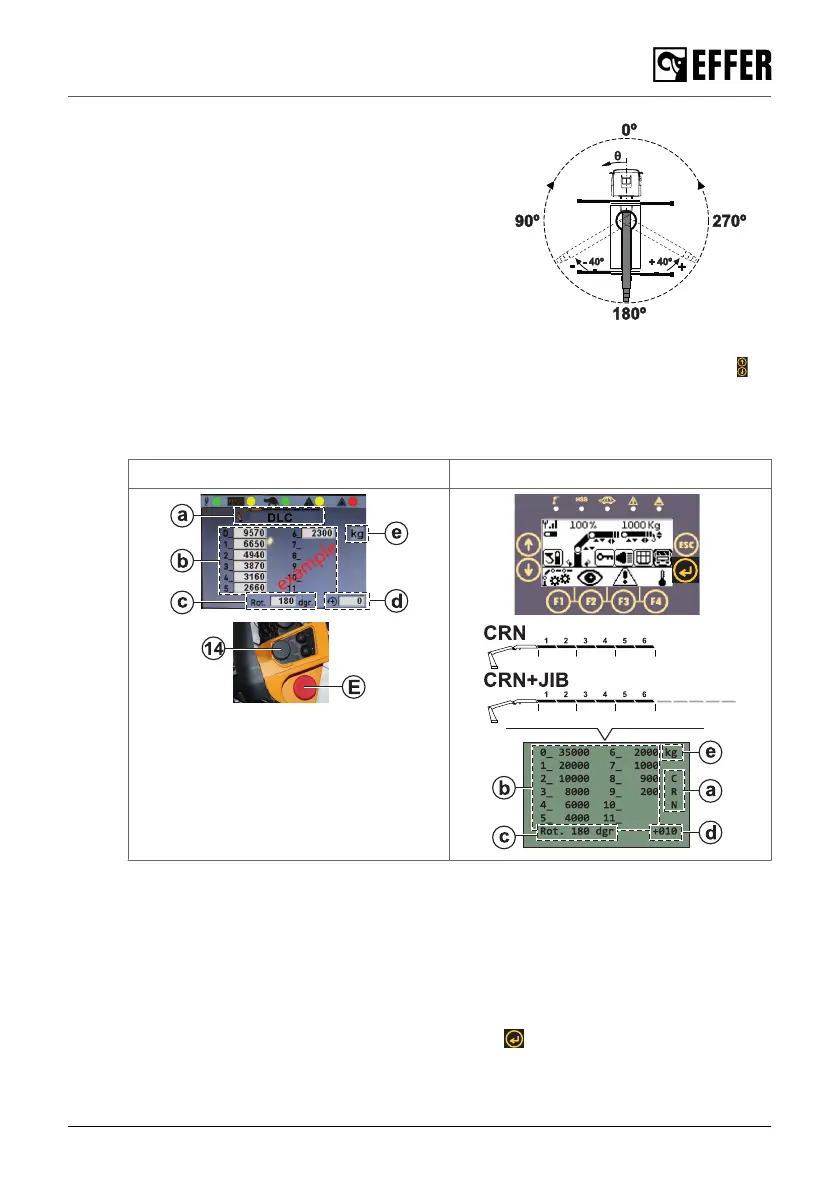
7. Read the maximum liftable loads for the
rotation current position of the crane on
the display:
a. The configuration version of the crane
or crane + JIB.
b. The load values depending on
which extensions are extended and
considering that they are in the
horizontal position.
c. The real rotation angle (e.g. 180º).
d. The angular variation (e.g. +40º / -40º)
referred to the real position (e.g.
180º). Use the rotary selector (14) in the STEADY and the arrow keys in
SCANRECO to change this value increasing or decreasing 10º at a time. The values of
the simulation will be automatically updated and displayed.
e. The unit of measurement (for example, kg or lbt).
STEADY Scanreco
8. Use the levers on your controller as in step 3 to run other simulations following the
previous steps.
9. Push the emergency stop button (E) to exit the simulation mode.
b. Display of liftable loads based on a real stabilisation
1. Extend the stabiliser extensions and set the stabiliser legs on the ground stabilising the
vehicle according to your needs.
2. Push the (F4) on the STEADY or the ENTER button on the SCANRECO. The “DLC-S”
screen appears on the controller’s display.
During operation
EFFER 265-315-395-525 Progress 2.0 CE 111



 To Next Page