SMS
User
ESIM384
19.10.5. About STAY mode and how to activate it by EWKB5
Stay mode allows the user to arm and disarm the alarm system without leaving the secured premises. Typically, this feature is used when
arming the system at home before going to bed.
The system can be Stay-armed using EWKB5 under the following condition:
Automatic – If a Delay-type zone with Stay attribute enabled exists and it is NOT violated during the exit delay countdown, the system will
arm in Stay mode. Once the system is successfully Stay-armed, the
icon will be indicated on the Partition button.
For more details on how to disarm and turn o the alarm by EWKB5 touchpad, please refer to section How to disarm the system and turn
OFF alarm by EWKB5.
19.10.6. Alarm indications and how to view violated zones / tampers by EWKB5
The
icon displayed on the Partition button indicates that no violated zones and/or tampers are present, therefore the partition is ready
for arming. If the icon is displayed instead, the partition is not ready for arming, therefore the user must restore all violated zones before
arming the partition. Alternatively, the violated zones and violated tampers associated with the zone can be bypassed (if a zone with the
Force attribute is bypassed, the following icon will appear on the main screen ; see 19.10.7. How to bypass a violated zone and
activate a bypassed zone by EWKB5) or a Force attribute enabled for a certain zone, resulting in partial arm (if a zone with the Force
attribute is violated, the following icon
will appear on the main screen; see Zone attributes). The icon displayed on the Partition
button represents all types of alarm, except tamper and re alarm, while the
icon represents re alarm exclusively. Note that when the
system is armed, both
and icons will disappear. In case of system fault presence, including tamper violation, the icon will appear
on the Partition button (see section 19.10.11. Fault messages).
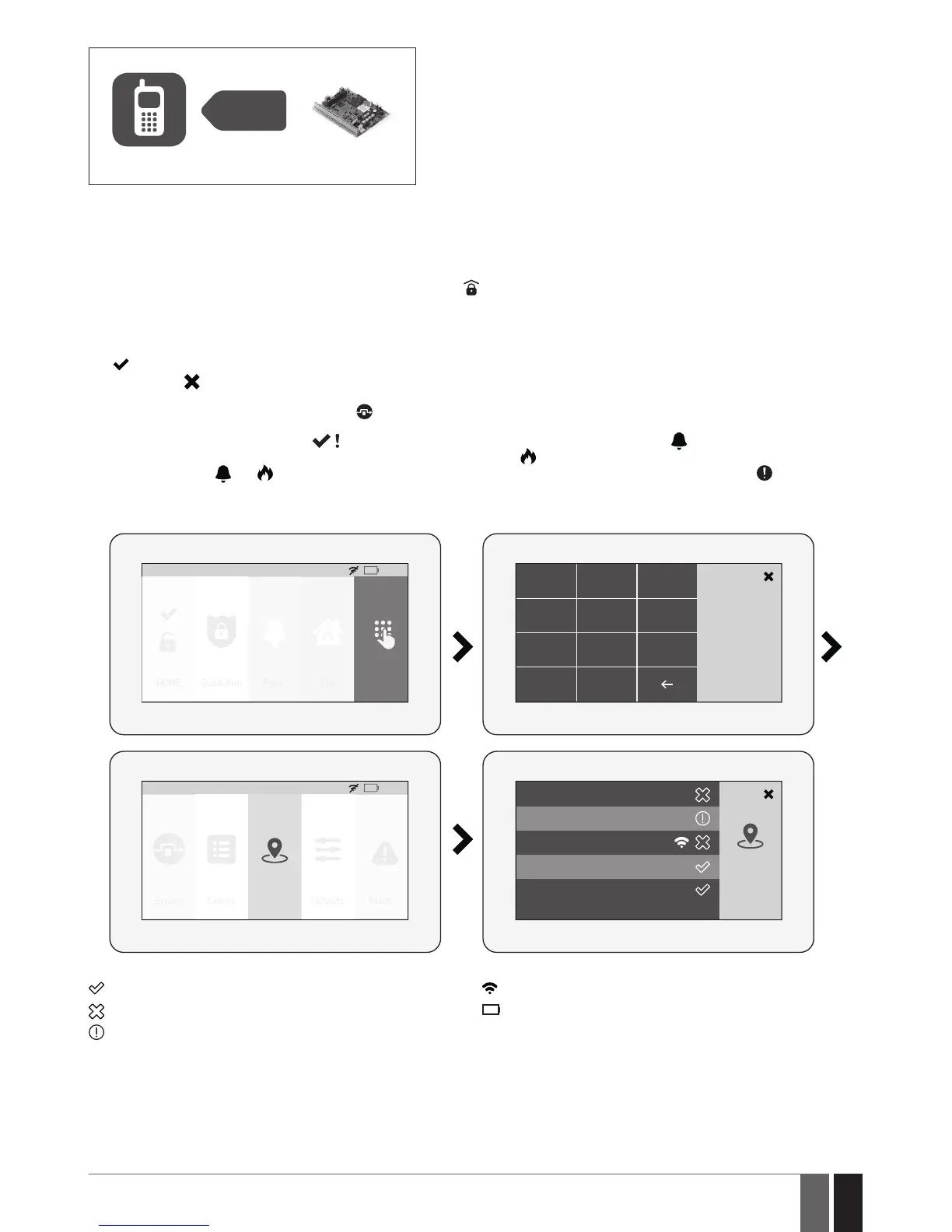
To view the list of violated zones and/or violated tampers associated with certain zones, please open Zones section by navigating through
the menu as follows. Please, note that Master code is required for this action.
HOME: 27
o
C
HOME Quick Arm Fire Settings
01:19
Panic
1 2 3
Master PIN
4
5 6
7
8
C
0
9
Alarm Zone1
Alarm Zone2
Zones
HOME: 27
o
C
Bypass Events Outputs Faults
01:19
Zones
Alarm Zone4
EKB5W Police zone
EKB5W Fire zone
The following Zones section icons represent the state of a certain zone/tamper:
– zone/tamper is OK – not violated.
– zone is violated.
– tamper associated with a corresponding zone is violated.
– zone of wireless category.
- LOW battery of the corresponding zones sensor
19.10.7. How to bypass a violated zone and activate a bypassed zone by EWKB5
Arming the system is disabled while there’s at least 1 violated zone. Bypassing the zone allows to temporally disable a particular violated
zone and arm the alarm system afterwards.
In case the user attempts to arm the system, while a violated zone/tamper exists, the touchpad will automatically re-direct the user to the
Bypass section, which lists the violated zones/tampers, and deny system arming unless the violated zone/tamper is bypassed. Alternative-
ly, the user can navigate through the menu as indicated below.



 To Next Page