5.26 Zigbee scenario command
This can be used to display and configure the ZigBee scenario control devices in the system.
It is accessed through the PROGRAMMATION → Zigbee Peripheral→ Zigbee Scenario Control menu.
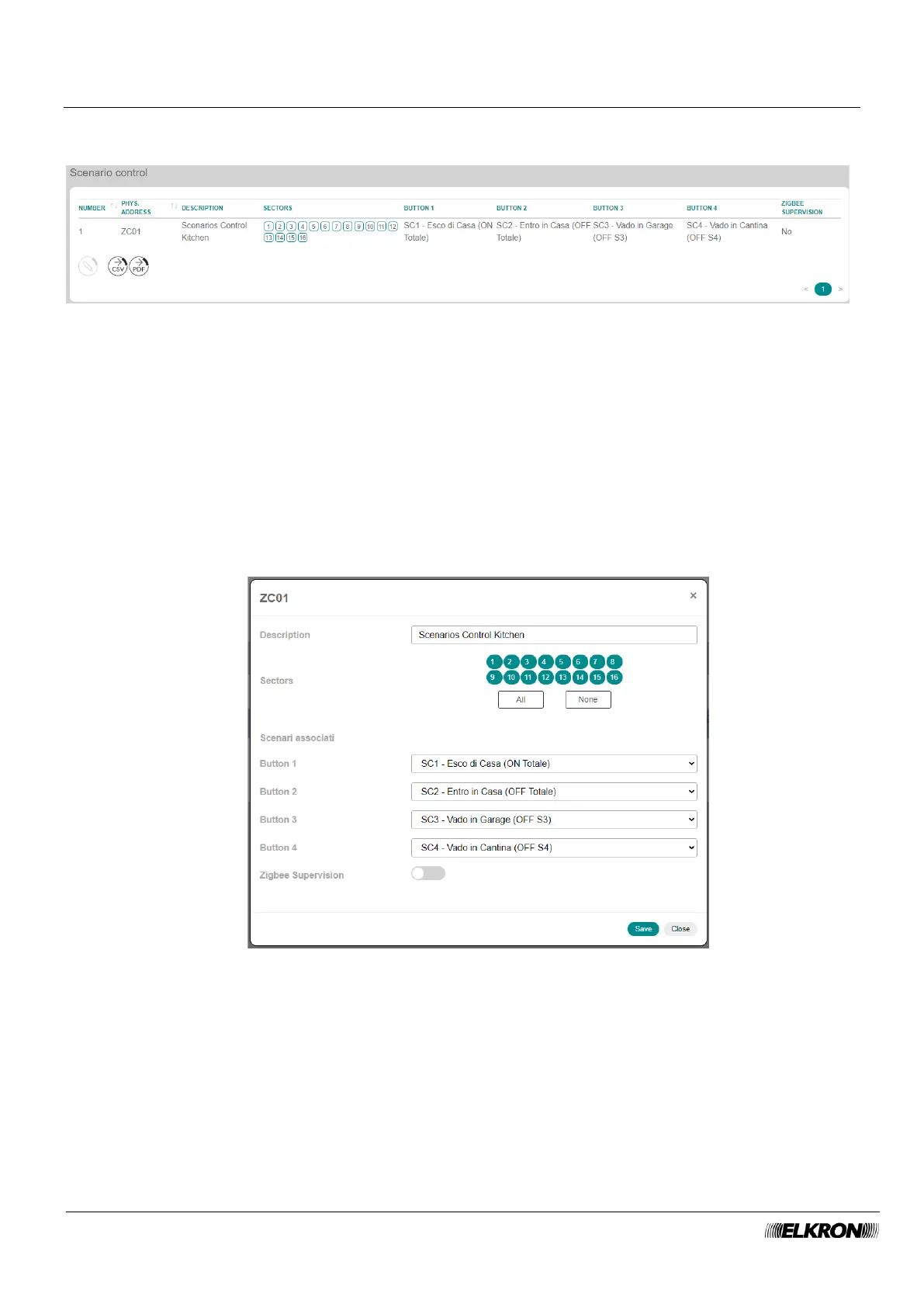
Figure 97 – ZigBee scenario controls
The table shows:
• NUMBER: This is the sequential number of acquisition of the scenario control.
• PHYS.ADDRESS: This is the physical address of the scenario control.
• DESCRIPTION: This is the alphanumeric label used to identify the scenario control device more
easily.
• SECTORS: This displays the sectors associated with the scenario control device.
• BUTTON 1: Scenario associated with button 1.
• BUTTON 2: Scenario associated with button 2.
• BUTTON 3: Scenario associated with button 3.
• BUTTON 4: Scenario associated with button 4.
• ZIGBEE SUPERVISION: This shows whether supervision is enabled or disabled.
Figure 98 – ZigBee scenario controls
Double-click on the flasher line to open a pop-up window.
• Enter the identification label of the flasher in Description. Use only alphabetic characters, including
accented characters, numbers, and spaces.
• Associate the scenario control to the sectors.
• Assign a single scenario control button to a scenario.
• Enable or disable ZigBee supervision of the scenario commands.



 To Next Page