Boot for the Fibre Channel Protocol User Manual P010096-02A Rev. A
7. Configure EFIBoot via UEFI HII (Human Interface Infrastructure) in a UEFI 2.1 System
Configure Boot Parameters
99
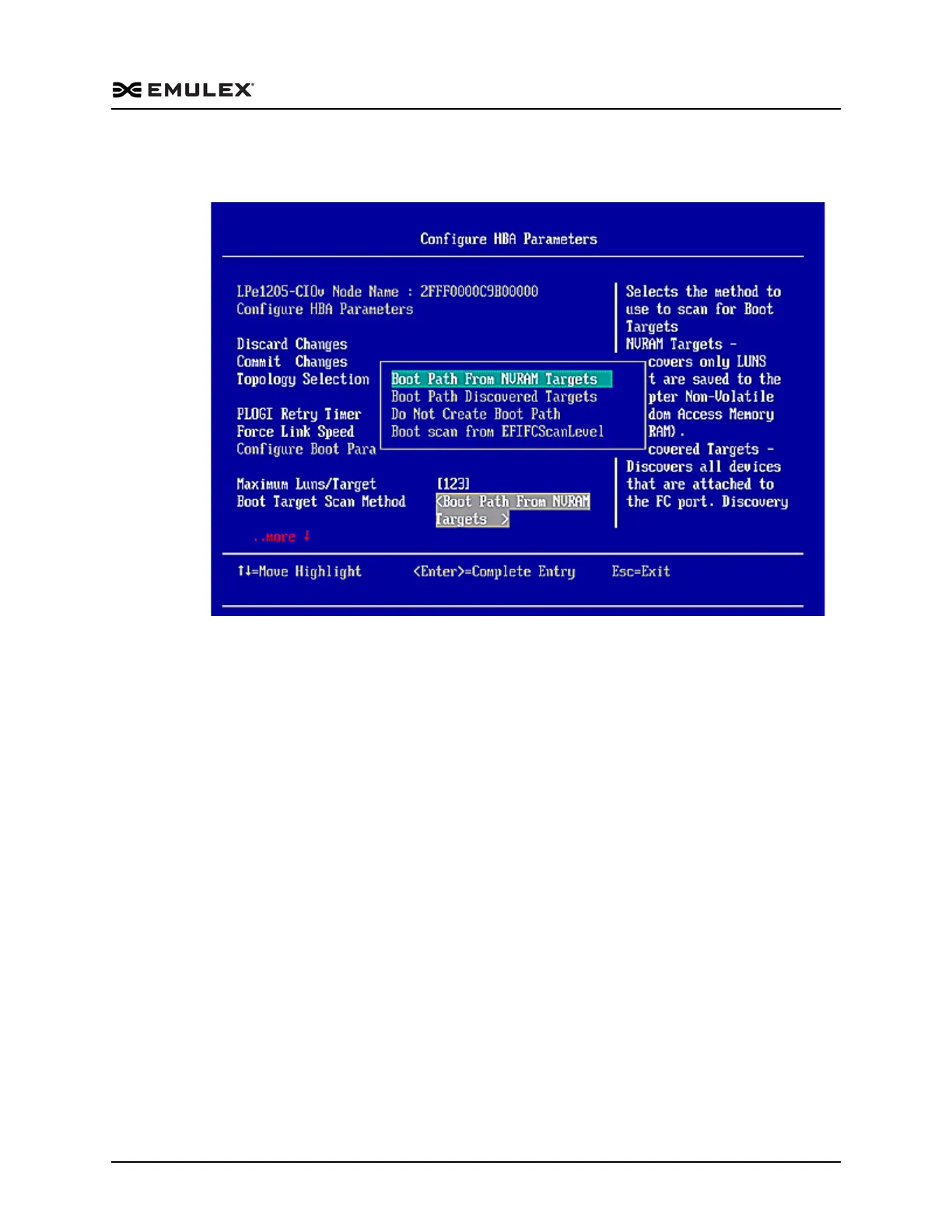
2. From the Configure Boot Parameters menu, navigate to Boot Target Scan Method
and press <Enter>. The Boot Target Scan Method menu appears.
Figure 7-19 Boot Target Scan Method Menu Screen
3. Select a boot scan setting and press <Enter>.The screen is refreshed with the new
value.
If you have a large SAN and set the boot path to “Boot Path Discovered Targets,”
discovery takes a long time.
4. Press <Esc> to return to the EFI utility menu.
5. Select Commit Changes and press <Enter>.
Change Device Discovery Delay
This parameter sets a delay to occur after an loop initialization and before a scan is
initiated to discover the target. The default is off or 0 seconds.
Change the default if you have an HP MSA1000 or HP MSA1500 RAID array and if
both of the following conditions exist:
The MSA array is direct connected or part of an arbitrated loop (for example,
daisy chained with a JBOD).
The boot LUN is not reliably discovered. In this case, a delay may be necessary
to allow the array to complete a reset.
Caution: Do not change the delay device discovery time if your MSA array is
connected to a fabric switch. Setting it to any other time guarantees that the
maximum delay time is seen on every loop initialization.



 To Next Page