C4 Maintenance 5. Joint #1
64 C Series Maintenance Manual Rev.2
Removal: Joint #1 Reduction gear unit
1. Turn OFF the Controller.
2. Turn the Manipulator laterally.
CAUTION
■
turning the Manipulator laterally, there must be two or more people to work
on it so that at least one of them can support the arm while
the others are removing
Removing the bolts without supporting the arm may result in the arm
falling, bodily injury, and/or malfunction of the robot system.
3. Remove the connector plate and the base bottom cover.
For details, refer to C4 Maintenance: 3. Covers.
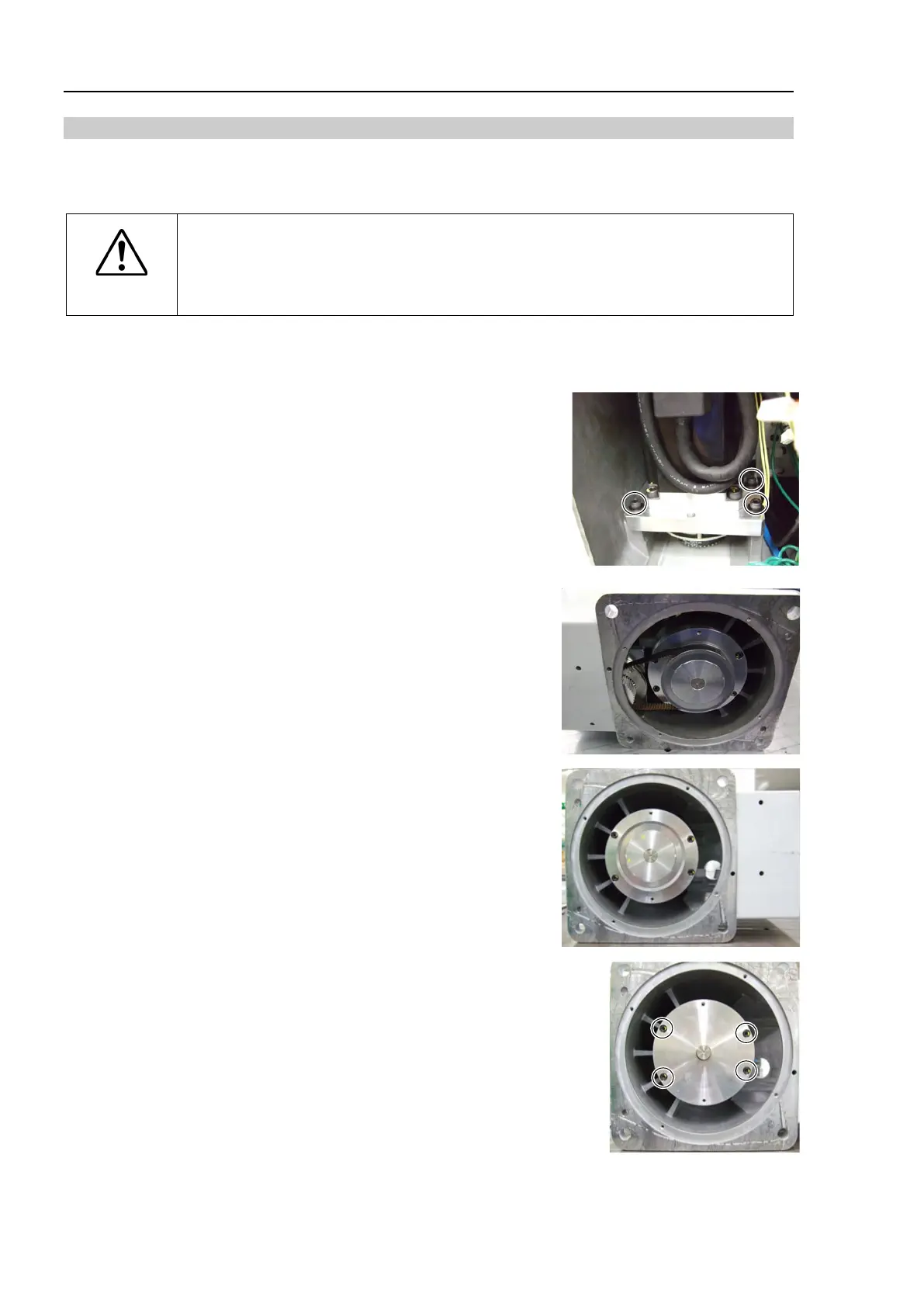
4. Loosen the set screws of the Joint #1 motor unit and remove the
Joint #1 timing belt.
Hexagon socket head cap bolt: 3-M4×20
5. Remove the pulley 2.
Hexagon socket head set screw: 2-M5×10 (with a brass bushing)
6. Remove the flange.
Hexagon socket head cap bolt: 4-M4×15











 To Next Page