126
Connect the Detector to your computer with the data cable.
Click on Detector > Load Detector log file.
Click on "...", select the saving location and enter the file name.
If the log file should be deleted after transferring to the Detector, check the box
Delete log file on the Detector after download.
Click OK.
4.13 E-Service
The Trendline software enables you now for the first time to utilize the services of
FAG Industrial Services GmbH easily and conveniently. Regardless of whether
we can assist you with the selection of measuring points or the analysis of the
vibration signals recorded by you, the E-Services function allows you to send all
data necessary to FAG Industrial Services GmbH by e-mail.
Before you begin
These services are economical, but subject to charge. You will find detailed
information on our website www.fis-services.com. Or just contact our sales
department (Tel. +49-(0)2407-9149-99 or sales@fis-services.com). If you have a
valid service contract, you can enter the contract number in the Options menu
(Extras > Options > E-mail). The contract number together with your e-mail
address are needed for identification.
Send data
In the configuration tree, select the first element you would like to use to send
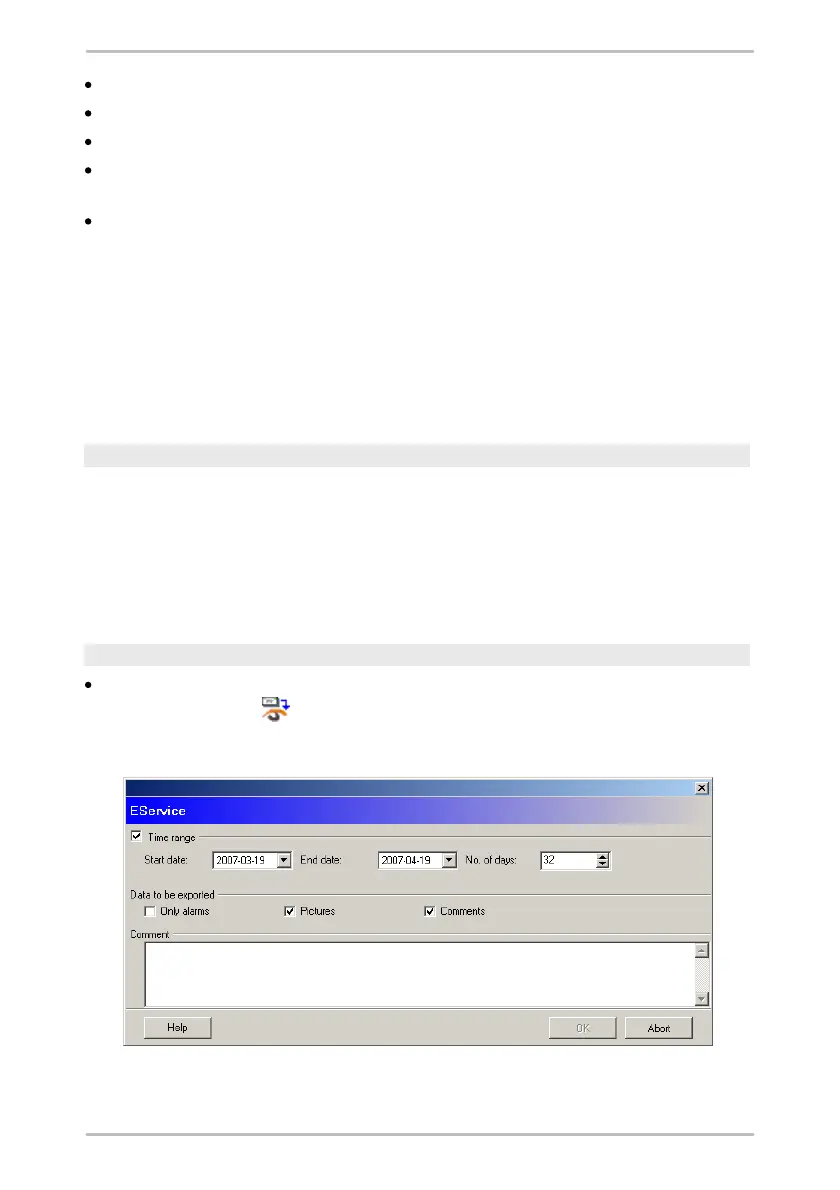
data. Now, click on or on Service > E-Service. The following window now
opens:
At the top of the window you can adjust the time range containing the data you



 To Next Page