239
Detector III
Sum
You can use this function to determine the sum of up to
three weights.
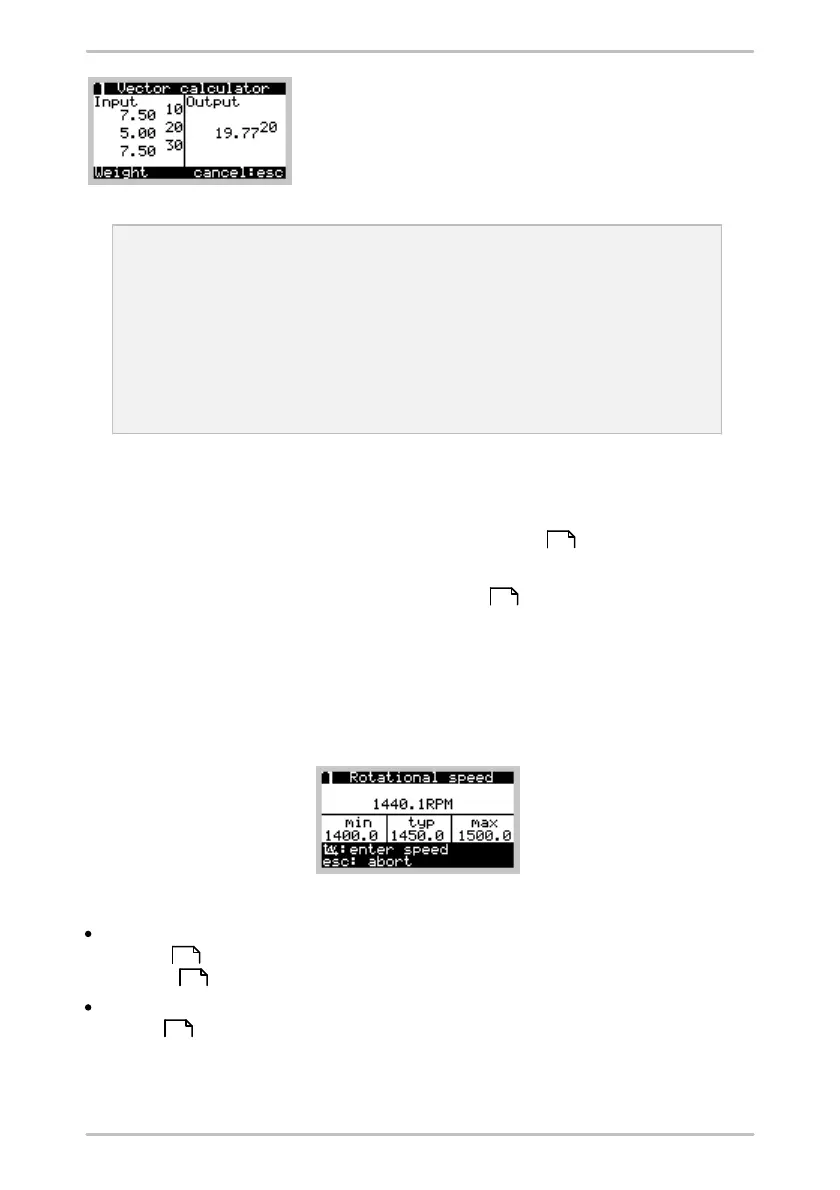
Example: You are balancing a shaft that allows you to screw on balance
weights at 36 positions. You have already attached several weights
during the balancing process. The Detector suggests that an additional
balance weight should be attached at a position that is already occupied.
You can now combine three existing weights to produce one new weight.
For example: you have 7.5 g at 10°, 5 g at 20° and 7.5 g at 30°. The sum
function then produces a total weight of 19.8 g at 20°. You can then
remove the three weights at 10°, 20° and 30° and replace them with a
new weight of 19.8 g at 20°.
Assign RFID
Select this menu item to assign an RFID tag placed at the measuring point (see "
Automatic assignment of RFID tags to measuring points ").
In the next step you measure the rotational speed .
6.8.1 Measuring rotational speed
The Detector measures the rotational speed at the start of the balancing
measurement via the trigger sensor. To do this, select Measure rot. speed from
the balancing menu.
The Detector returns an error message if the acquired speed
is outside the range defined in the Trendline software (see "Rotational speed
settings ") (speed out of range, see also "System messages and their
meaning "),
or is within a specified resonance frequency range (see "Resonance frequency
ranges ").
You can then cancel the measurement or apply the current rotational speed as
new speed.
54
239
70
263
71



 To Next Page