186
3.
Select the Paste option from the Edit menu for the application or use the
shortcut Ctrl+V
Change diagram boundaries
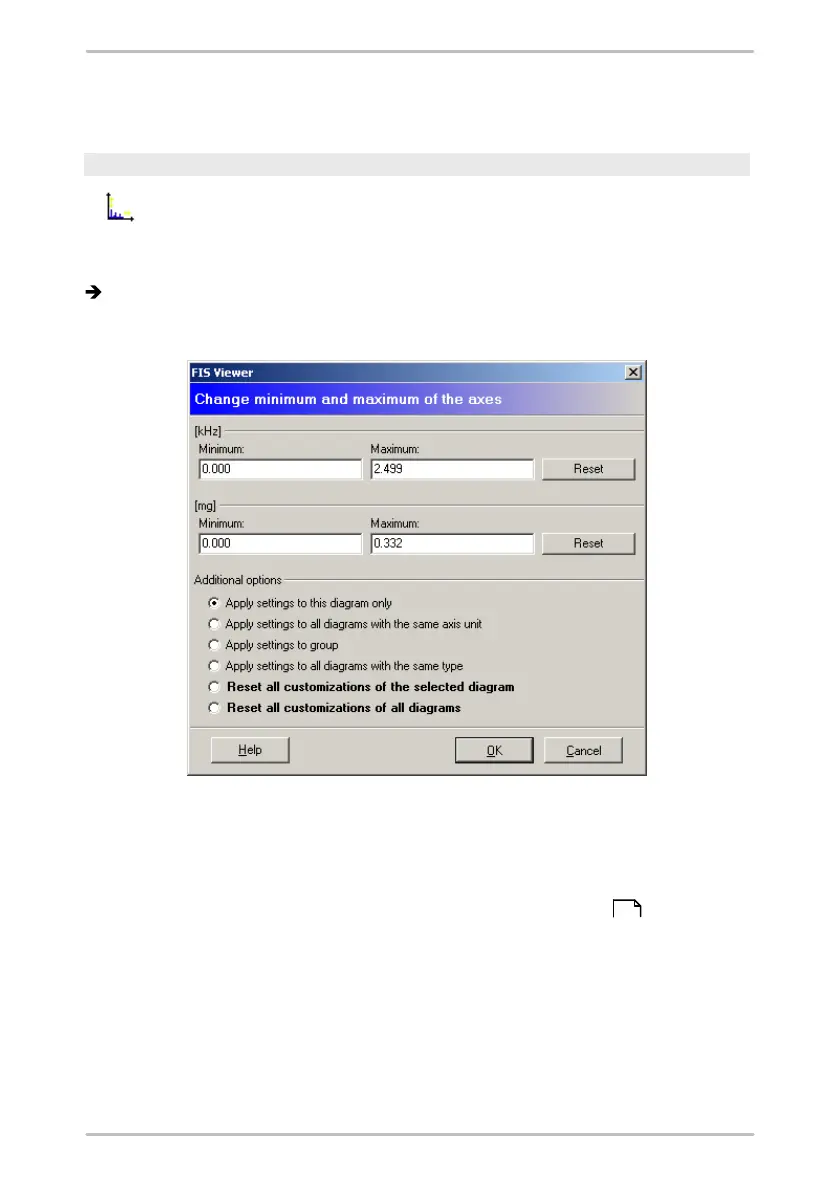
You can use this tool to change the minimum/maximum values
displayed on the x- and y-axis.
1.
Click on the Change diagram boundaries symbol.
The "Modify maximum values" dialogue is displayed.
2.
Enter a new minimum/maximum value for the X and/or Y axis in the appropriate
boxes. Click Reset to restore values automatically calculated by the Viewer.
3.
Select an additional option:
o
Apply settings to the selected diagram only: Only the diagram activated in
the signal selection (see "Displaying and removing signals" ) is changed.
o
Apply settings to all diagrams with the same axis unit: All diagrams with
the same axis unit – e.g. "g" – are changed.
o
Apply settings to group: All diagrams belonging to the same configuration
as the selected signal are changed.
o
Apply settings to all diagrams with the same type: All diagrams of the
same type – e.g. "time signals" – are changed.
o
Reset all customizations of the selected diagram: The settings for all
161



 To Next Page