Additional Info
145 G-TECH / Pro Competition User Guide, Release 3.1 145
RPM Calibration Tips
The G-tech monitors vehicle RPMs constantly. In order to
accurately convert your vehicle’s electrical signature to RPMs,
however, you must first perform an “RPM calibration”
(page 25).
You can perform the RPM calibration while the vehicle is sta-
tionary or while it is moving (in gear).
The only thing that matters during RPM calibration is that the
vehicle RPMs are stable (unchanging) and that they are at the
value requested by the G-tech.
This means that if the G-tech instructs you to rev the engine
to 4000 RPM and press , make sure the RPMs are steady
right at 4000 RPM before pressing . The more careful you
are during calibration, the better your RPM readings will be.
Some vehicles will allow you to rev the engine to redline
while parked; others have a rev limiter that kicks in early
(such as at 3000 RPM) when the vehicle is not moving.
3
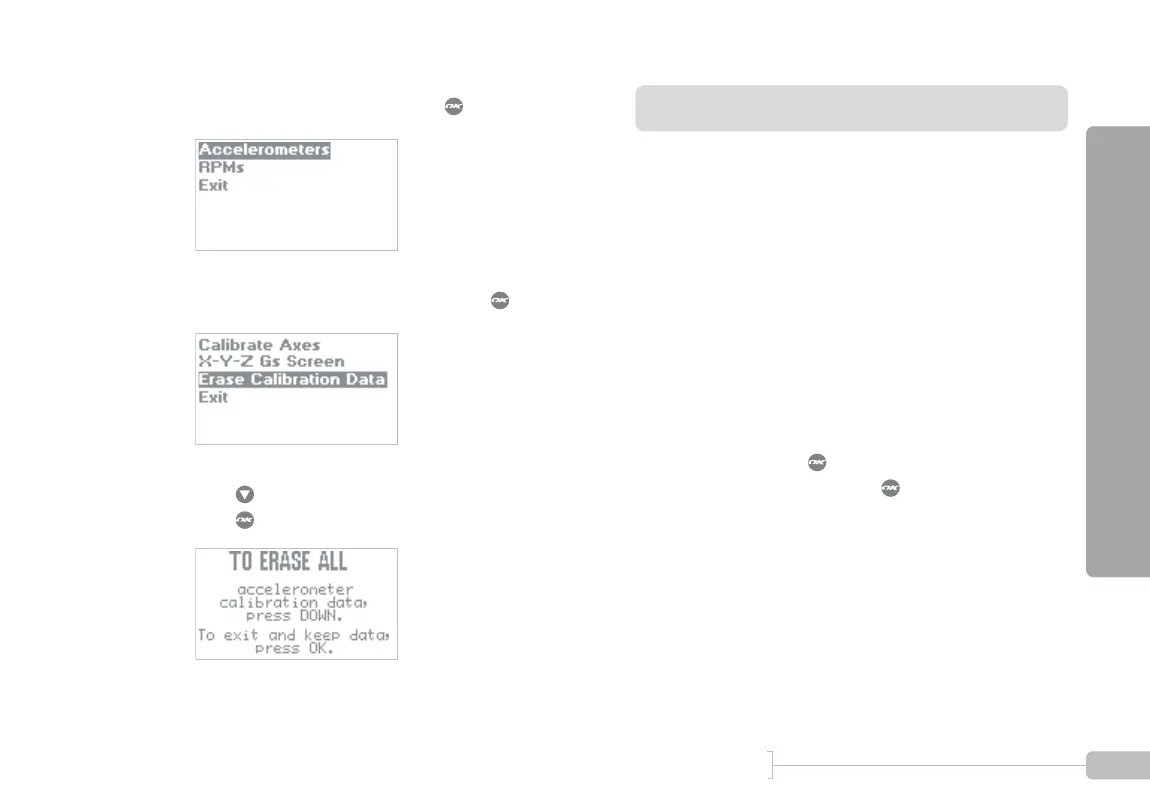
Select “Accelerometers” and press .
4
Select “Erase Calibration Data” and press .
5
Press to erase the calibration.
Press to keep the current calibration.
Note: DO NOT CALIBRATE ACCELEROMETERS or ERASE ACCELEROMETER CALIBERATION
on G-tech units which were shipped after August 2003. They have already been calibrated in the
factory. Older G-techs will automatically request calibration. If you are unsure contact tech support.



 To Next Page