G-Window
49 G-TECH / Pro Competition User Guide, Release 3.1 49
Self-leveling the G-tech
Note: If the G-tech is mounted in your vehicle and the vehi-
cle is not moving, both acceleration bars should register very
close to 0.000g. If not, you need to “self-level” the G-tech.
If your G-Window acceleration bars do not read zero when
your vehicle is stopped, you need to help the G-tech deter-
mine which direction is forward. We call this process “self-
leveling.”
To self-level the G-tech, simply do an acceleration run
(page 52). You need only go far enough to trigger the G-tech
and start the E.T. clock... just a few feet.
Once you have done this, DO NOT move the G-tech
mounting clip. Leave it in exactly the same mounting position
that it was in when you did the acceleration run.
When you get back to the G-Window, the G-tech’s accelera-
tion bars should read very close to 0.000 when the vehicle is
stopped.
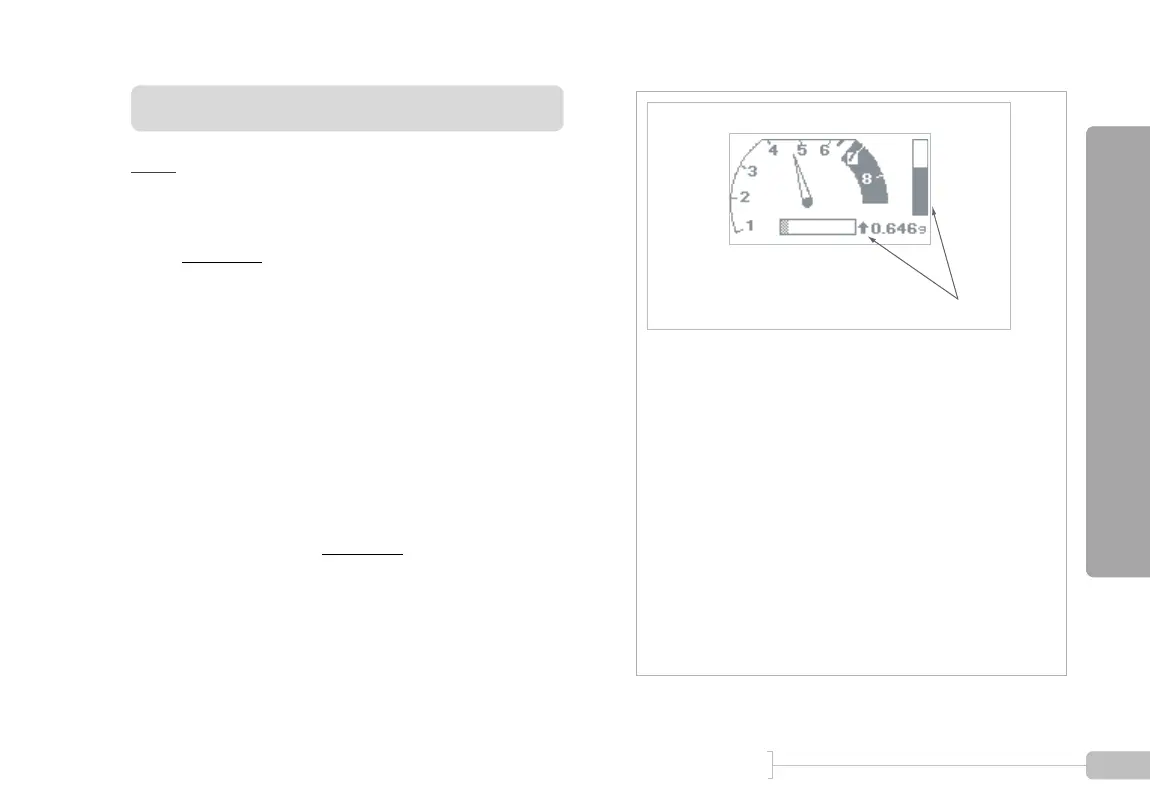
Example 1: Typical display during forward driving
•
Forward Acceleration Bar is darkly shaded – indicates that
forward acceleration is dominant, i.e. stronger than lateral
acceleration
• Primary Acceleration Direction is pointing up – indicates
that acceleration is forward (arrow would point down if you
braked hard)
• Primary Acceleration Value reads 0.646g – indicates
amount of forward acceleration
• Lateral Acceleration Bar is lightly shaded and very small –
indicates the vehicle is not quite going in a straight line (if
vehicle were going perfectly straight ahead, there would be
no lateral acceleration, only forward)
Strong Forward Acceleration



 To Next Page