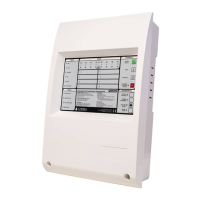
The IR Keypad is typically the most convenient method to program the system. The sensor for the IR Keypad is just below
the SOUND ALARMS button on the Main Panel and on a Repeater. Each time a key is pressed on the IR Keypad the Main
Panel will beep.
If no beeps are audible then check the batteries in the IR Keypad.
The IR Keypad uses 2 x AAA batteries.
To access the characters in , first press the SHIFT KEY. To return to the characters in BLACK press the SHIFT KEY again.
Each time a key press is received by the panel the panel emits a beep. The beeps when SHIFT is on are of a higher pitch
than when SHIFT is off.
0-9 are used to input numbers
and are used to select items
B-SP and are used to change fields (move the cursor)
+/- are used to select the loop
ENTER is used to select items and to store changes
ESC is used to abort changes and exit
HOME is often used to go back to the start of a function
Pressing both EXIT keys exits programming mode.
Where possible help is displayed automatically. However additional help is sometimes available if you press the help key
‘:’ the colon.
The first press will display help for 7 seconds, a second press will ensure the help is displayed for 20 seconds. Pressing any
key whilst help is displayed will clear the help but this key press will be ignored.
The IR Keypad Keys
Help
RED
59
Manufacturers of Fire Detection Equipment
INSTALLATION & COMMISSIONING MANUAL REVISION 4.0 05/2013
JUNO NET - NETWORKABLE ADRESSABLE PANEL
globalfire.pt


 To Next Page