Chapter 8 Hardware Reference
© 2017 Harmonic Inc. All rights reserved. 257 Harmonic MediaGrid Release 4.1
ContentStore 3160
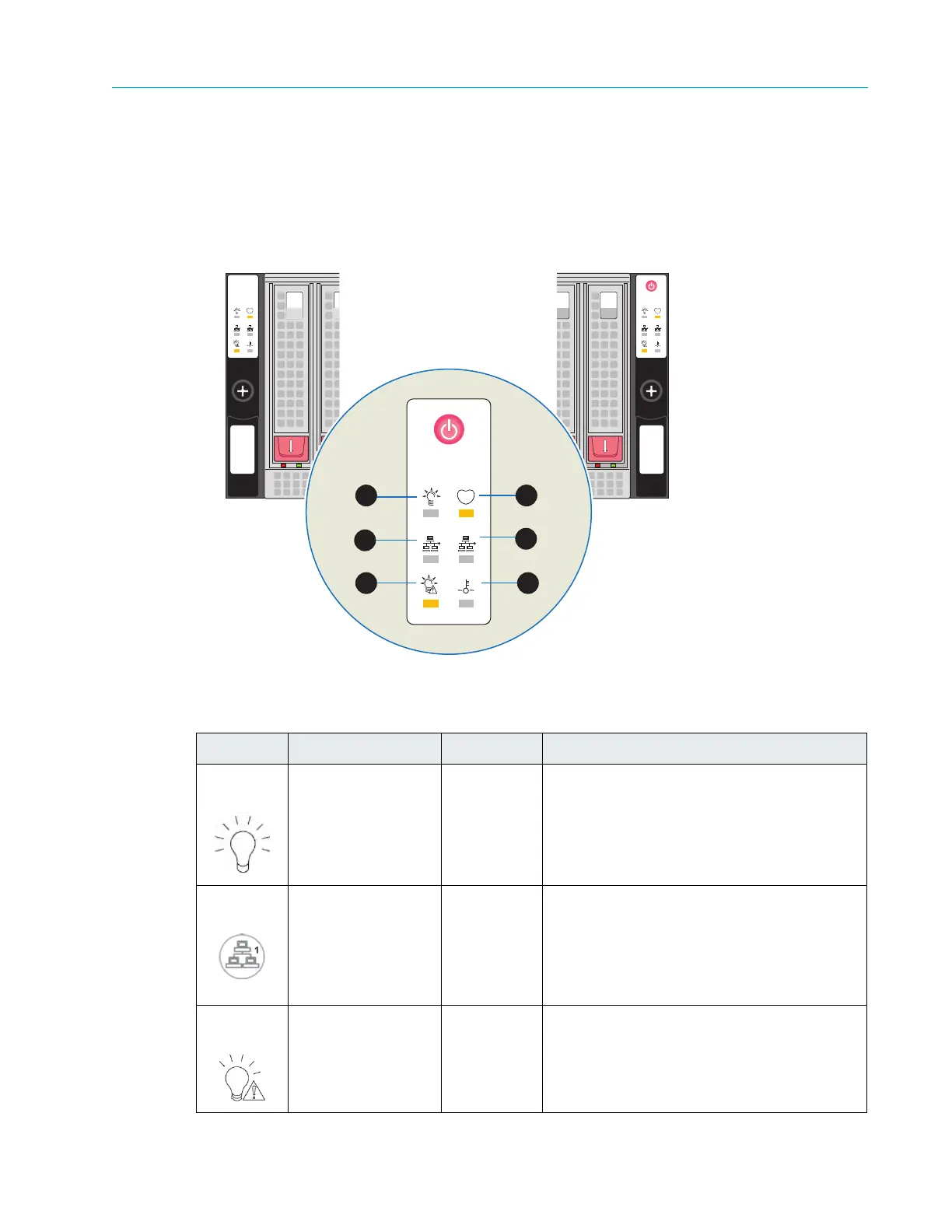
Control Panel LEDs
The two control panels located on the front of the chassis have LEDs, which provide you with
critical information related to the node on the same side of the chassis as well as power supply
information. Figure 8–37 and Table 8–36 provides descriptions of the control panel LEDs.
Figure 8–37: ContentStore 3160 Control Panel LEDs
Table 8–36: ContentStore 3160 Front Bezel LEDs
Symbol LED Color/State Description
1 Power Solid Indicates that power is being supplied to
the
power supply units
2 SAS-Out Solid Indicates that the SAS output port is
connected.
3 Power Fail Solid Indicates a power supply module has failed.
Refer to
the Harmonic MediaGrid
Component Replacement Guide for details
on replacing the power supply.
Left Control Panel
Right Control Panel
15
OPEN
0
OPEN
1
2
3
4
5
6



 To Next Page