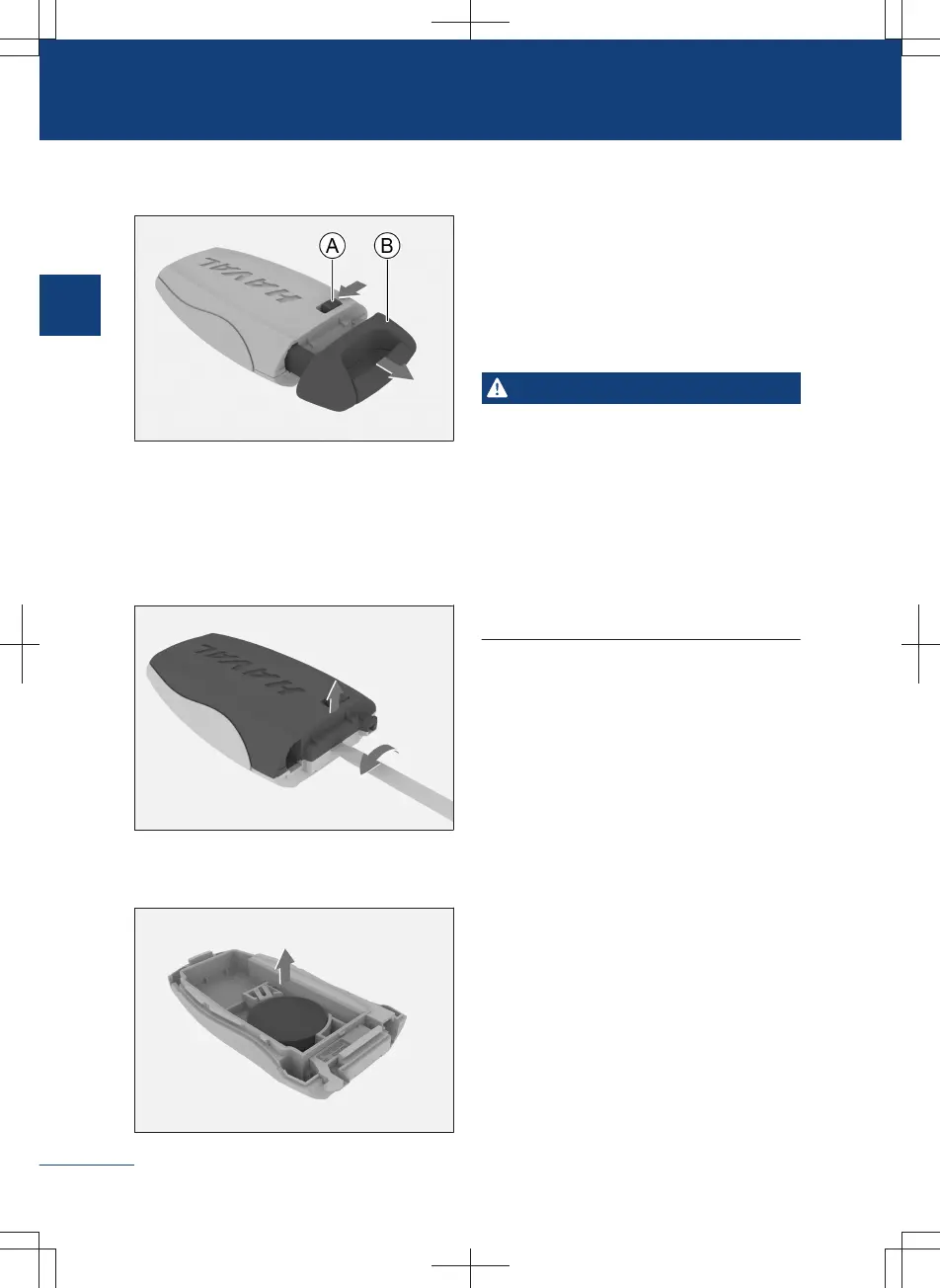
1. Push the release button of intelligent
key to eject the mechanical key.
C1BA6E3E9AB8
Ⓐ Release button
Ⓑ Mechanical key
2. Pry open the cover of the key using a
flathead screwdriver, and remove the
cover.
77636832C0AF
3. Take out the battery and insert a new
battery in its place.
B0B391378D50
When installing the battery, make sure
that the positive terminal of the battery
is facing down.
Battery model: CR2032
4. Install the rear cover of the key.
After installation, make sure that all the
key buttons are working properly.
Warning
〉
Place the battery replaced out of the
reach of children; if it is accidentally
swallowed by children, it may cause suf-
focation or death.
〉
Please dispose of used batteries in ac-
cordance with local laws and regula-
tions. Improper disposal of used batter-
ies can pose a risk to the environment.
18
1
Operation



 To Next Page