11-3
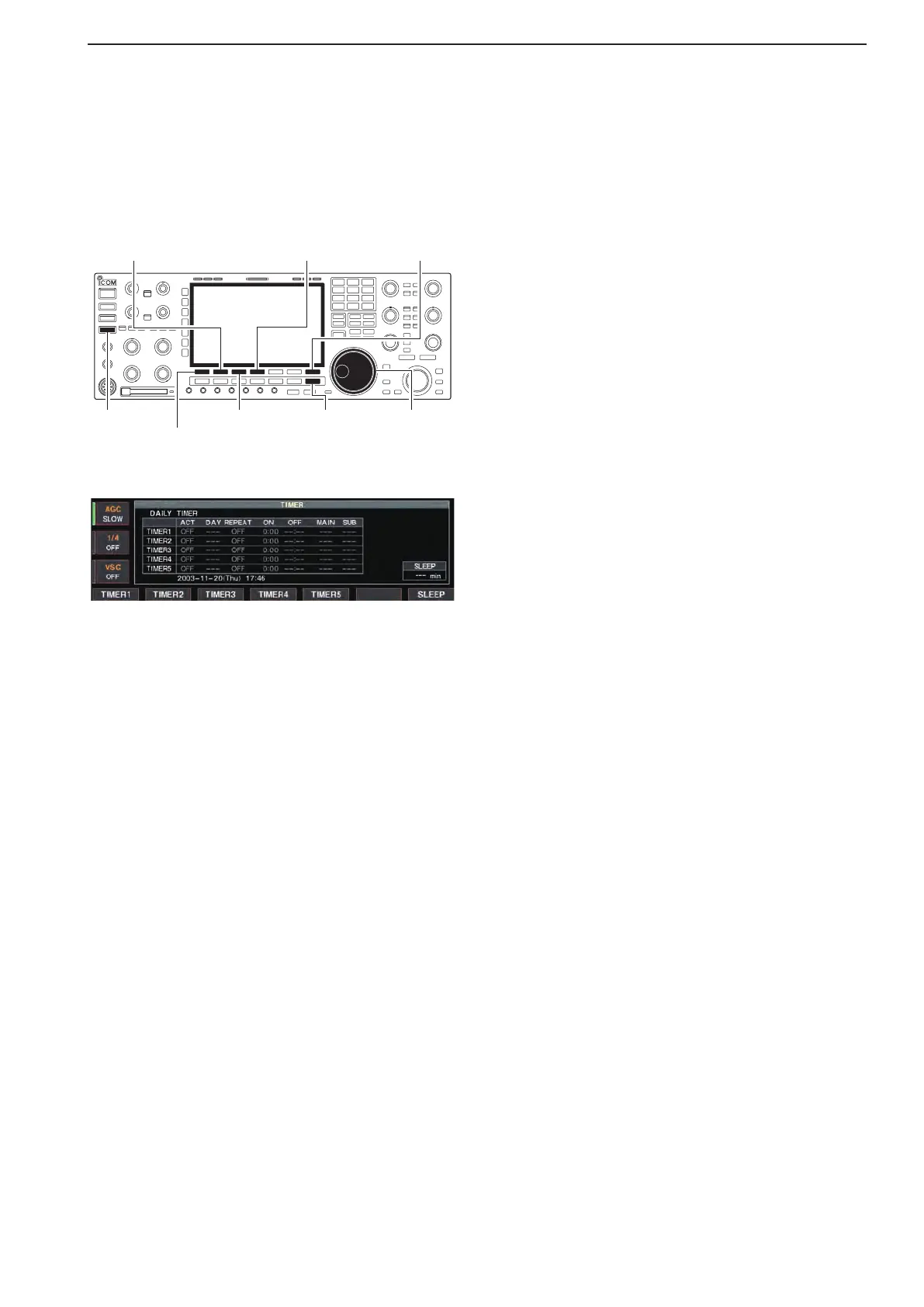
■ Daily timer setting
The transceiver turns power ON and/or OFF automat-
ically on the specified day and time, with the specified
frequency settings in each main and sub readout.
[EXIT/SET]
[F-4•TIMER4]/[F-4•CLR]
[F-3•TIMER3]
[TIMER]
[F-7•SET]
[F-1•TIMER1]/[F-1•Ω]
[F-2•TIMER2]/[F-2•≈]
Main dial
q Push [EXIT/SET] several times to close multi-func-
tion screen, if necessary.
w Hold down [TIMER] for 1 second to select timer set
screen.
ePushoneof[F-1•TIMER1]to[F-5•TIMER5]tose-
lect the desired timer.
r Rotate the main dial to select the timer action ON or
OFF.
tPush[F-2•≈] to select the “DAY” cell, then rotate
the main dial to select the desired day of the week.
•Select“–––”nottospecifythedayoftheweek.The
timer will function every day in this case.
•Onceadayoftheweekisselected,holddown[F-4•CLR]
for 1 second to select “– – –.”
yPush[F-2•≈] to select the “REPEAT” cell, then ro-
tate the main dial to select the repeat function ON
or OFF.
•ON :The timer functions every selected day of the
week. (repeats)
•OFF:Thetimerdoesnotrepeat.
uPush[F-2•≈] to select the “ON” cell, then rotate the
main dial to set the desired transceiver power ON
time.
•WhenusingpowerOFFtimeronly,holddown[F-4•CLR]
for 1 second to select “– – –.”
iPush[F-2•≈] to select the “OFF” cell, then rotate
the main dial to set the desired transceiver power
OFF time.
•WhenusingpowerONtimeronly,holddown[F-4•CLR]
for 1 second to select “– – –.”
oPush[F-2•≈] to select the “MAIN” cell, then rotate
the main dial to select the desired memory channel
number in the main readout.
•IfusingthecurrentlysetVFOconditioninmainreadout,
holddown[F-4•CLR]for1secondtoselect“–––.”
!0Push[F-2•≈] to select the “SUB” cell, then rotate
the main dial to select the desired memory channel
number in the sub readout.
•IfusingthecurrentlysetVFOconditioninsubreadout,
holddown[F-4•CLR]for1secondtoselect“–––.”
!1Push[F-7•SET]tosetthetimer.
•Thetimerindicatorabove[TIMER]switchlightsgreen.
!2
Repeat steps e to !1 to set other timers, if desired.
!3 Push [EXIT/SET] to exit timer set screen.
11
CLOCK AND TIMERS



 To Next Page