5
2001 NEW 2001 NEW
2
PANEL DESCRIPTION
D Functions
You can use various Software Key functions that are
assigned to the Software Keys, as described below.
Compose Distress
Push to compose a Distress call. (pp. 30 ~ 42)
Compose Non-Distress
Push to compose DSC calls other than Distress calls.
(pp. 43 ~ 56)
Compose DROBOSE
Push to compose a Distress Relay On Behalf Of
Someone Else (DROBOSE) call. (p. 37)
Task Mode
When the transceiver has any DSC tasks, push to
enter the DSC Task mode. (p. 29)
Mode
Push to select the J3E, H3E, LSB, J2B, F1B, or A1A
operating mode.
Scan
Push to start or stop a scan. (p. 14)
NB
Push to turn the Noise Blanker (NB) function ON or
OFF. (p. 15)
NB Level
Push to adjust the NB level. (p. 15)
SQL
Push to turn the Squelch function ON or OFF.
(p. 15)
S-SQL Level
Push to adjust the S-meter Squelch (S-SQL) level.
(p. 15)
RF Gain
Push to adjust the Radio Frequency (RF) gain level.
(p. 16)
Clarity
Push to turn the Clarity Control function ON or OFF.
(p. 16)
TX Freq Monitor
Push to check and monitor the transmit frequency.
(p. 15)
SP ×
Push to turn the speaker output ON or OFF.
AGC ×
Push to
turn the Automatic Gain Control (AGC)
function ON or OFF. (p. 16)
DSC Log
Push to check the received DSC calls. (p. 69)
Backlight
Push to change the brightness of the backlight.
(p. 13)
TIP: You can reassign the functions’ place to meet
your needs. (Soft Key 5 ~ Soft Key 20). For details
about how to assign them, see page 20.
InformationL
The rst set of Software Key functions ([Compose
Distress], [Compose Non-Distress],
[Compose DROBOSE], and [Task Mode]) are xed
and cannot be reassigned.
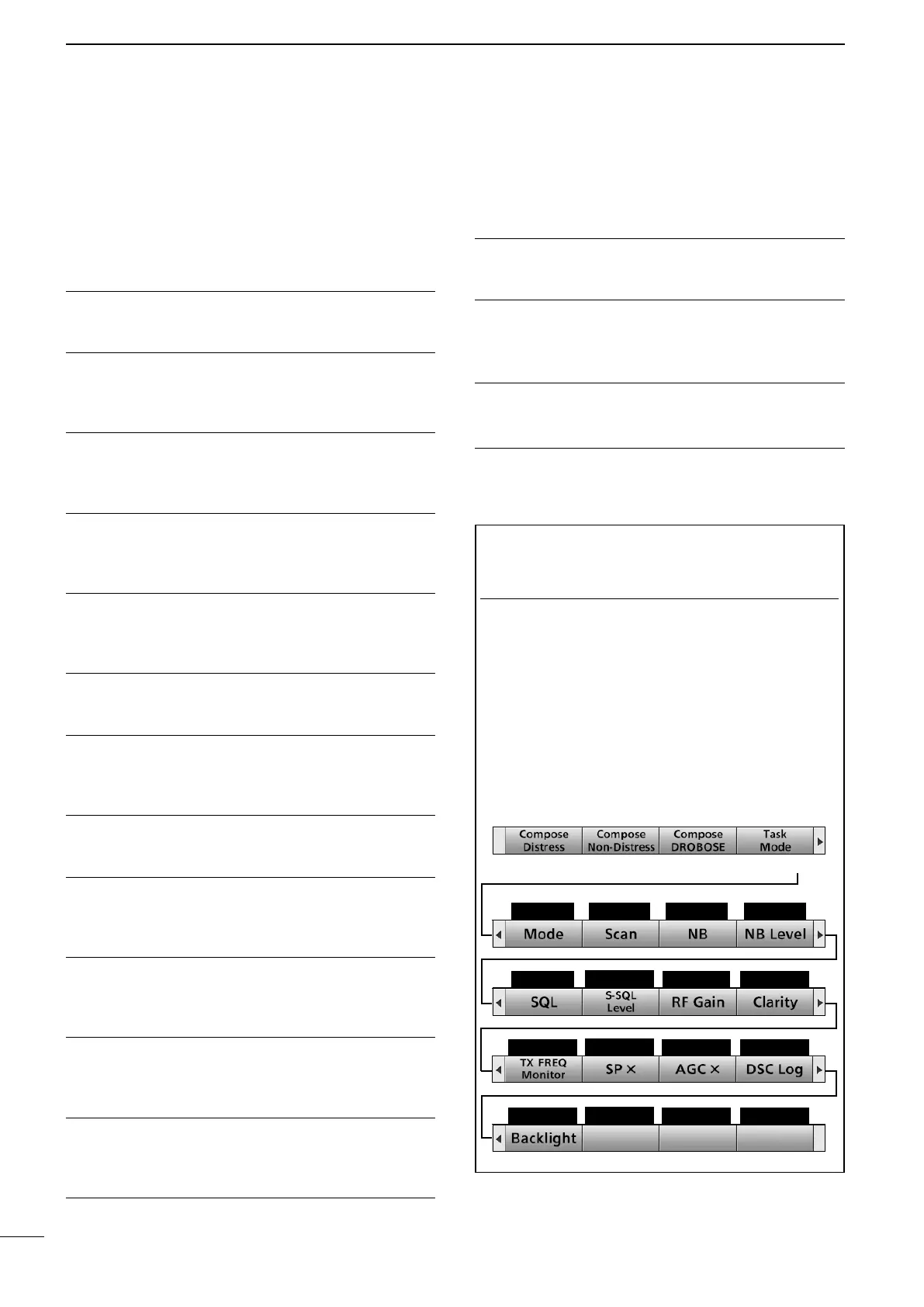
Push [►] to select the second set (Soft Key 5 ~ Soft
Key 8), the third set (Soft Key 9 ~ Soft Key 12), the
forth set (Soft Key 13 ~ Soft Key 16), and the fth
set (Soft Key 17 ~ Soft Key 20) of Software Key
functions.
Push [≈]
Soft Key 5
Soft Key 6
Soft Key 7 Soft Key 8
Soft Key 9
Soft Key 10
Soft Key 11 Soft Key 12
Soft Key 13
Soft Key 14
Soft Key 15 Soft Key 16
Soft Key 17
Soft Key 18
Soft Key 19 Soft Key 20
■ Software Key function



 To Next Page