18
6
17
16
15
13
14
12
11
10
9
8
7
5
4
3
2
1
Quick Reference
6
OTHER FUNCTIONS AND OPERATIONS
■ Setting a User channel or an ITU Simplex channel
Your dealer has already preset User channels and
ITU Simplex channels.
Follow the instructions as described below, only when
you need to edit the channels.
You can edit the following information of a User
channel or an ITU Simplex channel.
• Operating frequency
• Operating mode
• Channel name
NOTE:
• If you edit the preset channels, you may not be able to
communicate with other ships.
• The following instructions are for a User channel
Editing. However, you can set an ITU Simplex channel
name in the same way.
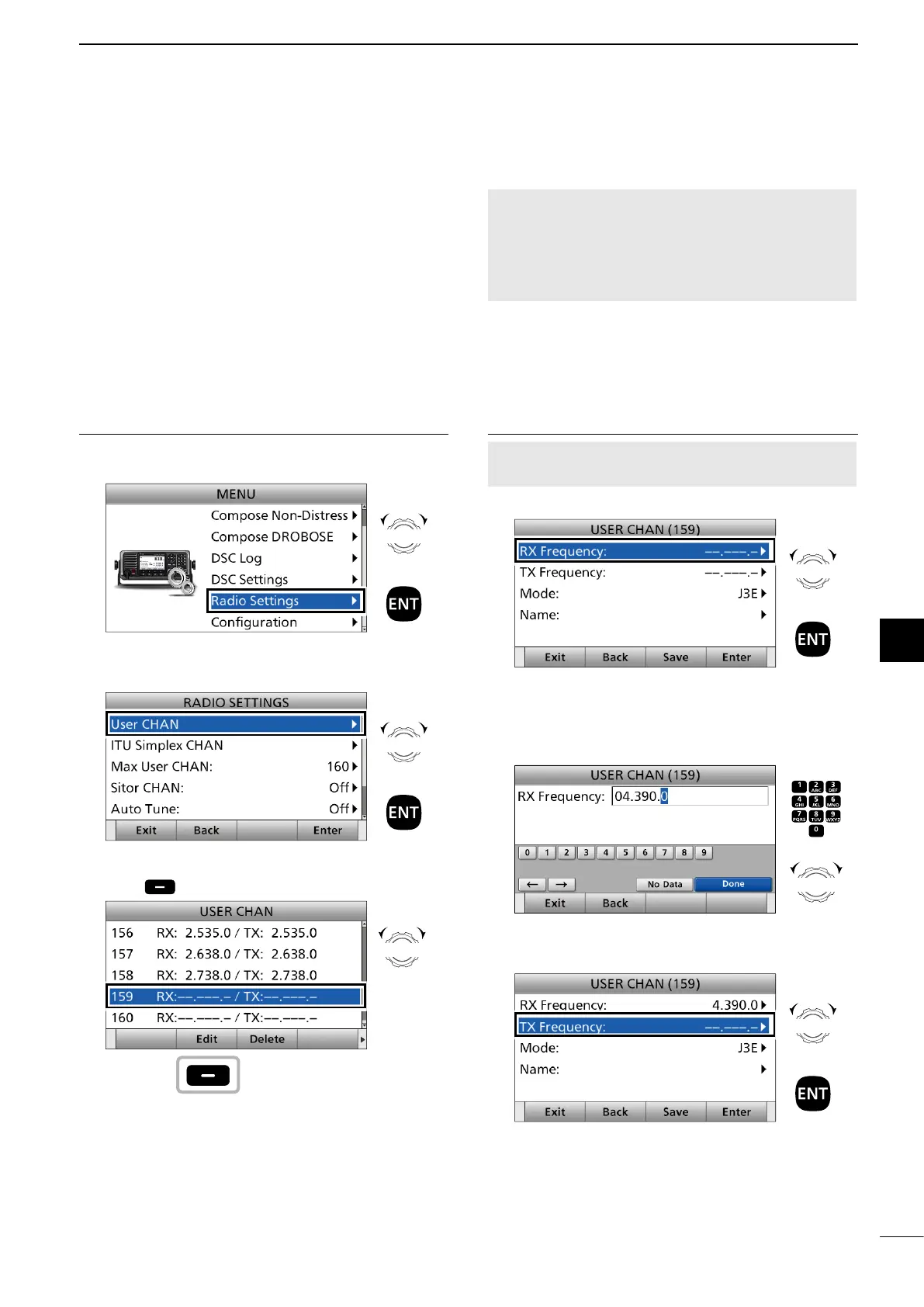
1. Entering the Channel Edit screen
1. Push [MENU].
2. Select “Radio Settings.”
3. Select “User CHAN” or “ITU Simplex CHAN.”
(Example: User CHAN)”
4. Select a channel you want to edit and push
[Edit] . (Example: CH 159)
Rotate
+
Push
Rotate
+
Push
Rotate
Push
2. Setting an RX and TX operating frequencies
NOTE: The RX and TX operating frequency are the
same when you select an ITU Simplex channel.
5. Select “RX frequency.”
6. Enter an RX frequency.
After entering, push [▲], [▼], [◄], or [►] to select
“Done” and push [ENT].
(Example: 4.390.0)
7. Select “TX frequency.”
Rotate
+
Push
Push
+
Rotate
to select
a character
CH/GRP
Rotate
+
Push



 To Next Page