31
DSC OPERATION
7
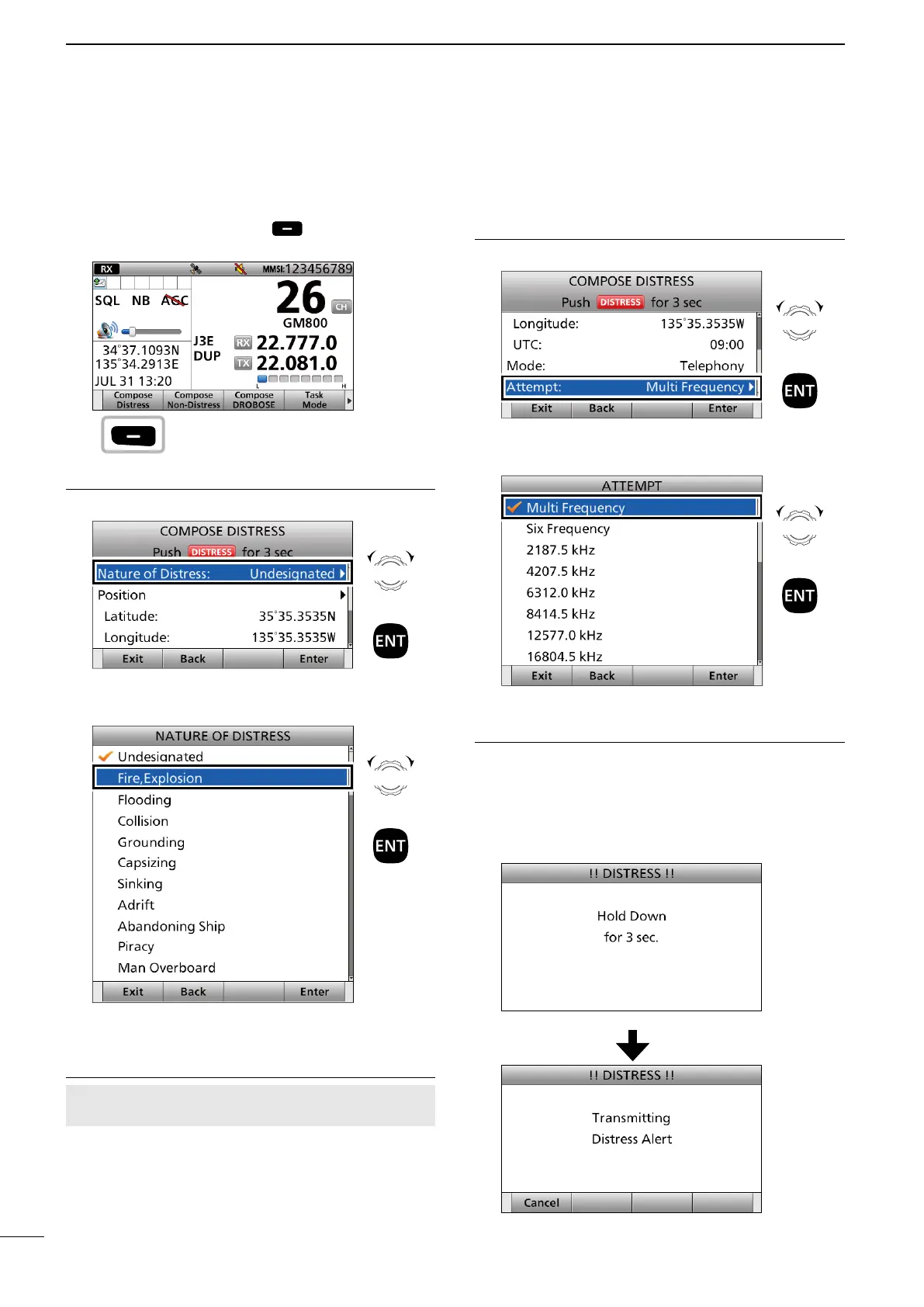
■ Sending a Distress call
D Regular call
1. Push [Compose Distress] to display the
COMPOSE DISTRESS screen.
Step.1 Setting a “Nature of Distress”
2. Select “Nature of Distress.”
3. Select an option.
(Example: Fire, Explosion)
The transceiver stores this setting for 30 seconds.
Step 2. Entering a “Position”
NOTE: You can skip this step if your position data
and time are valid. In that case, go to Step 3.
4. Select “Position.”
• The Latitude Position Entry screen is displayed.
5. Enter your position data and time.
• See page 27 for entering details.
Step 3. Setting a communication frequency
6. Select “Attempt.”
7. Select an option.
(Example: Multi Frequency)
Step 4. Sending
8. Lift up the key cover, then hold down [DISTRESS]
until “Transmitting” is displayed to send the
Distress call.
• While holding down [DISTRESS], count down beeps
sound and both the key and display backlighting
blink.
Push
Rotate
+
Push
Rotate
+
Push
Rotate
+
Push
Rotate
+
Push



 To Next Page