26
7
5
2
1
3
4
6
8
9
10
11
12
13
14
15
16
17
Quick Reference
7
DSC OPERATION
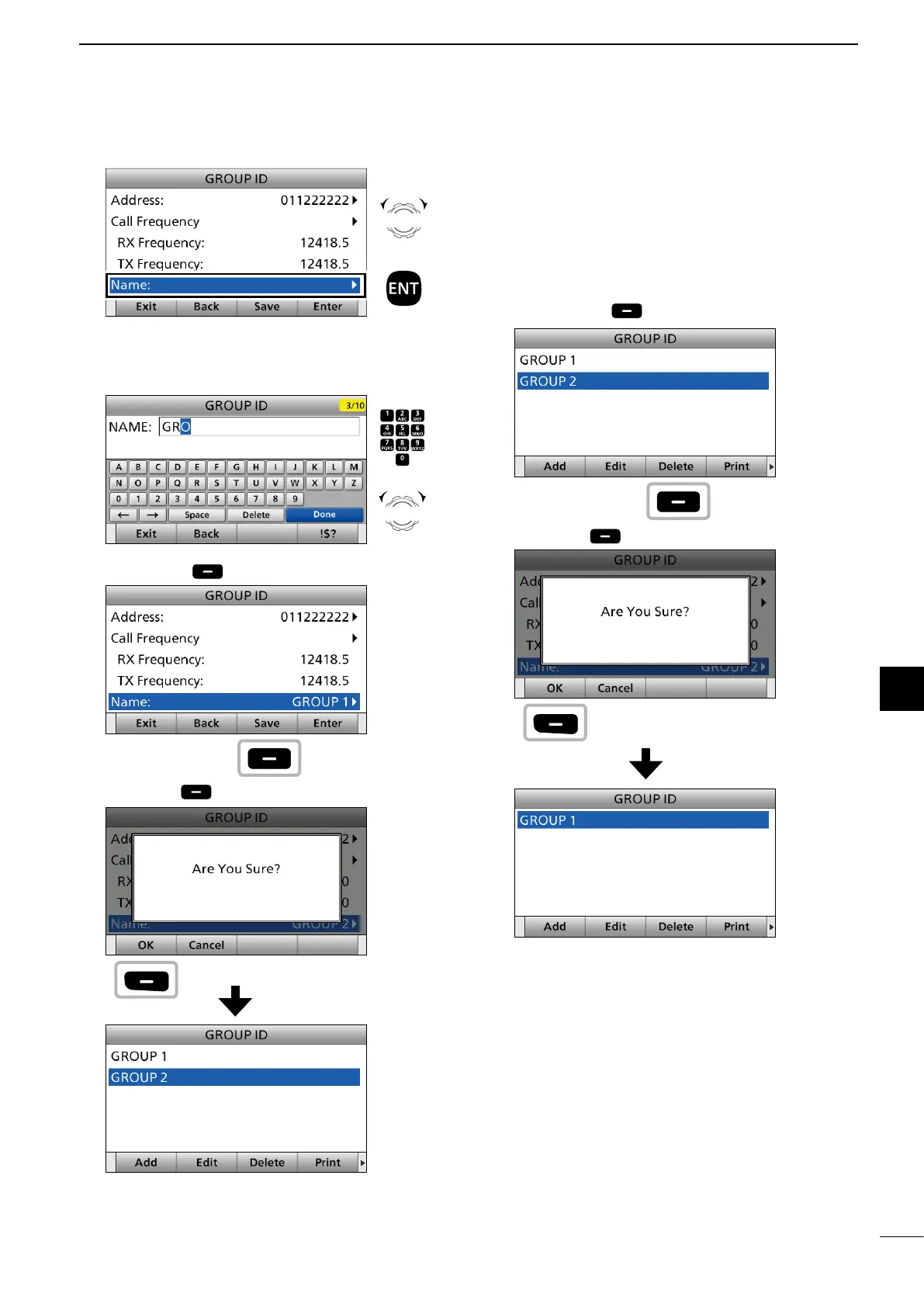
10. Select “Name.”
11. Enter a Group ID name.
After entering, push [▲], [▼], [◄], or [►] to select
“Done” and push [ENT].
12. Push [Save] .
13. Push [OK] to save the ID.
• The entered Group ID is added to the ID list.
14. Push [MENU] to return to the Main screen.
D Deleting an entered ID
1. Push [MENU].
• “MENU” screen is displayed.
2. Rotate [CH/GRP] to select “DSC Settings.”
• “DSC SETTING” screen is displayed.
3. Select “Individual ID” or “Group ID.”
• “INDIVIDUAL ID” or “GROUP ID” screen is displayed.
4. Rotate [CH/GRP] to select the ID to delete.
5. Push [Delete] .
6. Push [OK] .
• The selected ID is deleted from the ID list.
7. Push [MENU] to return to the Main screen.
Rotate
+
Push
Push
+
Rotate
to select
a character
CH/GRP
Push
Push
Push
Push



 To Next Page