21
OTHER FUNCTIONS AND OPERATIONS
6
D Assigning a Software Key function to
[VOL]
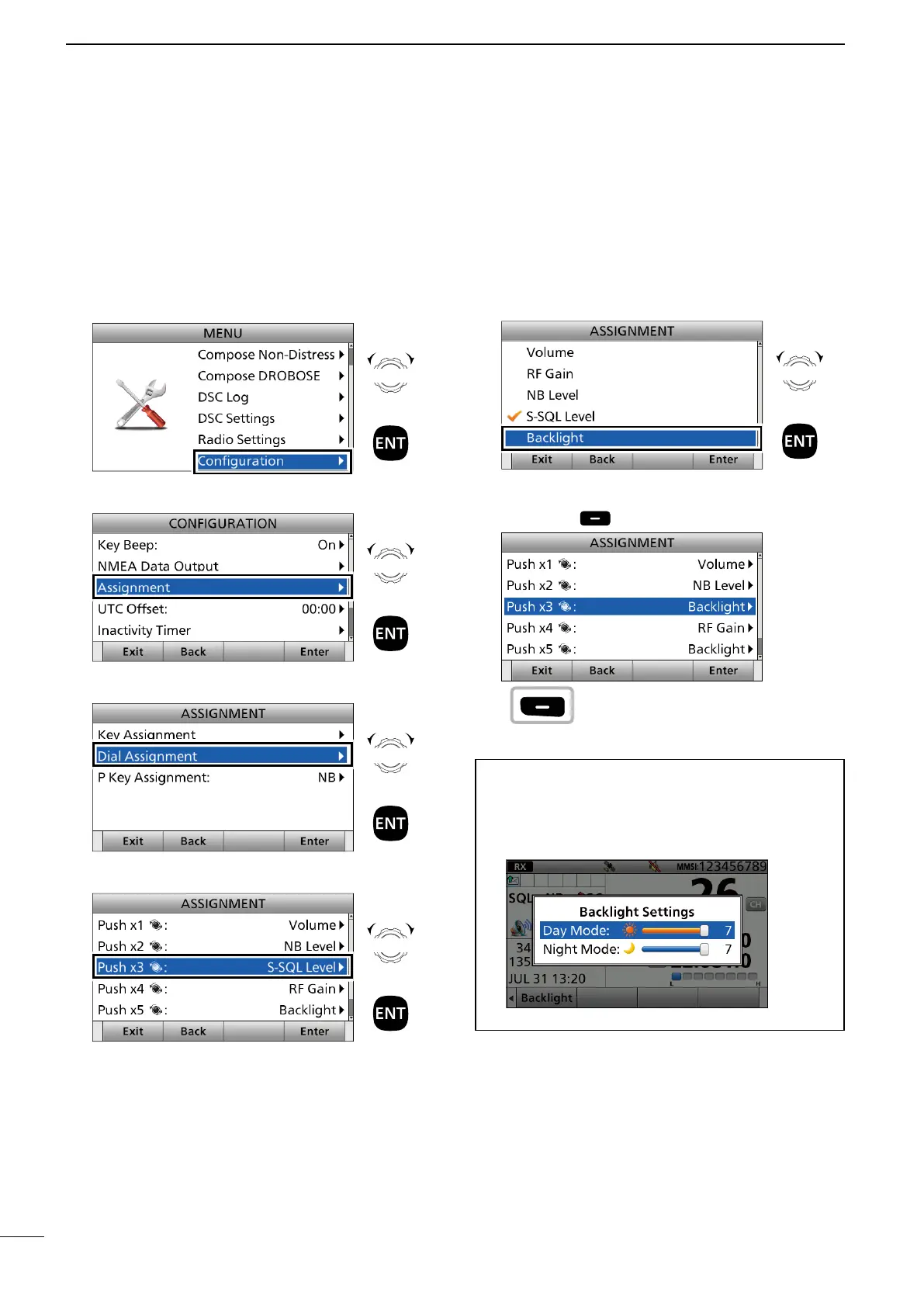
Example: Assigning “Backlight” to “Push ×3.”
1. Push [MENU].
2. Select “Configuration.”
3. Select “Assignment.”
4. Select “Dial Assignment.”
5. Select a place. (Example: Push ×3)
Rotate
+
Push
Rotate
+
Push
Rotate
+
Push
Rotate
+
Push
■ Assigning a function
6. Select a Software Key function.
(Example: Backlight)
• “Backlight” is assigned to “Push ×3.”
7. Push [Exit] to return to the Main screen.
TIP: You can con rm “Backlight” is assigned to
“Push ×3” after returning to the Main screen.
Push [VOL] 3 times.
• Backlight setting window is displayed.
Rotate
+
Push
Push



 To Next Page