84
2001 NEW
9
9
CONNECTIONS AND INSTALLATION
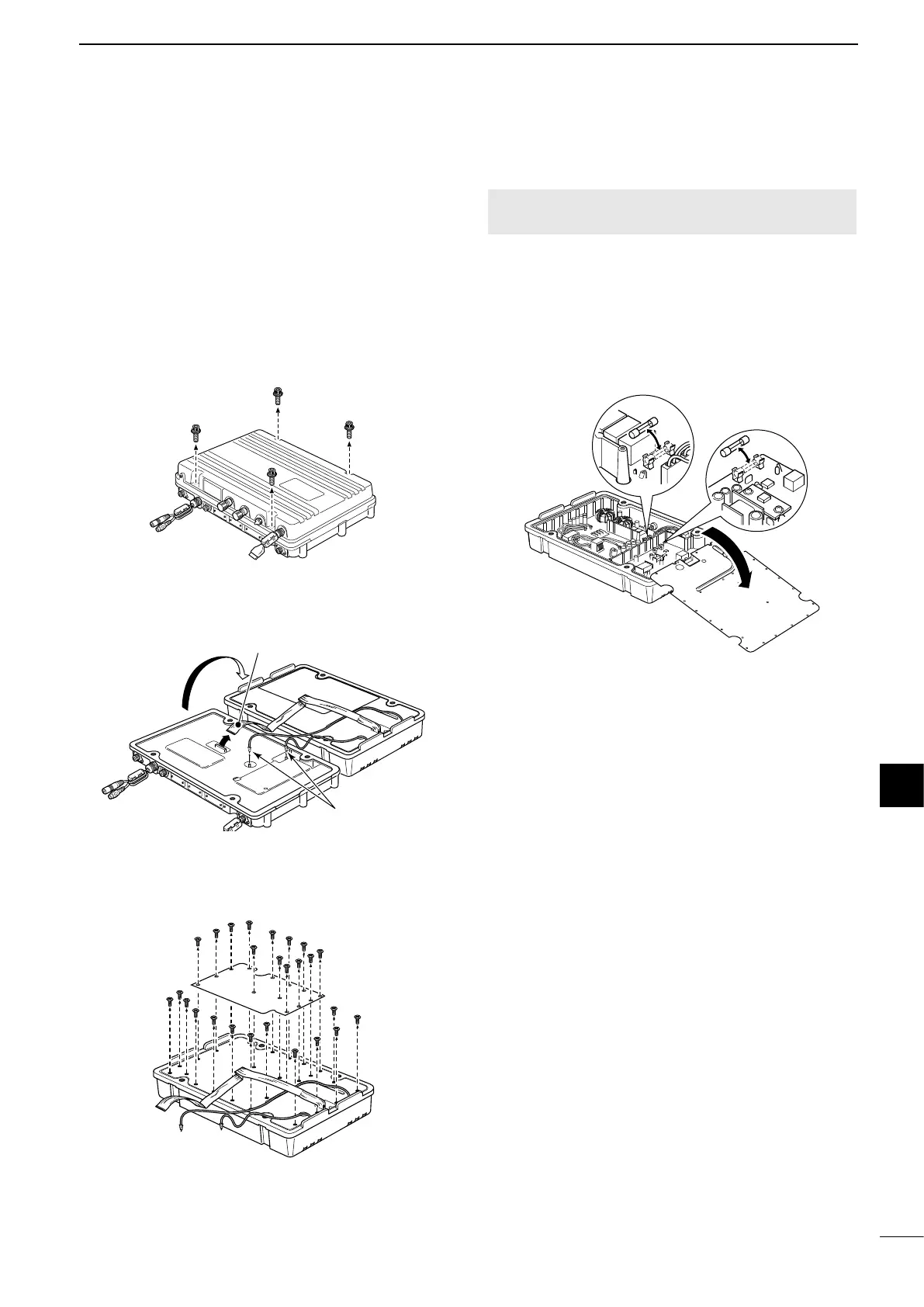
■ Replacing fuses
The transceiver has 2 fuses to protect internal
circuitry.
If the transceiver stops functioning, and only after
conrming a fuse is probably blown, check the fuses
below.
• DC-DC converter unit ....................FGB 5 A
• PA unit .......................................... FGB 5 A
CAUTION: Disconnect the DC power cable from the
transceiver before replacing a fuse.
1. Unscrew 4 cap bolts from the top case. Use
a 6 mm Allen wrench.
2. Open the transceiver’s main unit, then disconnect
1 flat and 2 coaxial cables, as shown below.
3. Unscrew the 26 screws from the shield covers,
then open the covers.
4. Replace the circuitry fuse, as shown below.
Use the supplied or same rated FGB 5 A fuse.
5. Reattach the shield covers, flat cable, coaxial
cables and top case to their original position.
Flat cable
Coaxial cables
Fuse in DC-DC converter unit
Fuse in PA unit



 To Next Page