53
DSC OPERATION
7
■ Sending a Non-Distress calls
D Sending a Test call (continued)
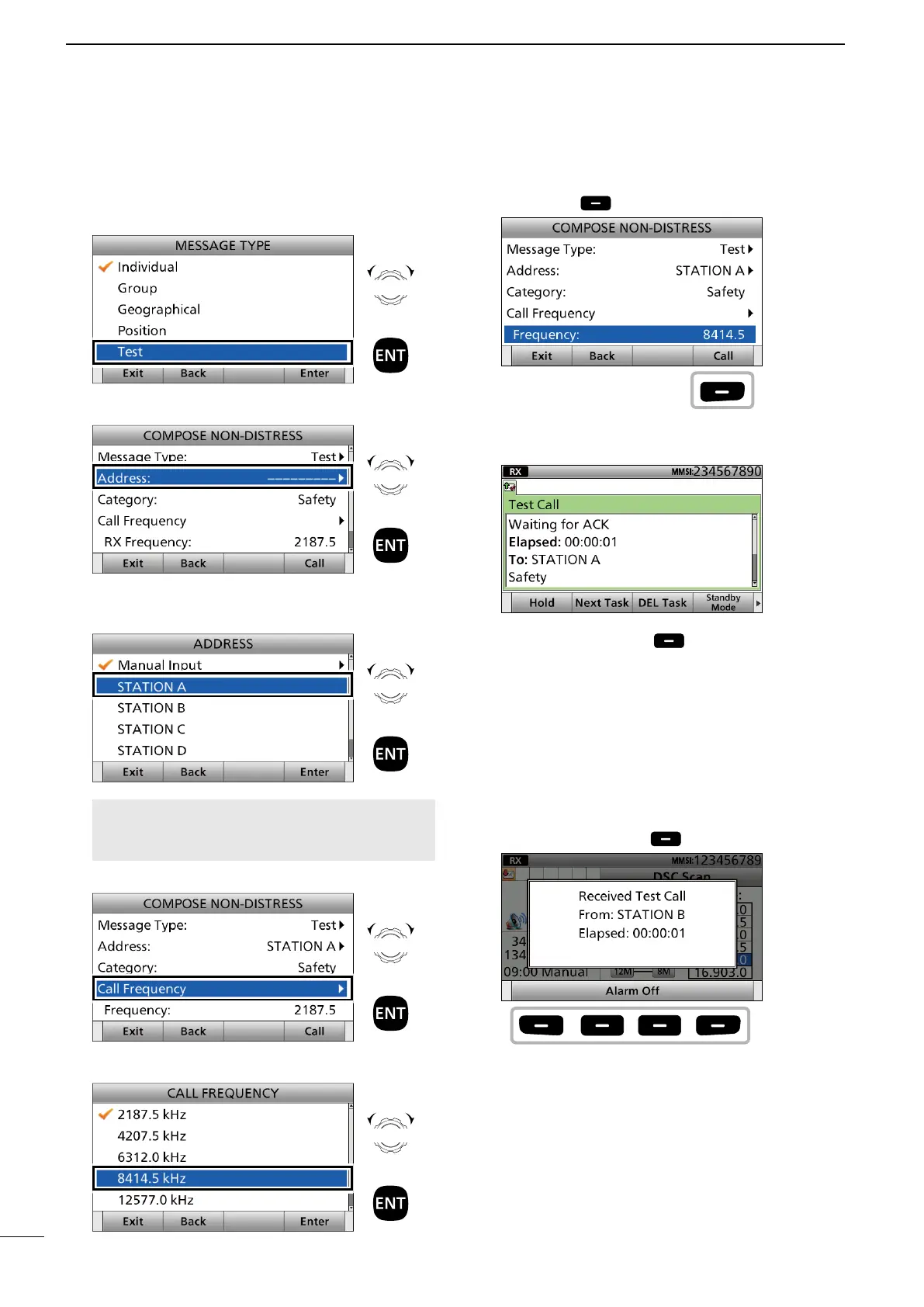
3. Select “Test.”
4. Select “Address.”
5. Select an Individual ID, or “Manual Input.”
(Example: STATION A)
NOTE: When you select “Manual Input” in
this step, push the keypad to manually enter an
Individual ID.
6. Select “Call Frequency.”
7.
Select an option. (Example: 8414.5 kHz)
8. Push [Call] to send the Test call.
9. After sending, the following screen is displayed.
See page 29 for details of the software key function
in the DSC Task mode.
10. Push [Standby Mode] to return to the
Standby mode.
D Sending a Test call acknowledgement
When a Test call is received, you can send an
acknowledgement.
1. When a Test call is received:
• Alarm sounds.
• The following screen is displayed.
Push any [Alarm Off] .
Rotate
+
Push
Rotate
+
Push
Rotate
+
Push
Rotate
+
Push
Rotate
+
Push
Push
Push
any



 To Next Page