52
7
DSC OPERATION
7
1
2
3
4
5
6
Quick Reference
8
9
10
11
12
13
14
15
16
17
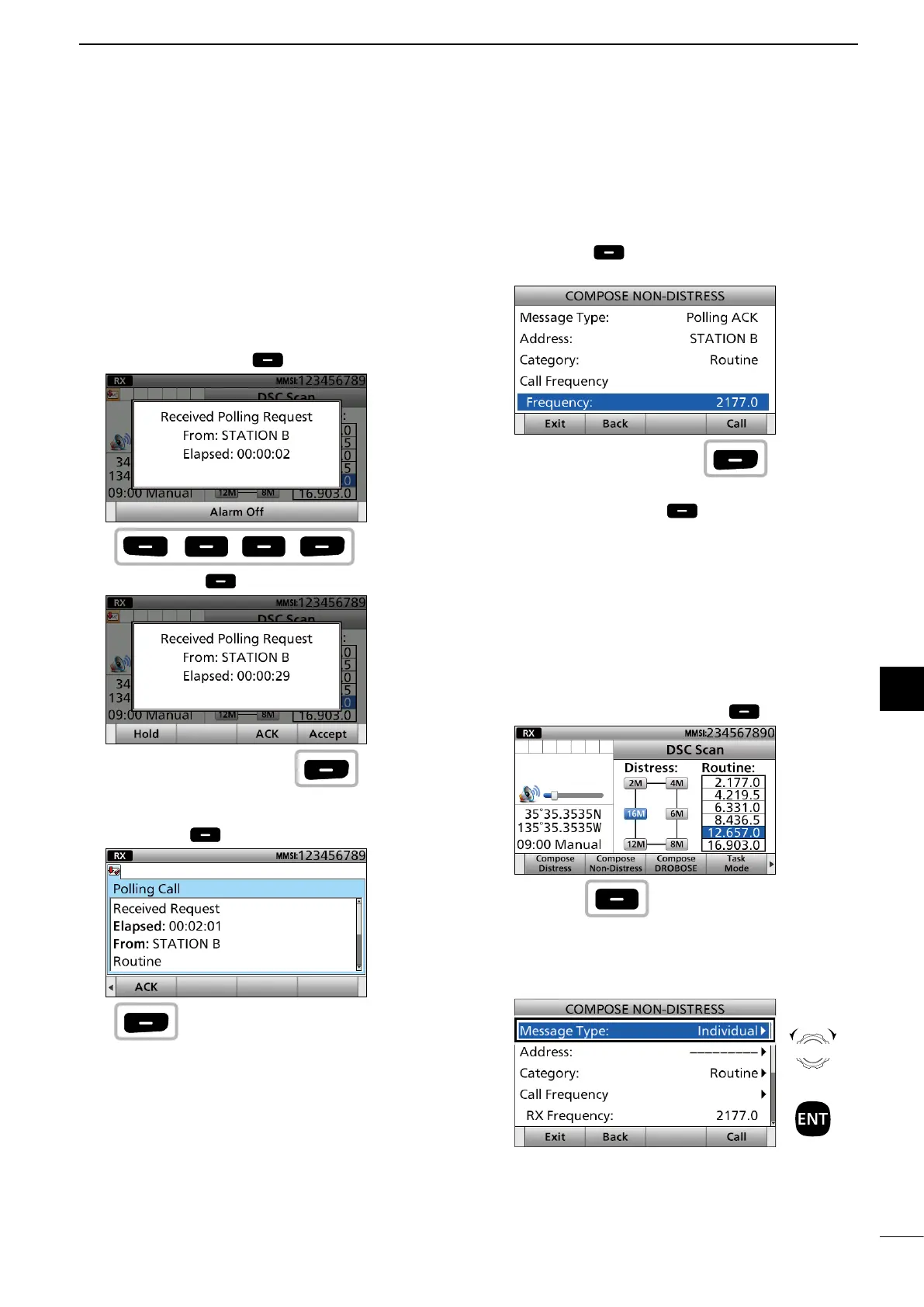
D Sending a Polling Request
acknowledgement
When a Polling Request is received, you can send an
acknowledgement.
1. When a Polling Request call is received:
• Alarm sounds.
• The following screen is displayed.
Push any [Alarm Off] .
2. Push [Accept] .
• Enters the DSC Task mode.
3. Push [≈] to scroll the software key function.
4. Push [ACK] .
• The call contents screen is displayed.
• Rotate [CH/GRP] to con rm the contents.
Push
any
Push
Push
5. Push [Call] to send the Polling Request
acknowledgement.
• Your position data and time are transmitted.
6. Push [Standby Mode] to return to the
Standby mode.
D Sending a Test call
Testing on the exclusive DSC Distress and Safety
calling frequencies should be avoided as much as
possible by using other methods.
Normally the test call would require no further
communications between the 2 stations involved.
1. Push [Compose Non-Distress] .
To display the screen from the Menu screen:
([MENU] >
Compose Non-Distress)
2. Select “Message Type.”
► Continued on the next page.
Push
Push
Rotate
+
Push



 To Next Page