10
4
17
16
15
14
13
12
11
10
9
8
7
6
5
3
2
1
Quick Reference
MENU SCREEN
4
■ Selecting the item
Follow the procedures described below to select a
Menu item.
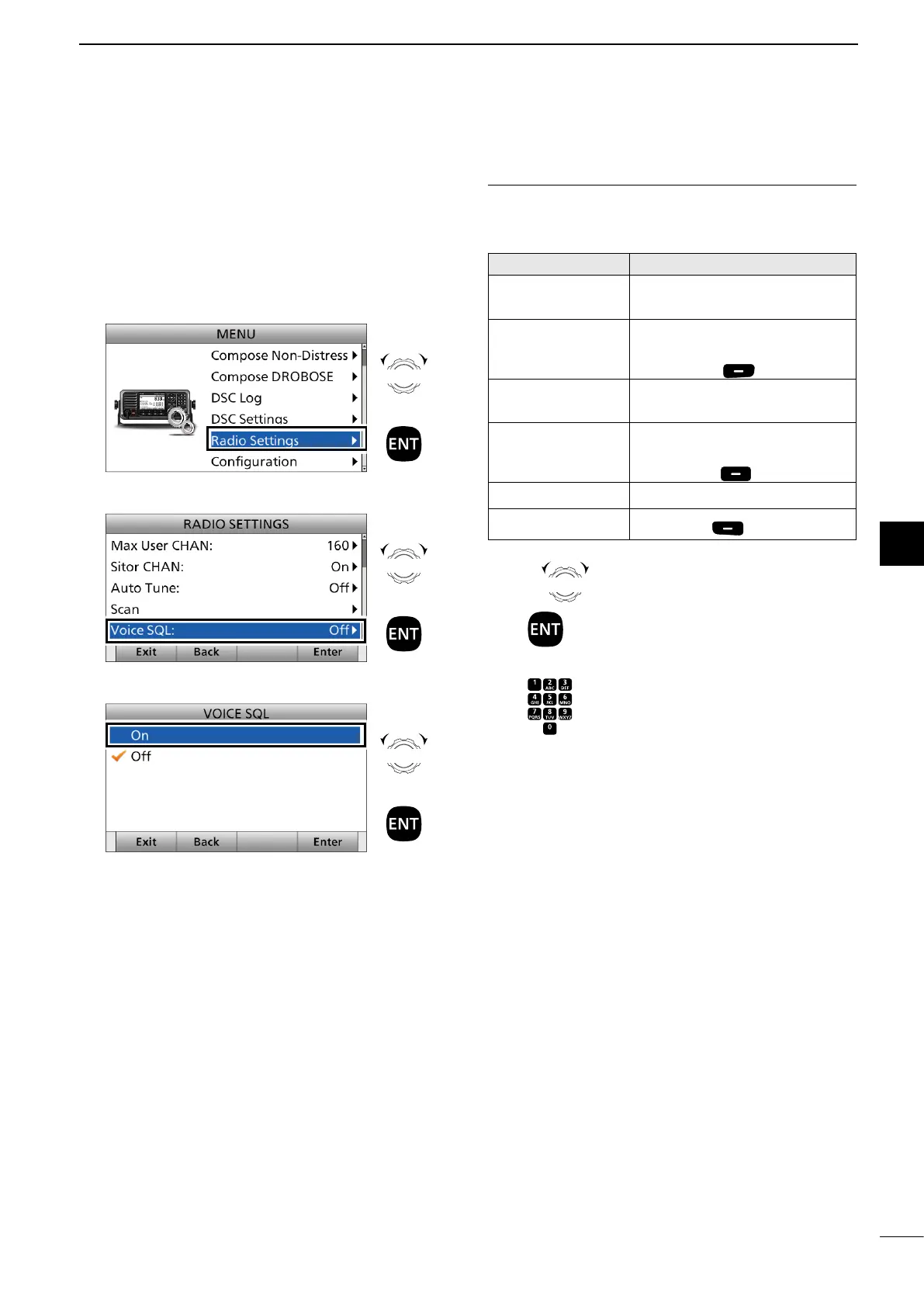
Example: Turning ON the Voice Squelch function.
1. Push [MENU].
2. Select “Radio Settings.”
3. Select “Voice SQL.”
4. Select “On.”
• Returns to the “RADIO SETTINGS” screen.
5. Push [MENU] to return to the Main screen.
Rotate
+
Push
Rotate
+
Push
Rotate
+
Push
InformationL
You can use the following key functions in the MENU
screen.
FUNCTION ACTION
Select Rotate [CH/GRP], or
Push [∫] or [√]
Enter Push [ENT],
Push [CH/GRP], or
Push [Enter]
Go to the next
tree level
Push [ENT] or
Push [≈]
Go back to the
previous tree
level
Push [CLR],
Push [Ω], or
Push [Back]
Cancel Push [CLR]
Exit
Push [Exit]
Rotate
CH/GRP
: Rotate [CH/GRP] to select.
Push : Push [ENT] to enter or set.
Push : Push the keypad keys to enter a
digit or text.



 To Next Page