17
6
OTHER FUNCTIONS AND OPERATIONS
■ Setting a temporary operating frequency
You can temporarily change the operating frequency
of the selected channel. The frequency returns to the
preset value after you select another channel, or turn
OFF the transceiver.
1. Select a channel that is programmed near the
frequency you want to receive.
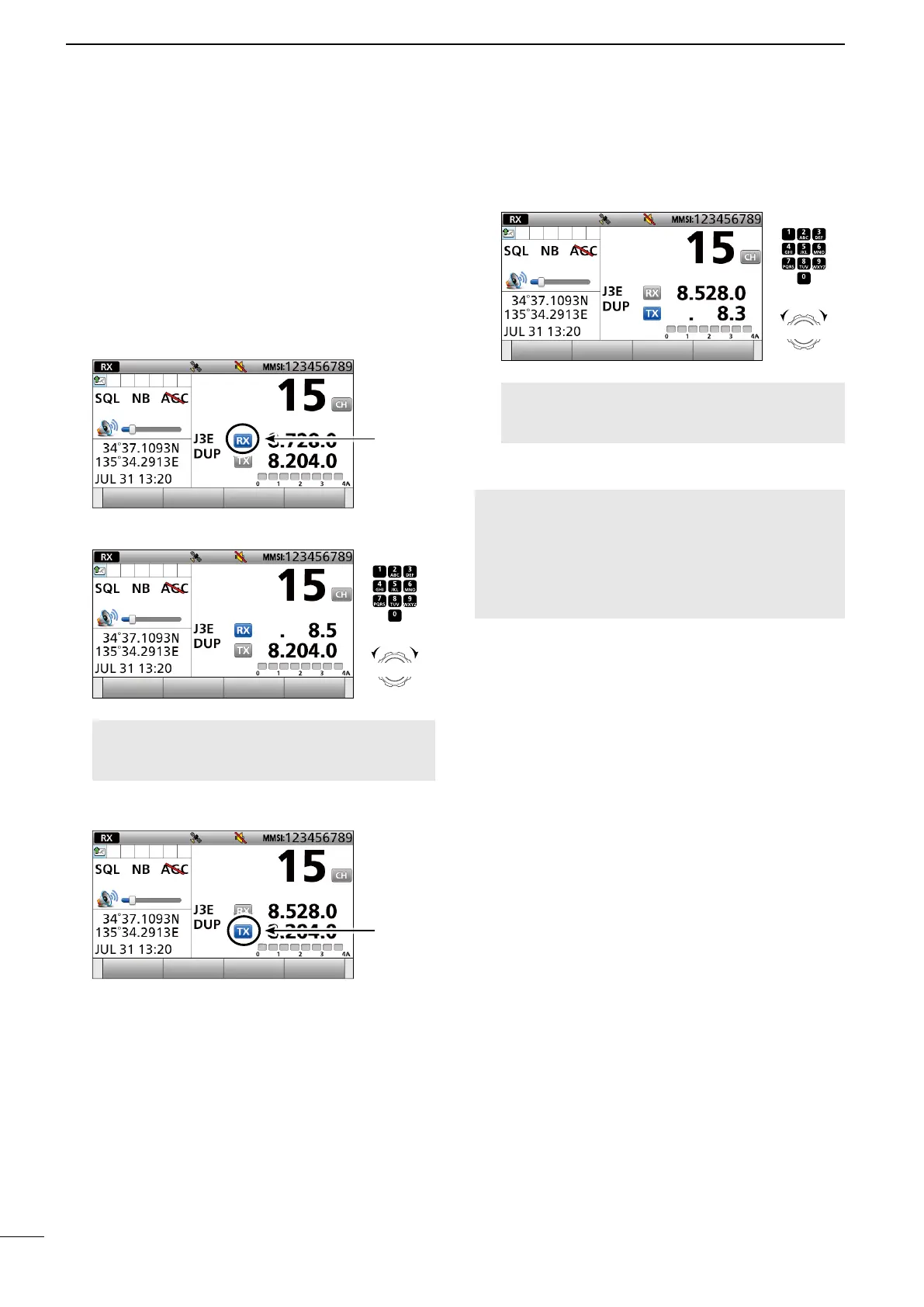
2. Push [RX/TX] to select the RX mode.
• The RX icon lights blue.
3. Enter an RX frequency, then push [ENT].
NOTE: Quickly enter a temporary operating RX
frequency and push [ENT]. Otherwise, it automatically
returns to the preset value soon.
4. Push [RX/TX] to select the TX mode.
• The TX icon lights blue.
5. Enter a TX frequency, then push [ENT].
NOTE: Quickly enter a temporary operating TX
frequency and push [ENT]. Otherwise, it automatically
returns to the preset value soon.
NOTE:
• If you enter a frequency that is out of the frequency
range, an error beep sounds and it automatically returns
to the preset value.
• BE SURE to push [ENT] after entering a frequency.
Otherwise, it automatically returns to the preset value
after 2 seconds.
Push
+
Rotate
to select
a character
CH/GRP
Push
+
Rotate
to select
a character
CH/GRP
lights
lights



 To Next Page