19
OTHER FUNCTIONS AND OPERATIONS
6
■ Setting a User channel or an ITU Simplex channel
2. Setting an RX and TX operating frequencies (continued)
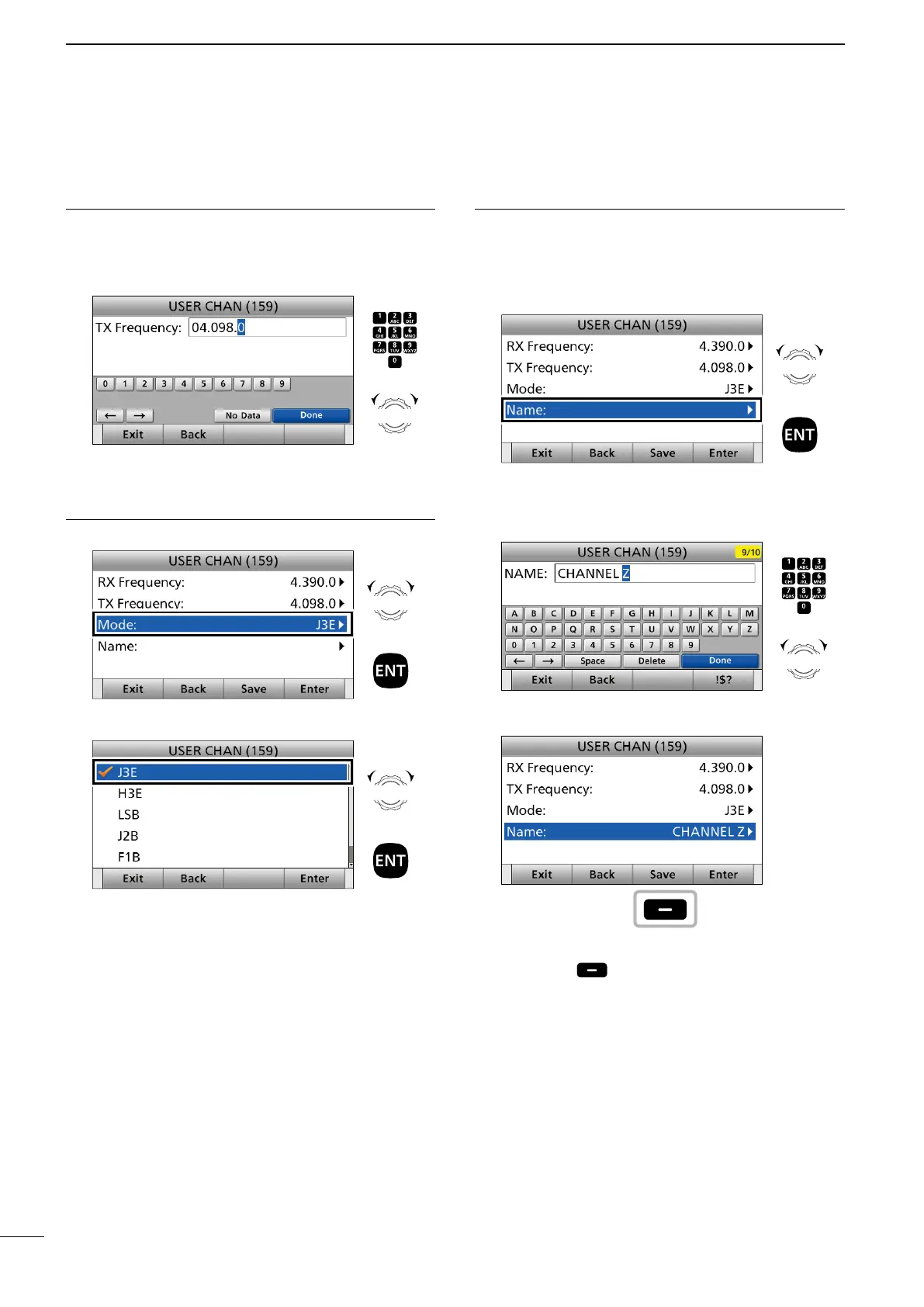
8. Enter a TX frequency.
After entering, push [▲], [▼], [◄], or [►] to select
“Done” and push [ENT]. (Example: 4.098.0)
3. Setting an operating mode
9. Select “Mode.”
10. Select an operating mode. (Example: J3E)
4. Setting a channel name
You can set a channel name of up to 10 characters
for each User and ITU channel. This may be helpful
to indicate the frequency's use, or a ship's name.
11. Select “Name.”
12. Enter a channel name.
After entering, push [▲], [▼], [◄], or [►] to select
“Done” and push [ENT].
13. Push [Save].
• “Are you sure ?” is displayed.
14. Push [OK] to save the name.
15. Push [MENU] to return to the Main screen.
Push
+
Rotate
to select
a character
CH/GRP
Rotate
+
Push
Rotate
+
Push
Rotate
+
Push
Push
+
Rotate
to select
a character
CH/GRP
Push



 To Next Page