24
1
2
5
6
7
8
9
10
11
12
13
14
15
16
17
Quick Reference
7
DSC OPERATION
4
3
17
16
15
14
13
11
12
10
9
8
7
6
5
2
1
Quick Reference
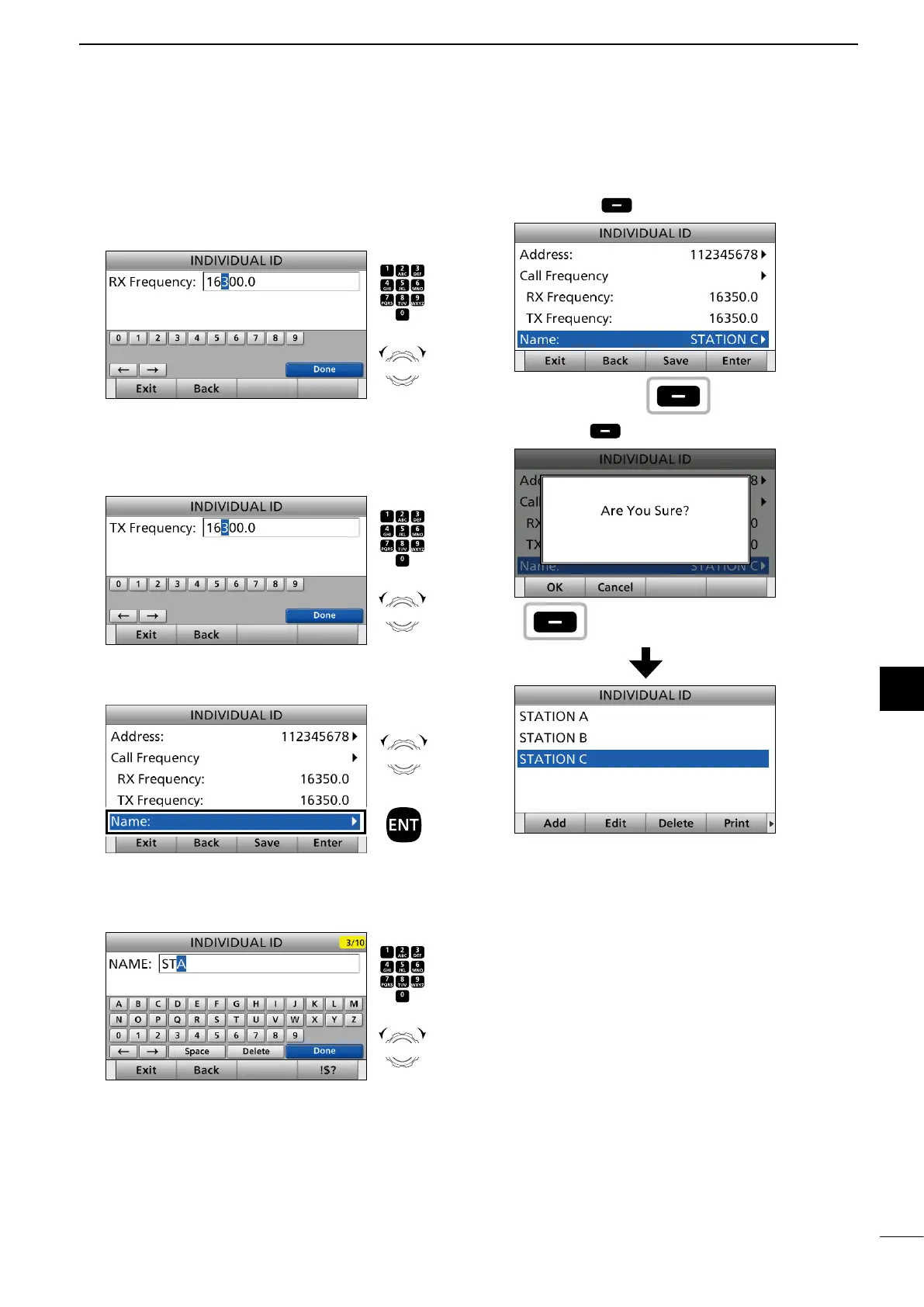
8. Enter an RX frequency.
After entering, push [▲], [▼], [◄], or [►] to select
“Done” and push [ENT].
9. Enter a TX frequency.
After entering, push [▲], [▼], [◄], or [►] to select
“Done” and push [ENT].
10. Select “Name.”
11. Enter an Individual ID name.
After entering, push [▲], [▼], [◄], or [►] to select
“Done” and push [ENT].
12. Push [Save] .
13. Push [OK] to save the ID.
• The entered Individual ID is added to the ID list.
14. Push [MENU] to return to the Main screen.
Push
+
Rotate
to select
a character
CH/GRP
Push
+
Rotate
to select
a character
CH/GRP
Rotate
+
Push
Push
+
Rotate
to select
a character
CH/GRP
Push
Push


 To Next Page