35
2001 NEW 2001 NEW
DSC OPERATION
7
■ Sending a Distress call
D Sending a Distress Cancel call (continued)
While waiting for a Distress Acknowledgement:
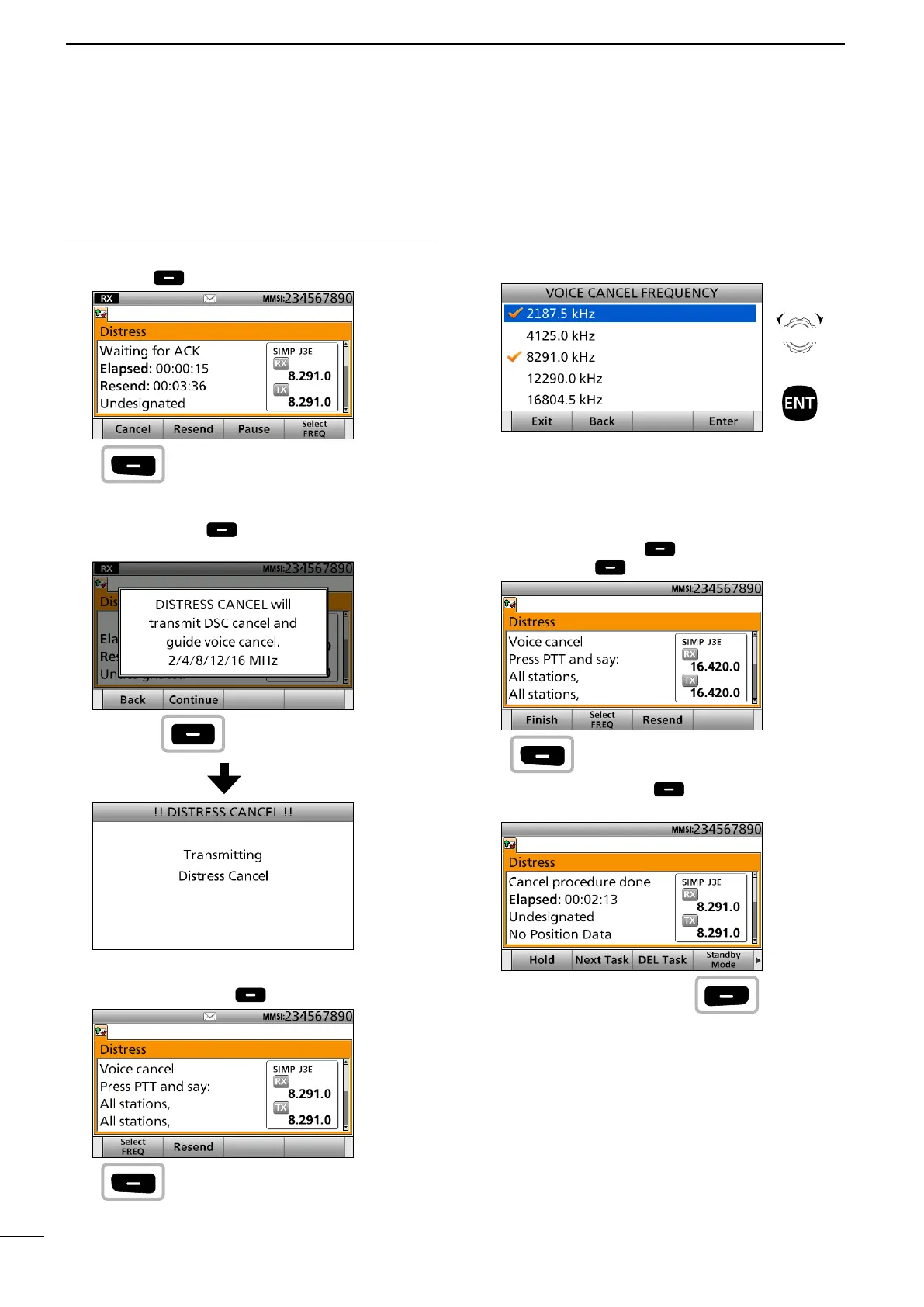
1. When “Waiting for ACK” is displayed, push
[Cancel]
.
See page 29 for details of the Software Key
functions in the DSC Task mode.
2. Push [Continue] to send the Distress Cancel
call.
3. After sending, the following screen is displayed.
Push [Select FREQ] .
4. Select a frequency to send a voice cancel
message and push [ENT].
The check mark shows that the Distress call on the
selected frequency is canceled by sending voice
cancel message.
5. Hold down [PTT] to announce your situation.
You can conrm the statement of the Distress
Cancel call by rotating [CH/GRP].
6. Repeat steps 3 to 5 to cancel for all frequencies.
7. After sending a voice cancel message for all
frequencies, [Finish] is displayed.
Push [Finish] .
8. Push [Standby Mode] to return to the Main
screen.
Push
Push
Push
Rotate
+
Push
Push
Push



 To Next Page