EasyManua.ls Logo

Ingenico Move 5000 - Screen Calibration Procedure

Ingenico Move 5000
108 pages
Print Icon
To Next Page IconTo Next Page
To Previous Page IconTo Previous Page
Loading...
Page 98
Move/
5000
User Guide
Copyright© 2019 Ingenico
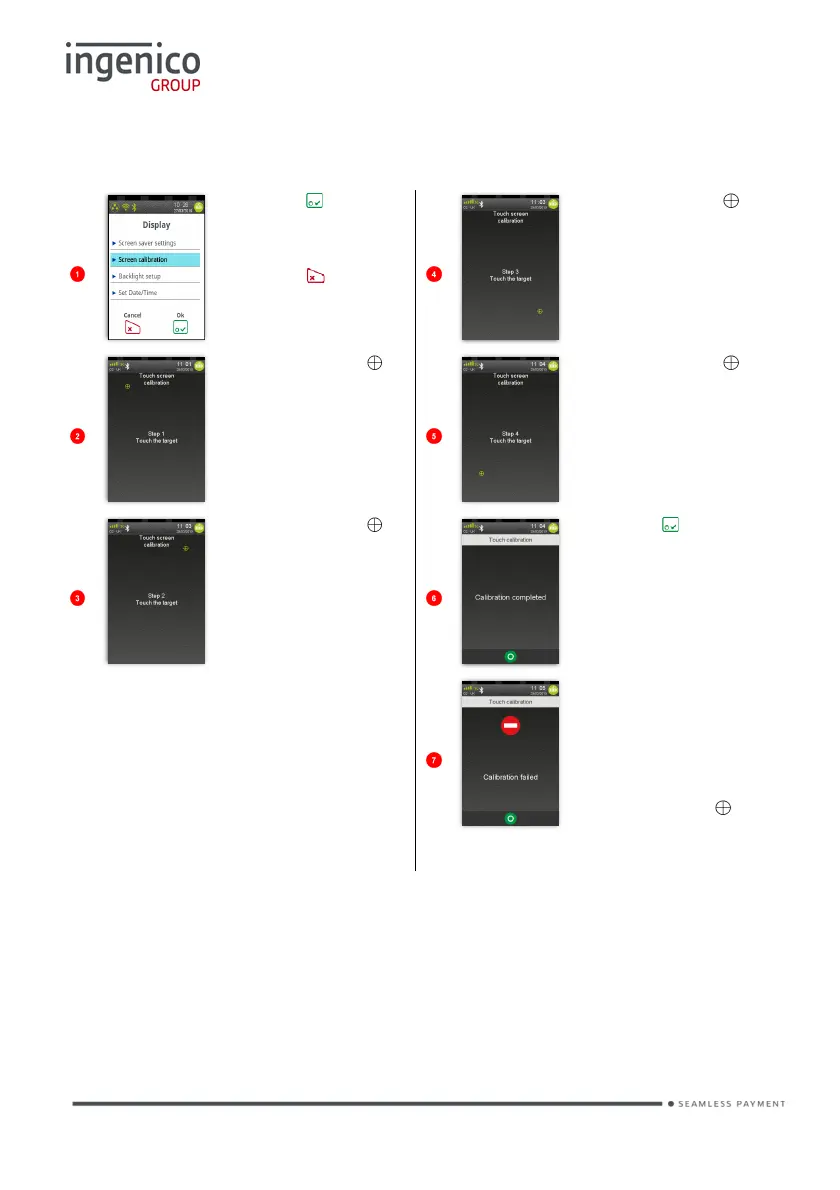
Screen Calibration
Press to select
highlighted
option.
Press to exit
function.
Gently touch
on the screen
with your stylus
or a pen.
Screen will
change
Gently touch
on the screen
with your stylus
or a pen.
Screen will
change
Gently touch
on the screen
with your stylus
or a pen.
Screen will
change
Gently touch
on the screen
with your stylus
or a pen.
Screen will
change
Press to
complete
process and
return to the ‘Idle
Screen’.
This screen will
be displayed if
calibration failed.
Repeat steps
again taking care
to touch the .

Table of Contents

Other manuals for Ingenico Move 5000

Related product manuals