LIP-9070 iPKTS User Guide
4
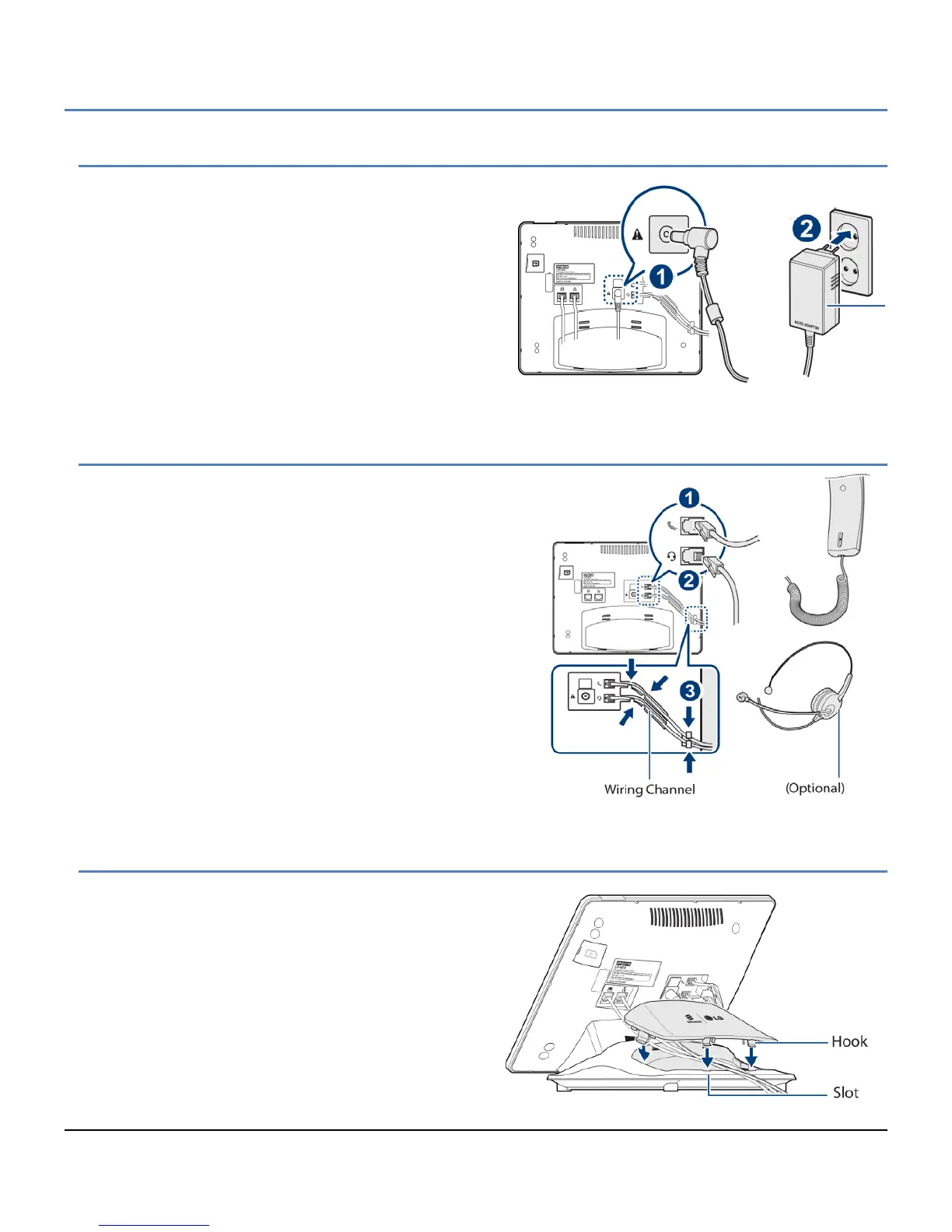
2.5 Optional AC/DC Adapter Connections
The optional AC/DC adapter is used when the network
connection is not PoE compatible. In this case, the AC/DC
adapter converts the normal AC power input to the 48 VDC
at 0.3 amps required by the LIP-9070. The adapter is
plugged into a standard AC wall outlet and the DC
connector is inserted in the DC jack located on the bottom
of the phone.
2.6 Connect the Handset and Optional Headset
The handset and headset connectors are located slightly to
the right center of the phone. The handset coil cord RJ-9 is
plugged into the upper RJ-9 jack of the phone and handset.
The lower RJ-9 jack can be used for a wired headset. When
using a wired headset, the Speakerphone button activates
audio to the headset.
After connecting the handset coil cord and the headset cord,
firmly place the cords in the respective wiring channel to
protect the wiring.
2.7 Replace the Cord Cover
After completing the wiring and mounting of the phone,
the Line Cord cover should be replaced to protect the
Line cords and the AC/DC adapter wiring. The cover has
tabs on the bottom that fit into slots in the pedestal. To
replace the cover, align the tabs with the slots making
sure the wiring is located beneath the cover but not in the
path of the tabs. Push down firmly on the cover to fully
engage the tabs and slots.



 To Next Page