LIP-9070 iPKTS User Guide
33
7 Call Log
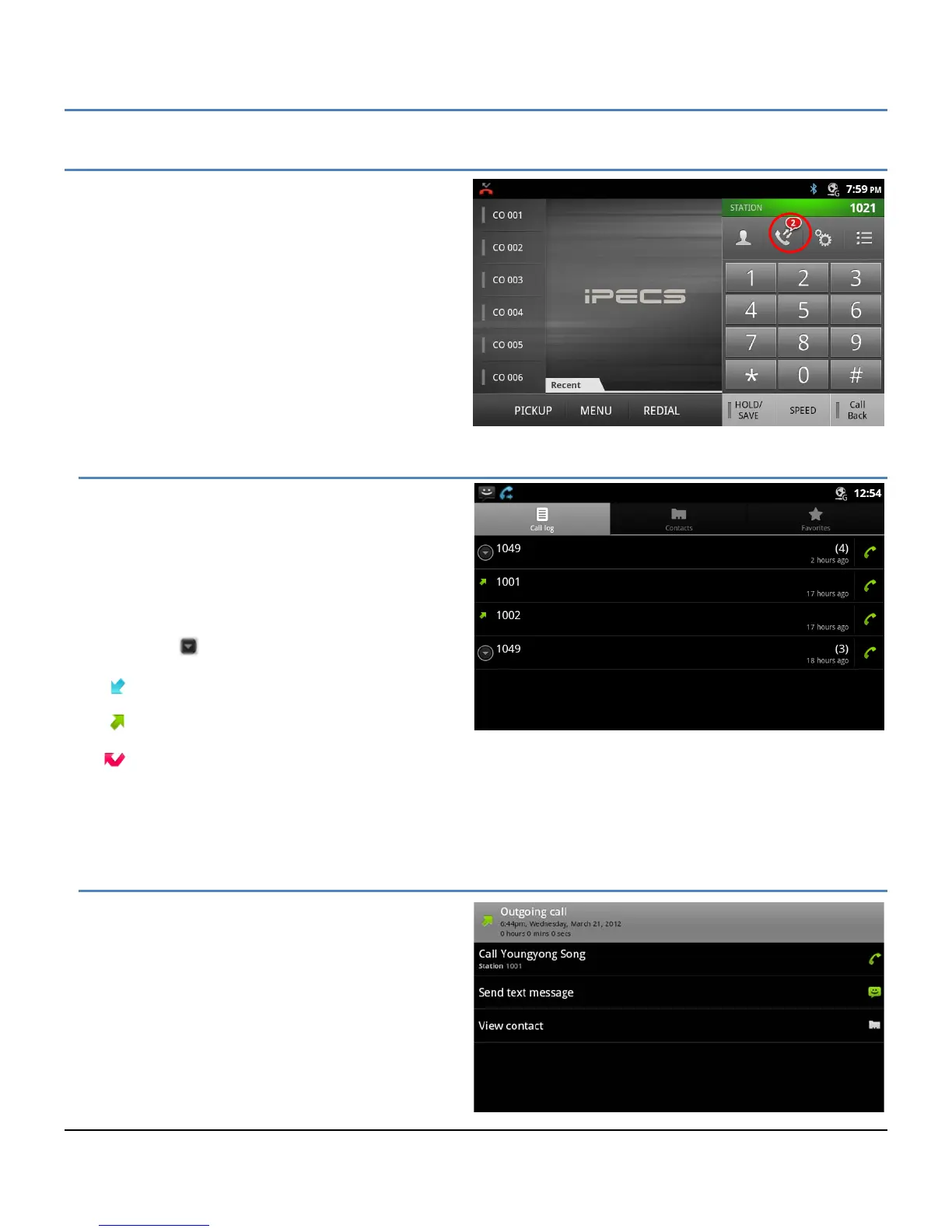
The LIP-9070 maintains a log of incoming, outgoing and
missed calls. Up to 500 call records are stored; the
oldest record is deleted to provide room for a new record
when the record limit is reached. The Log icon indicates
the number of new missed calls up to 99 and “…” will
display for more than 99.
7.1 Viewing the Call Logs
Tapping the Call Log icon in the iPECS phone window
or from the Call Log icon in the App dock, displays the
Log list. The Log list can be scrolled and, from the
screen, the user’s Contacts and Favorites can be
accessed.
In the list, an icon on the left indicates the type of call
for the record. When a number has multiple logs, the
‘more’ icon ( ) opens a list of logs associated with
the number. The call type icons are:
Incoming
Outgoing
Missed
To the right, the list indicates the number of logs associated with a number and when the last log was generated.
7.2 Using the Call Logs
To return a call, simply touch the handset icon to the
right of the Log entry.
Touching a log displays the actions available for the
log. The display will vary for records associated with
a Contact and numbers that can receive an SMS text
message.



 To Next Page