Home
iPECS
IP Phone
LIP-9070
Page 45
iPECS LIP-9070 - Page 45
87 pages
Manual
Save Page as PDF
To Next Page
To Next Page
To Previous Page
To Previous Page
Loading...
LIP-9070
iPKTS
User Guide
34
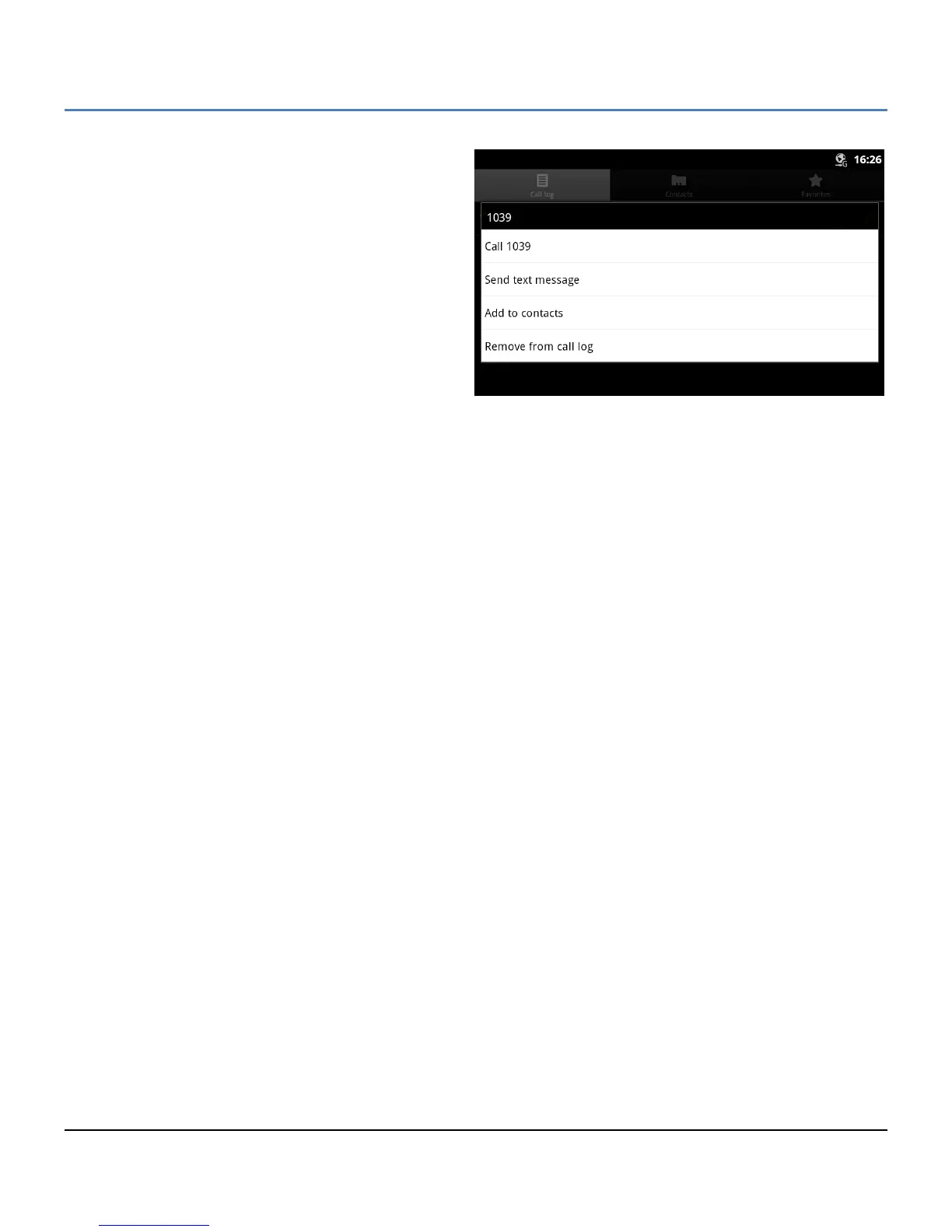
Touch and hol
d
a record to displ
ay the
C
ontex
t menu
that
perm
it
s
the log to be adde
d to the Cont
acts or
rem
oved from the C
all Log.
Other opti
ons are sh
own,
if available
, to send a m
essage or c
all the num
ber in
the log.
44
46
Table of Contents
Main Page
Default Chapter
3
European Union Declarations of Conformity
3
Regulatory and Safety Notices
3
Important Safety Instructions
4
Table of Contents
6
1 Introduction
12
2 Installation
13
Installation
13
Overview
13
Removing the Cord Cover
14
Mounting the Phone and Pedestal
14
Network Connections
14
Optional AC/DC Adapter Connections
15
Connect the Handset and Optional Headset
15
Replace the Cord Cover
15
Power up and Setup Wizard
16
Language Selection
16
Protocol Selection
16
Registration
17
Mounting and Dismounting an SD Card
18
3 Basics Operation
19
Incoming Calls
19
Outgoing Calls
19
Holding Calls
20
Transferring a Call
20
Conference
20
4 Mini-Tab Phone Display Basics
21
Basic User Gestures
21
Mini-Tab Function Buttons
22
LIP-9070 Ipkts
22
Mini-Tab Menus
22
Screen Option Menus
22
Touch and Hold Context Menus
22
Dialogs and Popups
23
Launcher Screens
23
Home Screen
23
Application Dock
23
Managing the App Dock
24
Adding Icons to App Dock
24
Deleting Icons from the Apps Dock
24
Notification and Status Bar
25
Customize the Launcher Screens
27
Adding Apps and Widget
27
Reposition or Delete a Screen Item
27
Handling Widgets
28
5 Ipecs Phone
29
Speed
30
Using Auto Dialing
30
Setting up a Station Speed Dial
31
Call Back Message Wait
31
Flex Buttons
32
Video Calling
32
Ipecs Phone Call Settings
33
Preferences
34
Flex Button Labels
34
Phone Management
35
Ringtone Sounds
35
System Configuration
35
Reboot
36
6 Working with Contacts
37
Searching the Contacts
37
Communicating with Contacts
37
Managing the Contact Database
38
Adding a Contact
38
CO Access Code
39
Display Options
39
Import and Export Contacts
40
Managing a Contact Record
41
Edit Contact Information
41
Deleting a Contact
41
Joining Contact Records
41
Favorites
42
Miscellaneous Contact Options
42
Contact's Default Number
42
Send to Voice Mail
42
Contact Ringtone
42
Share a Contact
43
7 Call Log
44
Viewing the Call Logs
44
Using the Call Logs
44
8 Using SMS (Short Message Service)
46
Send a Message
46
Options Menu
47
Receive a Message
47
Message Options
48
Messaging Screen Options Menu
48
Deleting a Message Thread
49
Messaging Settings
49
9 Appointment/Event Calendar
50
Viewing Schedule Details
51
Managing Schedules
51
Add an Event Schedule
51
Edit an Event Schedule
51
Delete an Event Schedule
52
Responding to a Reminder
52
10 General Purpose Apps
53
Setting the Alarm Clock
53
Using the Calculator
54
Handling Pictures and Videos
54
Taking Pictures
55
Recording Videos
55
Picture and Video Controls
56
Review Pictures and Videos
57
Using the Gallery and Albums
57
Viewing a Slide Show
58
Selecting Multiple Pictures
58
Viewing Pictures
58
Picture Gallery Tools
59
Viewing Videos
60
Playing Music
60
Playing Songs
61
Playing a Party-Shuffle
61
Play Songs from a Playlist
61
Managing Playlists
62
Create a Playlist
62
Add Songs to a Playlist
62
Rename a Playlist
63
Delete a Playlist
63
Delete Song from Playlist
63
Delete Songs from SD Card
63
Use as Ringtone
63
11 Managing Bluetooth
64
Bluetooth Headset
64
Bluetooth Handsfree
64
Bluetooth HF Call Waiting
65
Outgoing HFP Call
66
Audio Transfer
66
Bluetooth HF Audio Priority
66
12 Settings
67
Network and Bluetooth
67
Network (Ethernet) Configuration
68
Openvpn
68
LLDP Setting
69
802.1X Setting
69
Bluetooth Settings
69
Sound
70
Display
70
Applications
71
Privacy
71
Storage
71
SD Card
72
Language & Keyboard
72
NTP Settings
72
About Phone
73
System Updates
73
Appendix A Station User Programming
74
Appendix B Web Admin
77
Security Menu
78
Lan Settings
78
Vlan Settings
79
System Setting
79
Flexible Buttons
81
Firmware Upgrade
81
Time Server
84
Appendix C Touch Screen Calibration
86
Related product manuals
iPECS LIP-9002
61 pages
iPECS LIP-9040
75 pages
iPECS LIP-9030
75 pages
iPECS LIP-9008G
10 pages
iPECS LIP-9024 LSS
65 pages
iPECS LIP-9000 Series
77 pages
iPECS LIP-8008D
58 pages
iPECS LIP-8002E
53 pages
iPECS LIP-8040E
86 pages
iPECS LDP-9008D
4 pages
iPECS 1040i
2 pages
iPECS 1000i Series
66 pages



 To Next Page