LIP-9070 iPKTS User Guide
7
the phone, section 13.1.1, and the System Configuration data, section 6.5.5, may require modification with the
assistance of the iPECS administrator.
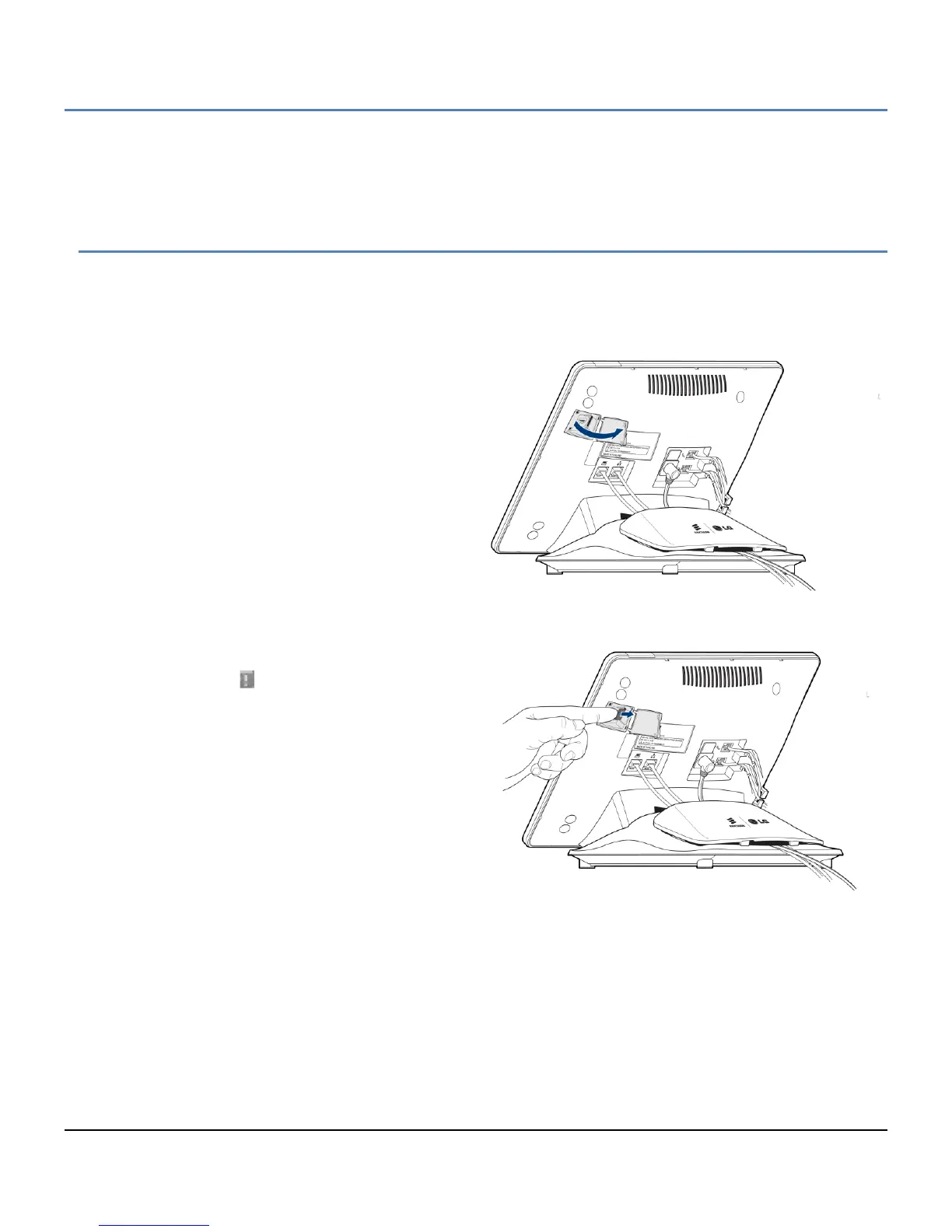
2.10 Mounting and Dismounting an SD card
An SD card can be installed in the SD card slot on the right side of the LIP-9070. The SD card expands the
memory of the LIP-9070, stores pictures, videos and music. Note once an SD Card is inserted in the slot, it must
be ‘unmounted’ properly to safely remove.
To mount an SD card:
1. Uncover the SD slot located on the left side of
the phone.
2. Position the SD card with the gold strips facing
down.
3. Slide the card into place until it is fully inserted
and locked in place. The phone will inspect
the card to prepare it for use.
To safely remove the SD card from the phone, the card must first be unmounted. To remove the SD card,
1. Select ‘Unmount SD card’ from the System
Settings Storage menu as shown in section
12.6.1. The icon indicates that it is safe to
remove the card.
2. Open the SD card slot cover.
3. Gently push the card in to release the card
lock.
4. Carefully pull the card from the slot.
Note
° Do not remove the SD card during a file
transfer or while files are being accessed or
transferred. If the card is removed in such
circumstances, loss or damage to data may result.



 To Next Page