LIP-9070 iPKTS User Guide
36
Note
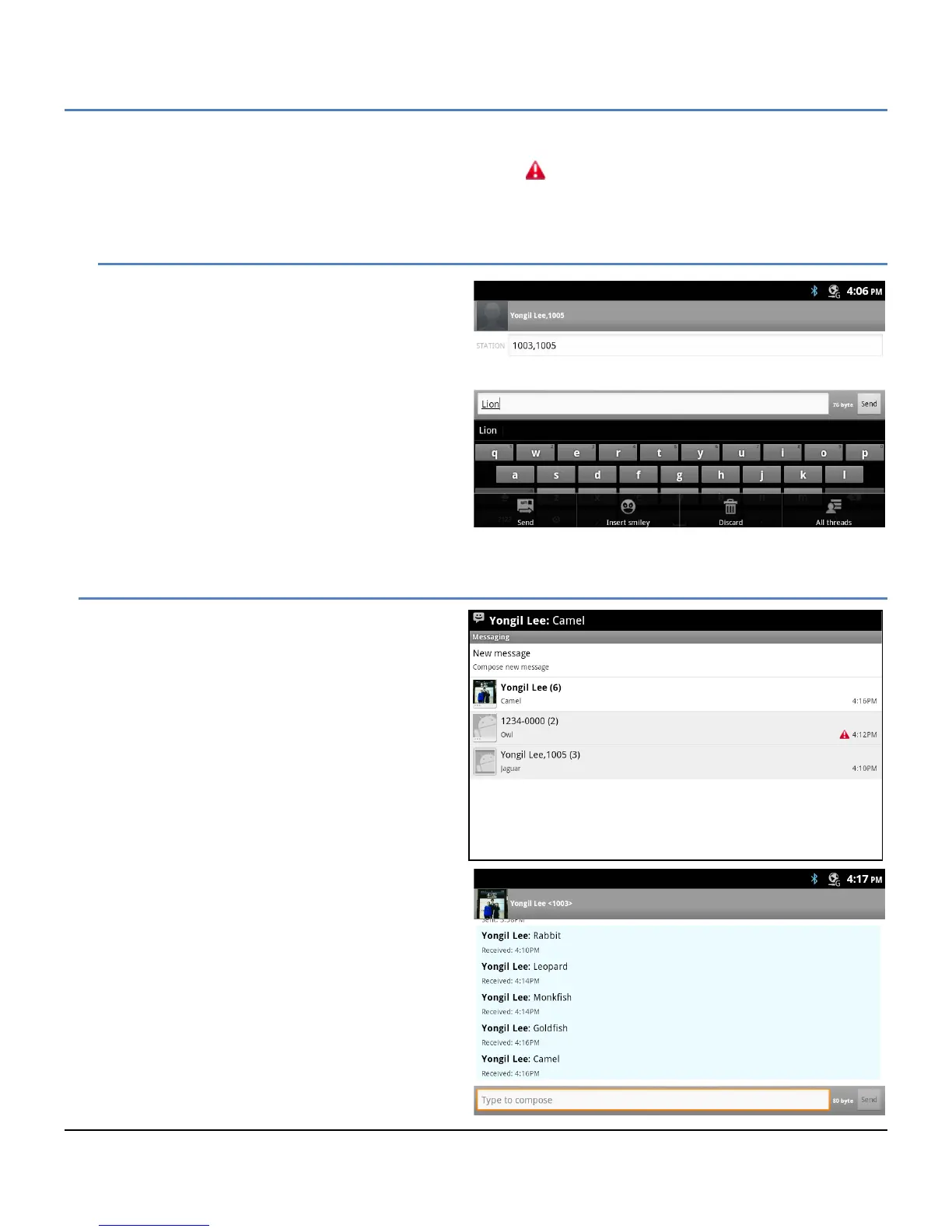
° If the message is not properly sent, the warning notice, , displays to the right of the message.
° To hide the keyboard, press the Back button.
8.1.1 Options Menu
The Compose screen has an Option menu with the
following tools.
Send: send the message.
Insert Smiley: drag and drop a smiley face
into the message. A smiley face uses
several characters of the message.
Discard: erase the message and return to
the Messaging screen.
All threads: save the draft message and
return to the Messaging screen. The
message is saved and displays on the
Messaging screen as a draft where it can
be accessed, edited and sent.
8.2 Receive a Message
When a new message arrives, the SMS icon appears
in the Notifications bar along with the sender and part
of the message. To view the full contents of the
message,
1. Drag down the Notifications bar to expose
the Notification detail and select the SMS
notification.
or
Select the SMS icon from a Launcher screen
or Apps Dock.
2. Touch the highlighted thread.
The most recent messages in the thread are
displayed and previous messages can be viewed with
the swipe gesture. The sender of the message is
identified followed by the message. Below the sender
and message, the time received is indicated.
The thread screen includes the ‘Type to compose’
box so that the user may quickly compose a return
message.



 To Next Page