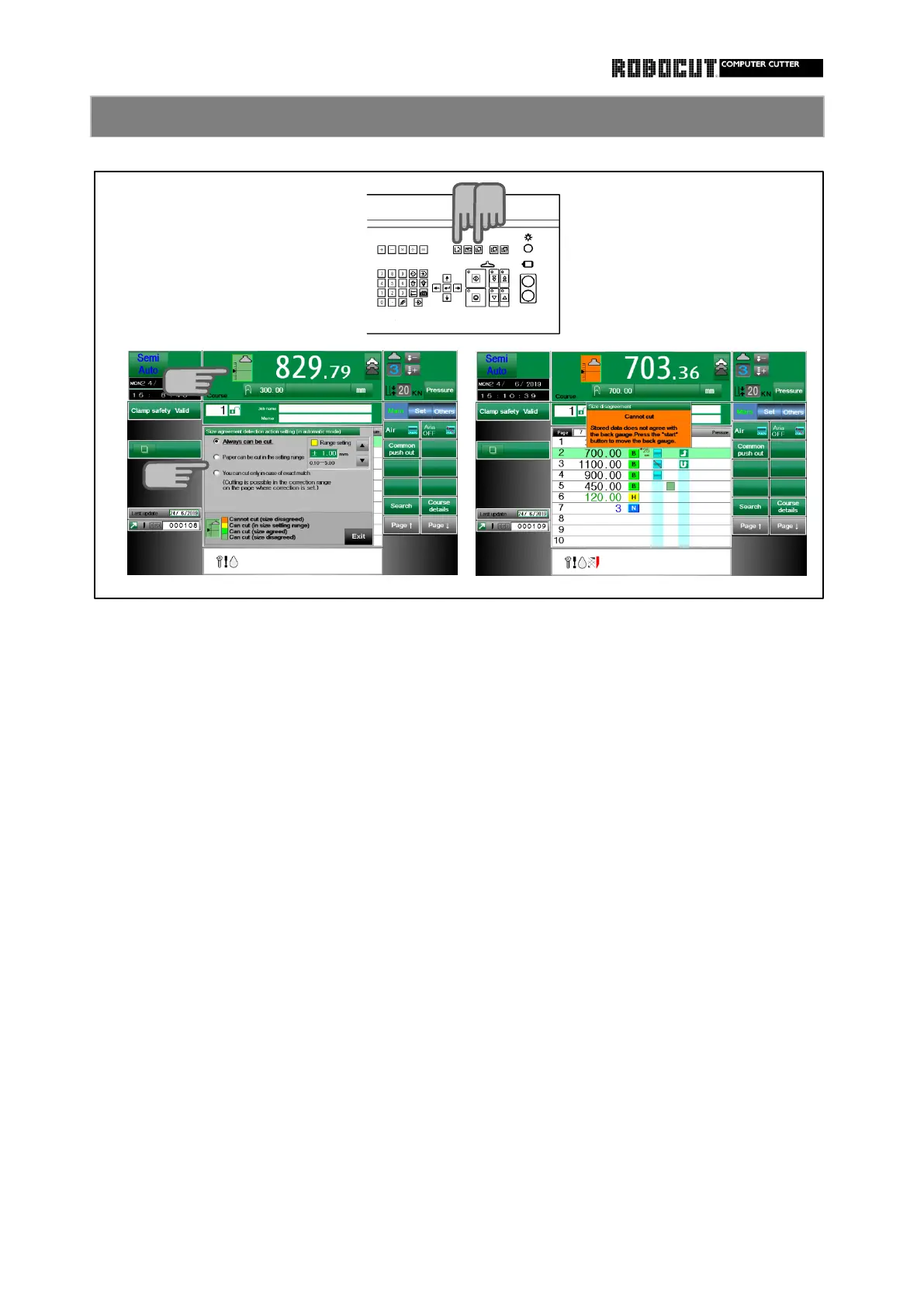
Selecy the memory or automatic mode.
Select one of the following.
[ Allways can be cut. ]
Cuting is always possible even if the stored size does not agree with backgauge size.
Cutting is prohibited with a setting if the stored data does not agree with the
Cutting is possible as far as the range setting located on the right. If the range is exceeded,
The size agreement detection function includes the following.
1. Cutting is always possible. ( Initia setting )
2. Cutting is possible within the setting range.
3. Cutting is possibale in case of the exact match only.
[ Paper can be cut in the setting range. ]
[ You can cut only in case of exact match. ]
If cutting is execuuted out of the setting range, an error message is displayed.
Cutting is impossible unless the stored size completely agree with the backgauge size.
If cutting is executed in the state without agreement, an error message is displayed.
However, if correction is designated in the page, cutting is possible even if agreement is not
obtained as far as within the correction range.
If cutting is executed in the state out of the setting range, an error message is displayed.
Press the left part of the backgauge size view at the upper left of the screen.
Function of size agreement detection setiing 1



 To Next Page