190
PR-23 instrucon manual
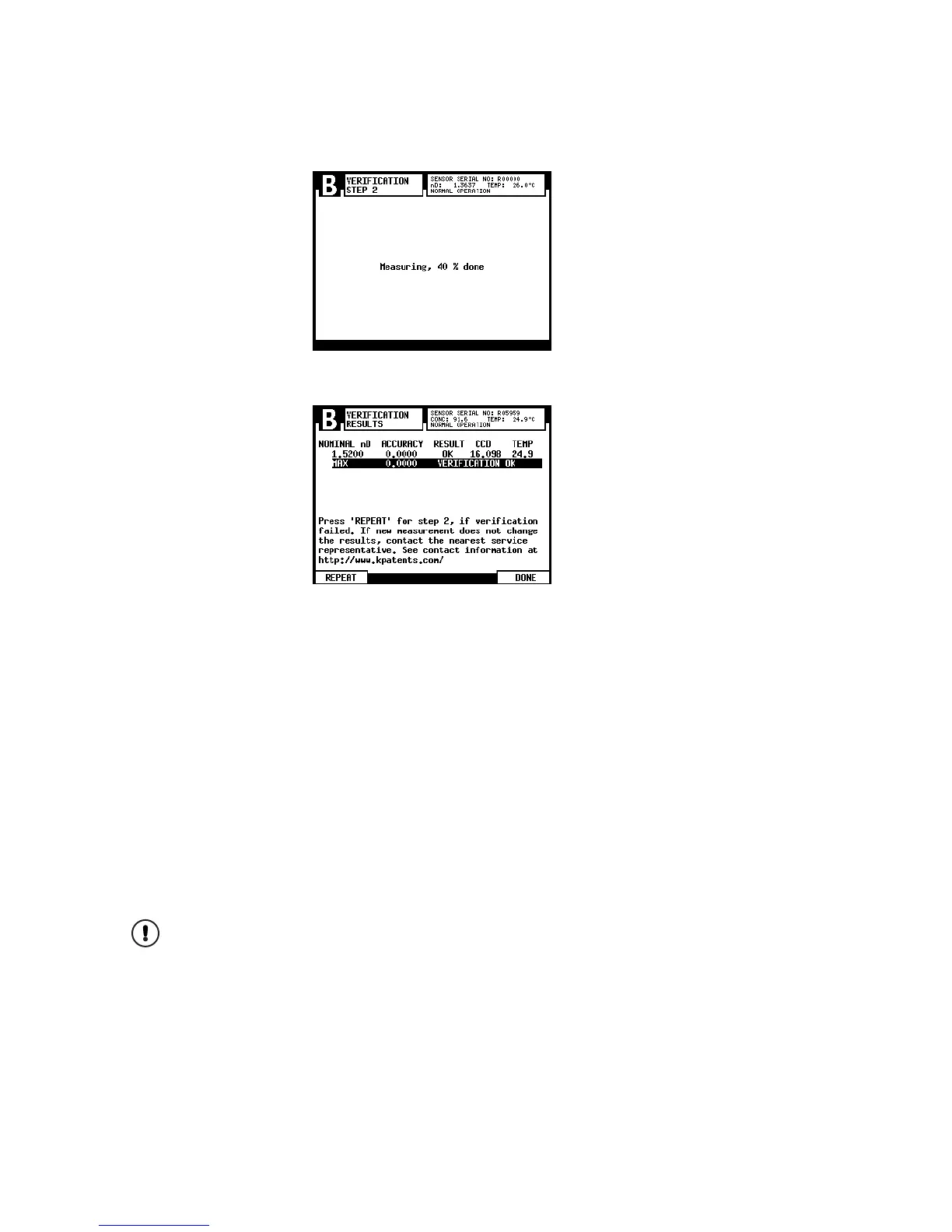
Figure 13.5 Vericaon in process
Figure 13.6 Vericaon completed successfully (here only with one RI liquid)
If veriication is successful, i.e. all measurements are within ±0.0004 of the nominal
values, you get the message VERIFICATION OK, see Figure 13.6 below.
Note: The sensor veriication concerns only the refractive index n
D
measurement.
The calculation of concentration from n
D
and process temperature TEMP is not in-
cluded, see Section 6.4, “Calibrating the concentration measurement”.
If the veriication fails, please see section 13.4 for corrective action.
13.3 Sensor vericaon cercate
The DTR stores the most recent veriication done on the DTR and the results of that
veriication can be viewed and printed on the instrument homepage by following the
Veriication link on the link bar. (For more information on the instrument homepage,
see Chapter 12.)
Important: When you have performed a veriication on a sensor, reload/refresh the
veriication page to view the newest results. The date given on the veriication page
is the page load date, not necessarily the veriication date.
The date and time settings are taken from the browser, i.e. the computer used to view
the veriication certiicate. The DTR doesn’t have timekeeping functionality.
To print the veriication certiicate, simply use your browser’s print function. The
page is designed so that with browser default settings it normally its onto a single


 To Next Page
 Loading...