English 59
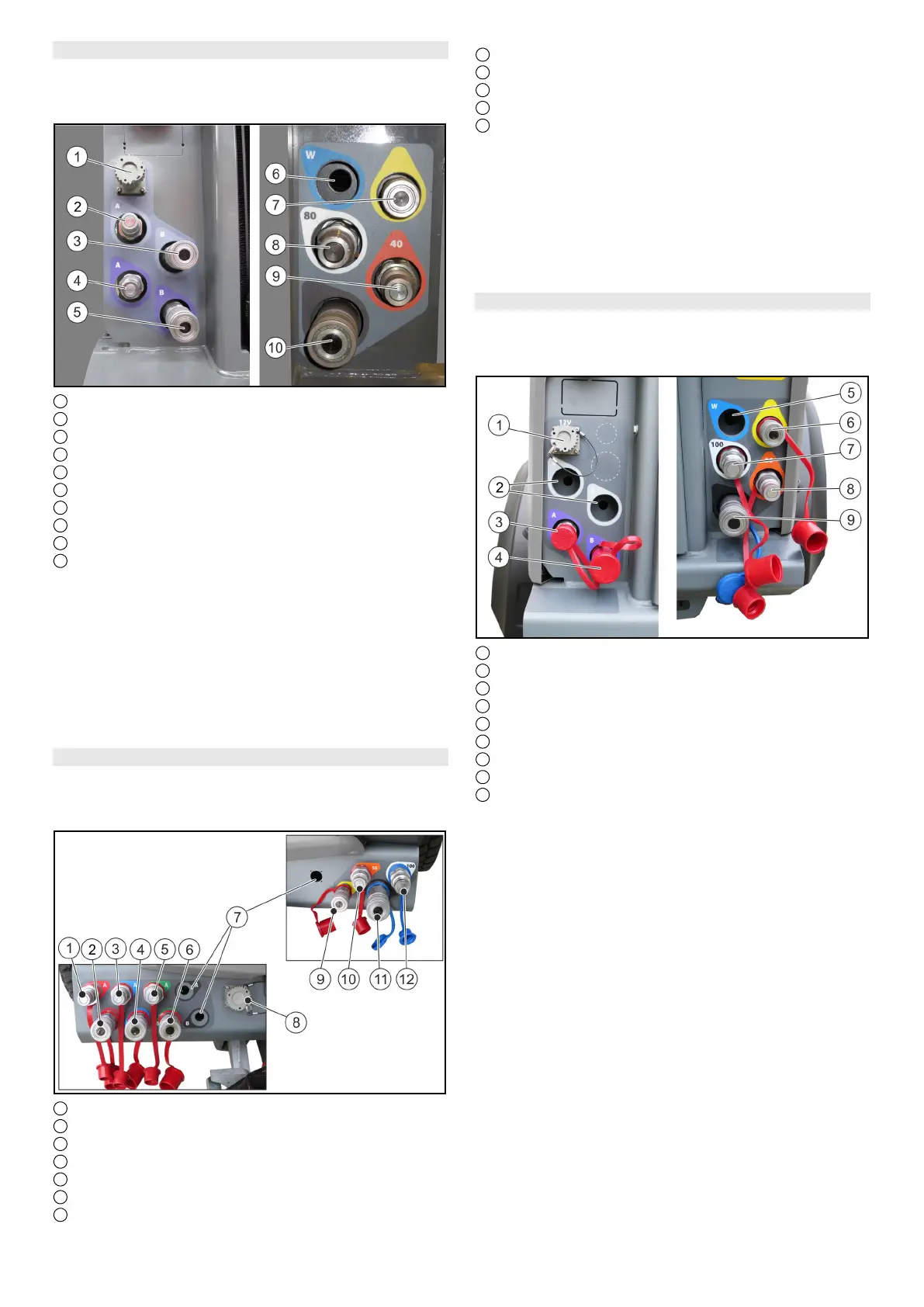
6.4.2 Connections for MIC 50 rear attachment
Note
Fit a dust cap to an unused connection to provide protec-
tion.
1 Electrical PTO
2 AUX + (A - grey)*
3 AUX - (B - grey)*
4 AUX + (A - purple)
5 AUX - (B - purple)
6 Recess (prepared for optional connection)
7 Leakage oil
8 Hydraulic PTO flow (80 litres/min)
9 Hydraulic PTO flow (40 litres/min)
10 Hydraulic PTO return flow
* optional
Note
The hydraulic connections AUX are controlled using the
control lever.
Note
The hydraulic PTO is activated using the hydraulic PTO
selector switch in the operating console.
For a description of the selector switch, see chapter 6.11.2
Centre operating console for MIC 50.
6.4.3 Connections for MIC 70 front attachment
Note
Fit a dust cap to an unused connection to provide protec-
tion.
1 AUX 1+ (A - red)
2 AUX 1- (B - red)
3 AUX 2+ (A - blue)
4 AUX 2- (B - blue)
5 AUX 3+ (A - green)
6 AUX 3- (B - green)
7 Recesses (prepared for optional connections)
8 Electrical PTO
9 Leakage oil
10 Hydraulic PTO flow (50 litres/min)
11 Hydraulic PTO return flow
12 Hydraulic PTO flow (100 litres/min)
Note
The hydraulic connections AUX are controlled using the
joystick.
Note
The hydraulic PTO is activated using the hydraulic PTO
selector switch in the operating console.
For a description of the selector switch, see chapter 6.11.3
Centre operating console for MIC 70.
6.4.4 Connections for MIC 70 rear attachment
Note
Fit a dust cap to an unused connection to provide protec-
tion.
1 Electrical PTO
2 Recess (prepared for optional connection)
3 AUX + (A - purple)
4 AUX - (B - purple)
5 Recess (prepared for optional connection)
6 Leakage oil
7 Hydraulic PTO flow (100 litres/min)
8 Hydraulic PTO flow (50 litres/min)
9 Hydraulic PTO return flow
Note
The hydraulic connections AUX are controlled using the
control lever.
Note
The hydraulic PTO is activated using the hydraulic PTO
selector switch in the operating console.
For a description of the selector switch, see chapter 6.11.3
Centre operating console for MIC 70.


 To Next Page
 Loading...