English 67
11 Locking enabling for shovel or fork in the optional front
loader attachment
12 Switch for bypassing floating position (PTO usable with-
out floating position)
ATTENTION
Only use with attachments that need this function!
13 Hazard warning switch
14 Hand throttle lever - preselection for engine speed
15 Switch 2: Switch for AUX green to grey or purple (only
in the MDC variant)
16 Switch 1: Switchover from AUX red to blue (only in the
MDC variant)
Selector switch for hydraulic PTO
1 Hydraulic PTO (80 l/min, front) activated
2 Hydraulic PTO (40 l/min, front) activated
3 Hydraulic PTO (40 l/min, front) and (40 l/min, rear) acti-
vated
4 Hydraulic PTO (40 l/min, rear) activated
5 Hydraulic PTO (80 l/min, rear) activated
The selector switch is used to activate the relevant con-
nection for the front and rear hydraulic PTO.
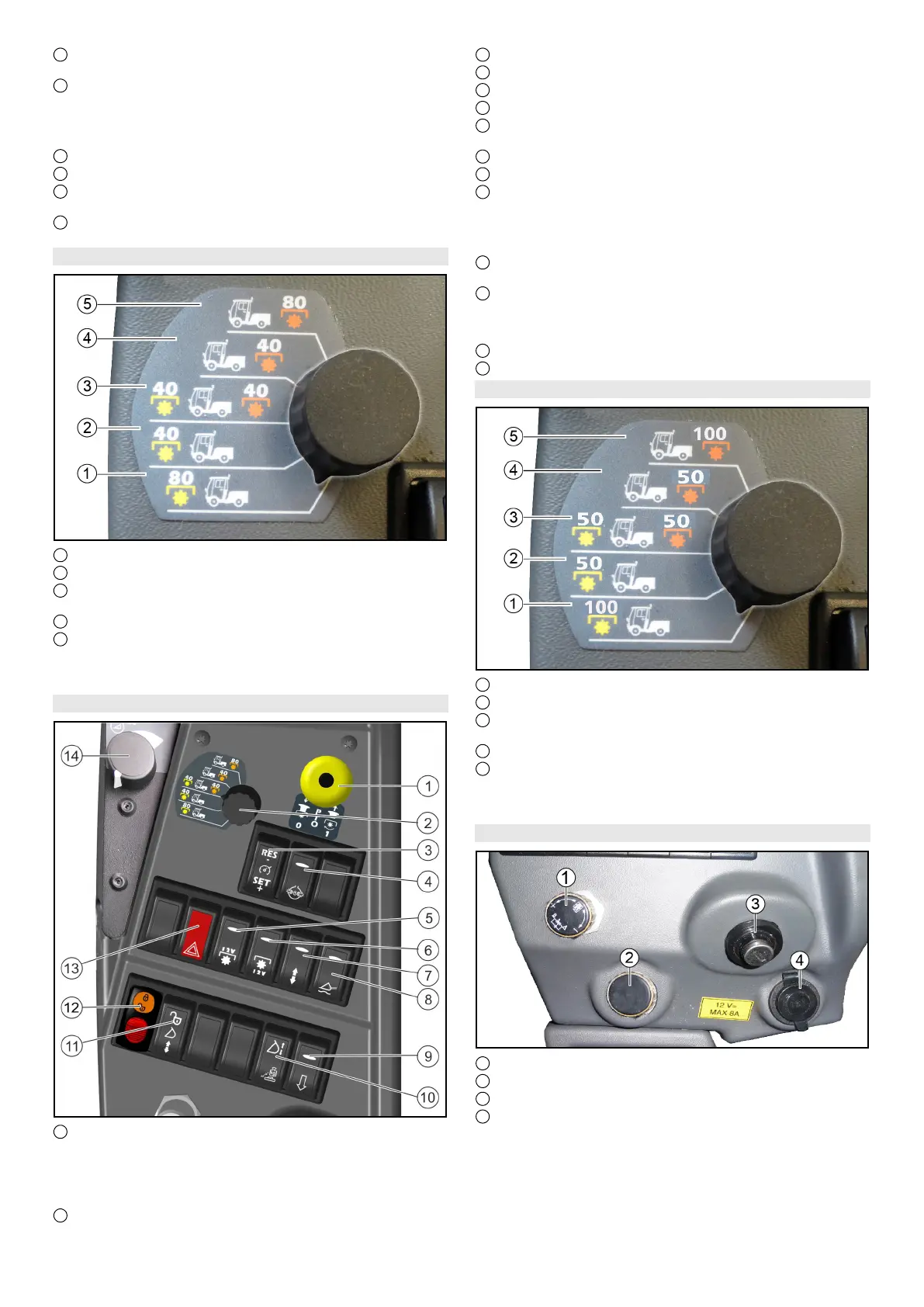
6.11.3Centre operating console for MIC 70
1 PTO on/off
Position 1: Switch on the PTO
Press the black knob and pull the button
PTO on/off
Position 0: Switch off the PTO
Press the button downwards.
2 Selector switch for hydraulic PTO
3 Tempomat
4 Differential lock
5 Electrical PTO, front
6 Electrical PTO, rear
7 Switchover for double-acting control hydraulics AUX
"rear/attachment frame with tipping function"
8 Main switch, floating position
9 Dump valve (quick-lowering for AUX rear)
10 Attachment release switch (optional)
Note
This switch is responsible both for vibration dampening
and for attachment release (both options at the same
time does not work)
11 Locking enabling for shovel or fork in the optional front
loader attachment
12 Switch for bypassing floating position (PTO usable with-
out floating position)
ATTENTION
Only use with attachments that need this function!
13 Hazard warning switch
14 Potentiometer - engine speed
Selector switch for hydraulic PTO
1 Hydraulic PTO (100 l/min, front) activated
2 Hydraulic PTO (50 l/min, front) activated
3 Hydraulic PTO (50 l/min, front) and (50 l/min, rear) acti-
vated
4 Hydraulic PTO (50 l/min, rear) activated
5 Hydraulic PTO (100 l/min, rear) activated
The selector switch is used to activate the relevant con-
nection for the front and rear hydraulic PTO.
6.11.4Rear operating console for MIC 50
1 Rotary knob for front power lift lowering speed
2 Rotary knob for attachment release (optional)
3 Ignition lock
4 Additional socket-outlet, 12 V


 To Next Page
 Loading...