62 English
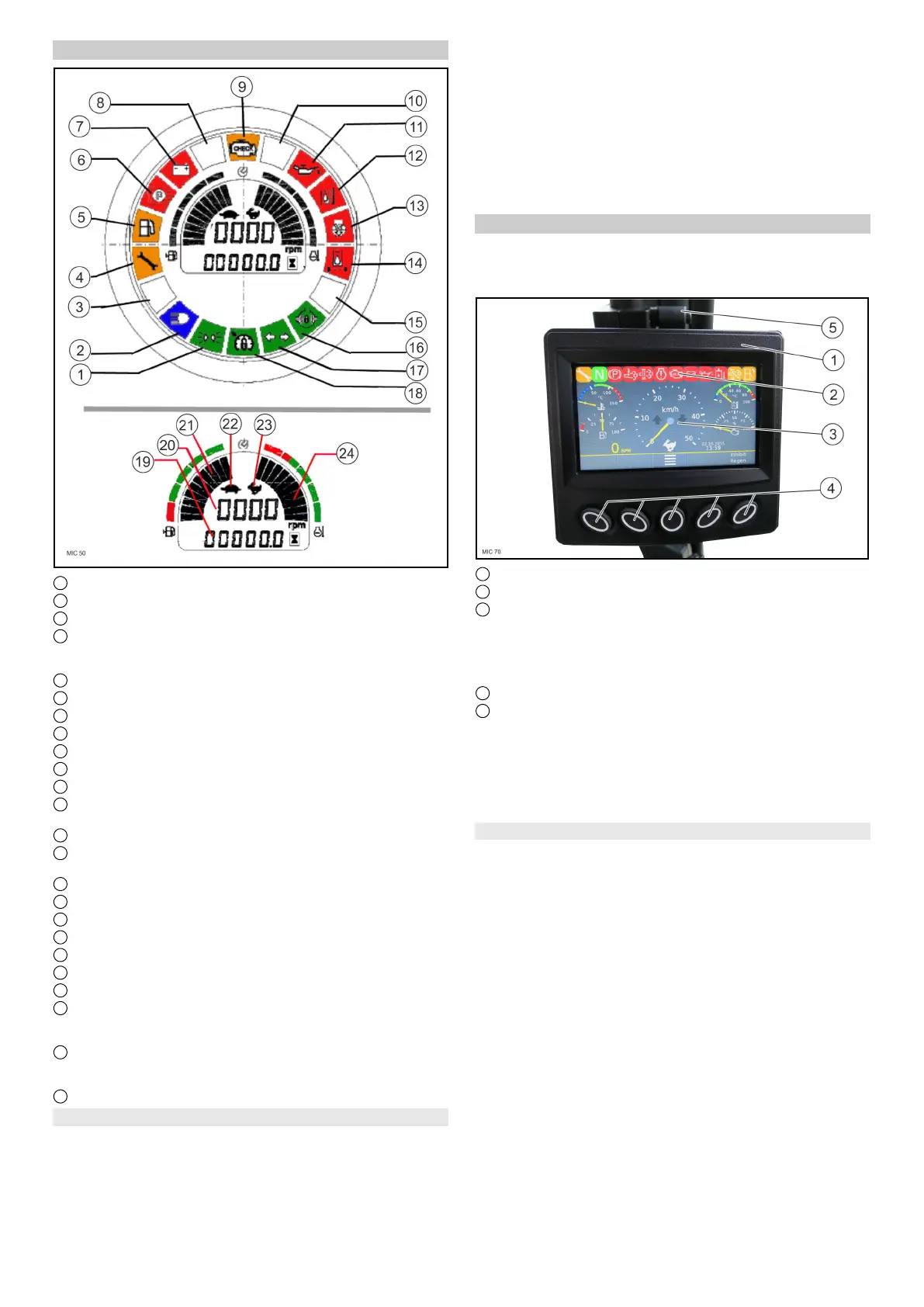
6.7 MIC 50 multifunction display
1 Parking light indicator lamp
2 High beam indicator lamp
3 Not used
4 Service display
Note
Lights up if the relevant maintenance is to be carried out
5 Fuel reserve warning light
6 Parking brake warning light actuated
7 Battery charging monitor warning light
8 Not used
9 Drive / error indicator warning light
10 Not used
11 Engine oil pressure warning light
12 Hydraulic oil temperature warning light (too low / too
high)
13 Air filter warning light
14 Warning light for drive hydraulic oil filter (Hydraulic oil fil-
ter clogged)
15 Not used
16 Indicator lamp for differential lock active
17 Indicator lamp for flasher
18 Indicator lamp for Tempomat activated
19 Operating hours counter
20 Engine speed
21 Fuel level indicator
22 Symbol: Turtle
Note
Display for transport mode slow
23 Symbol: Rabbit
Note
Display for transport mode fast
24 Engine coolant temperature
6.7.1 Warning lights and indicator lamps
몇 WARNING
Risk of damage to vehicle
If a red warning light lights up, then you must take immedi-
ate measures to rectify the fault. Search for the next oppor-
tunity for safely stopping out of the moving traffic.
ATTENTION
If a yellow warning light lights up, then you must take
measures to rectify the fault as soon as possible.
Note
Green and blue indicator lamps indicate the current activi-
ties of the vehicle.
1. The significance of the warning lights that light up in the
event of a malfunction is described in chapter 14 Trou-
bleshooting guide .
6.8 MIC 70 multifunction display / display
The default display language is English, but the language
can be changed via the Settings menu, see chapter 6.8.3
Setting the language on MIC 70.
1 Multifunction display, adjustable in height
2 Display
3 Warning lights and indicator lamps
Note
Whilst the system is starting up, all the warning lights
and indicator lamps briefly light up. This can be used for
monitoring purposes, in order to check that the lights are
working correctly.
4 Function buttons
5 Lever for height adjustment
The function buttons are used for navigating, changing the
settings or for directly selecting a menu. This is visually
seen in the navigation display in the display.
In order to adjust the multifunction display in height, open
the lever and set to the required position.
6.8.1 Warning lights and indicator lamps
몇 WARNING
Risk of damage to vehicle
If a red warning light lights up, then you must take immedi-
ate measures to rectify the fault. Search for the next oppor-
tunity for safely stopping out of the moving traffic.
ATTENTION
If a yellow warning light lights up, then you must take
measures to rectify the fault as soon as possible.
Note
Green and blue indicator lamps indicate the current activi-
ties of the vehicle.
1. The significance of the warning lights that light up in the
event of a malfunction is described in chapter 14 Trou-
bleshooting guide .


 To Next Page
 Loading...