Chapter 4
| Interface Configuration
Trunk Configuration
– 111 –
■
Threshold events are triggered as described above to avoid a hysteresis
effect which would continuously trigger event messages if the power level
were to fluctuate just above and below either the high threshold or the low
threshold.
■
Trap messages configured by this command are sent to any management
station configured as an SNMP trap manager using the Administration >
SNMP (Configure Trap) page.
Web Interface
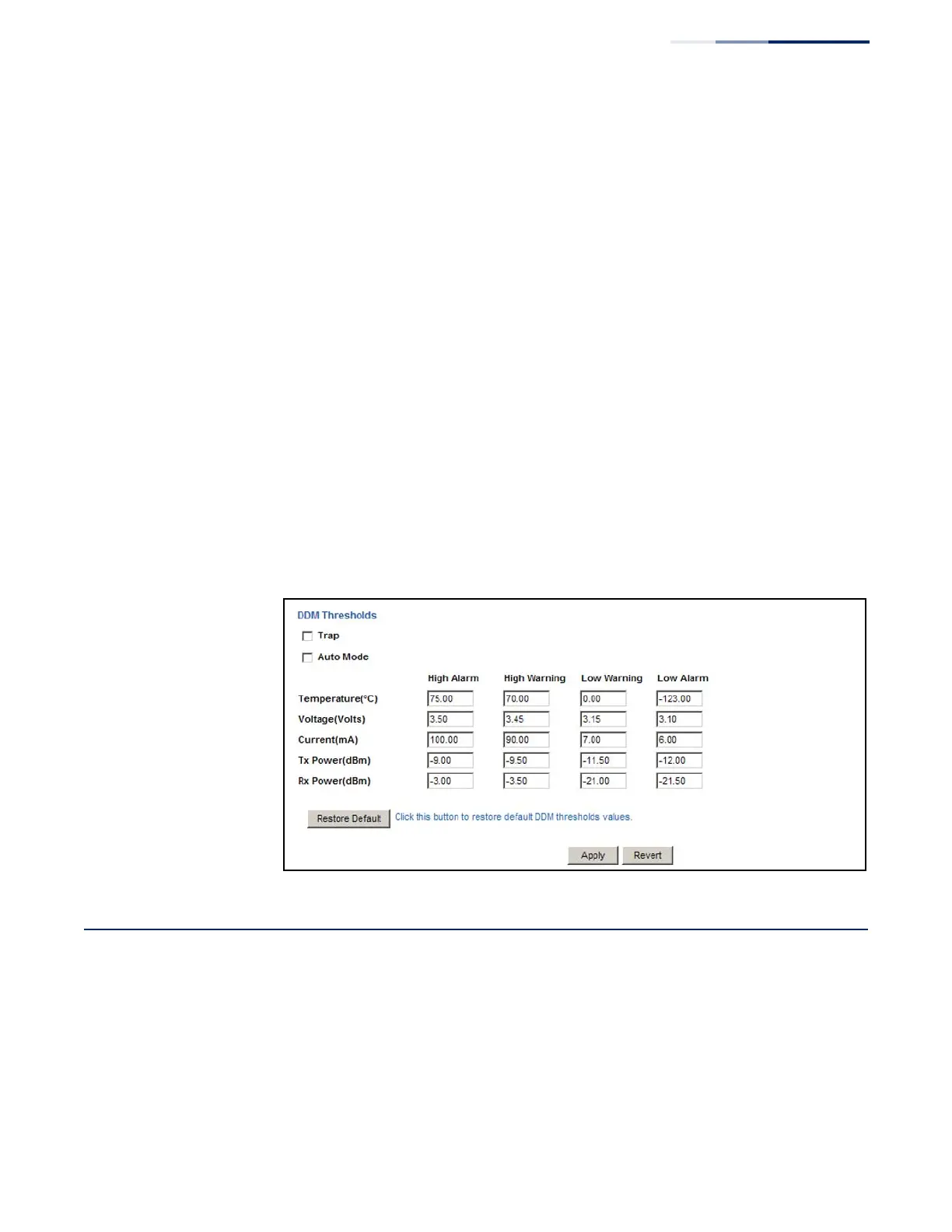
To configure threshold values for optical transceivers:
1.
Click Interface, Port, Transceiver.
2.
Select a port from the scroll-down list.
3.
Set the switch to send a trap based on default or manual settings.
4.
Set alarm and warning thresholds if manual configuration is used.
5.
Click Apply.
Figure 43: Configuring Transceiver Thresholds
Trunk Configuration
This section describes how to configure static and dynamic trunks.
You can create multiple links between devices that work as one virtual, aggregate
link. A port trunk offers a dramatic increase in bandwidth for network segments
where bottlenecks exist, as well as providing a fault-tolerant link between two
devices. You can create up to 16 trunks at a time on the switch, or up to 32 across
the stack.















 To Next Page