Chapter 12
| Security Measures
ARP Inspection
– 282 –
◆
Log Message Number – The maximum number of entries saved in a log
message. (Range: 0-256; Default: 5)
◆
Log Interval – The interval at which log messages are sent. (Range: 0-86400
seconds; Default: 1 second)
Web Interface
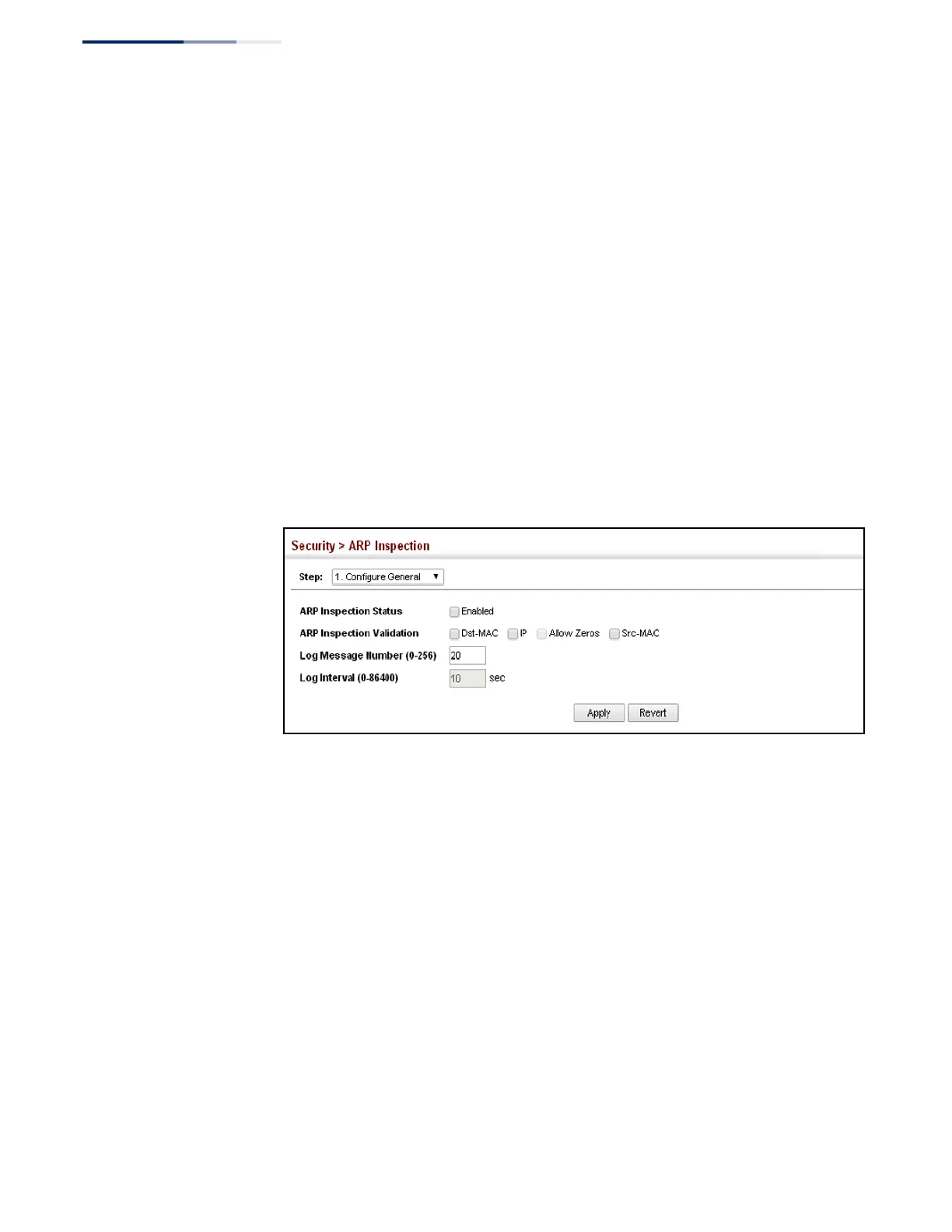
To configure global settings for ARP Inspection:
1.
Click Security, ARP Inspection.
2.
Select Configure General from the Step list.
3.
Enable ARP inspection globally, enable any of the address validation options,
and adjust any of the logging parameters if required.
4.
Click Apply.
Figure 179: Configuring Global Settings for ARP Inspection
Configuring
VLAN Settings for
ARP Inspection
Use the Security > ARP Inspection (Configure VLAN) page to enable ARP inspection
for any VLAN and to specify the ARP ACL to use.
Command Usage
ARP Inspection VLAN Filters (ACLs)
◆
By default, no ARP Inspection ACLs are configured and the feature is disabled.
◆
ARP Inspection ACLs are configured within the ARP ACL configuration page
(see page 275).
◆
ARP Inspection ACLs can be applied to any configured VLAN.
◆
ARP Inspection uses the DHCP snooping bindings database for the list of valid
IP-to-MAC address bindings. ARP ACLs take precedence over entries in the
DHCP snooping bindings database. The switch first compares ARP packets to
any specified ARP ACLs.















 To Next Page