161
exchanges information with the PD such as duty-cycle, peak and average power needs.
◆ All the RJ-45 ports support both the IEEE 802.3af and IEEE 802.3at standards. The total
PoE power delivered by all ports cannot exceed the maximum power budget.
◆ The switch’s power management enables individual port power to be controlled within the
switch’s power budget. Port power can be automatically turned on and off for connected
devices, and a per-port power priority can be set so that the switch never exceeds its power
budget. When a device is connected to a switch port, its power requirements are detected by
the switch before power is supplied. If the power required by a device exceeds the power
budget of the port or the whole switch, power is not supplied.
◆ Ports can be set to one of four power priority levels, critical, high, medium, or low. To
control the power supply within the switch’s budget, ports set at critical to medium priority
have power enabled in preference to those ports set at low priority. For example, when a
device connected to a port is set to critical priority, the switch supplies the required power, if
necessary by denying power to ports set for a lower priority during bootup.
Note: For more information on using the PoE provided by this switch refer to the Installation
Guide.
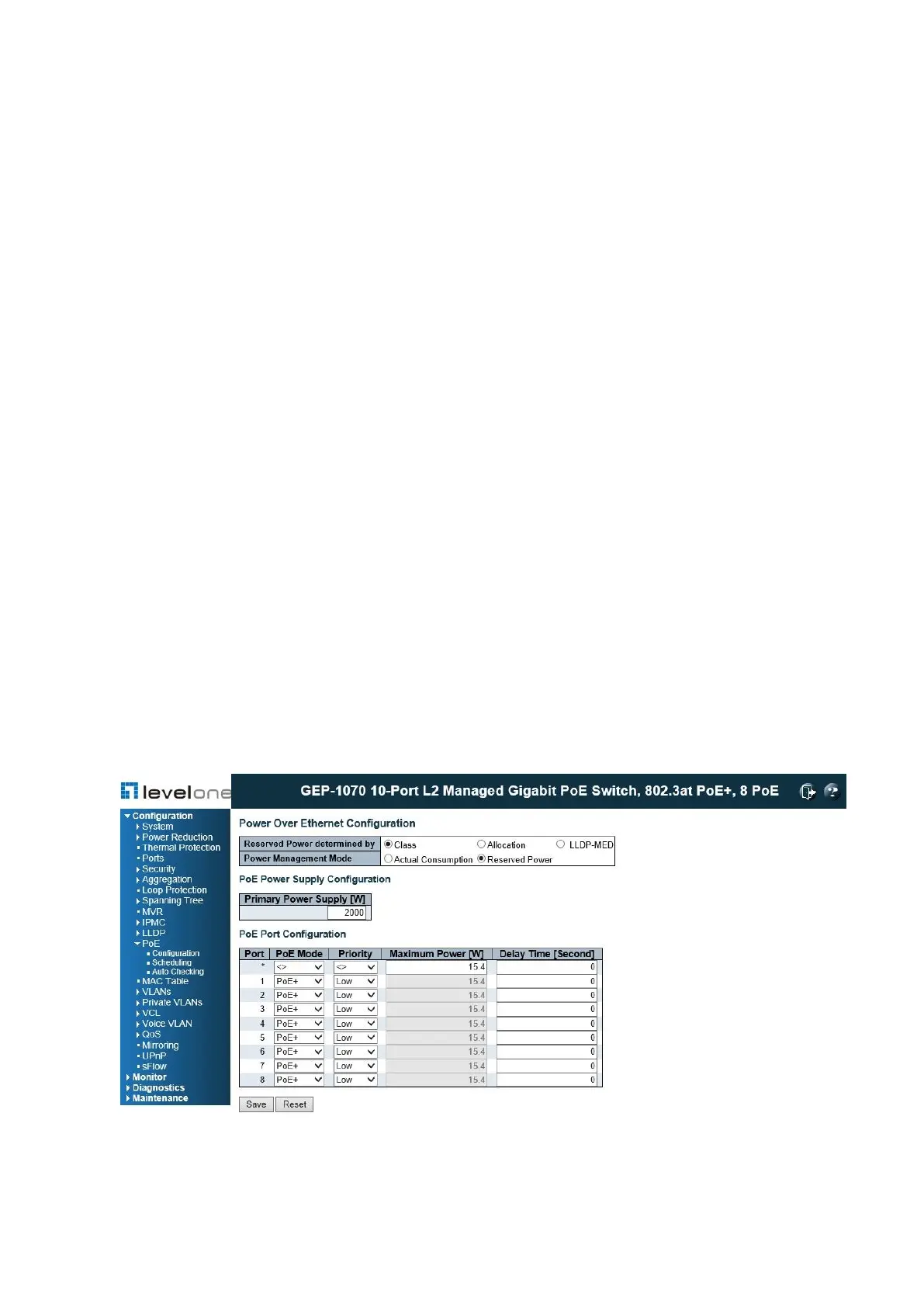
PoE Configuration
Use the PoE Configuration page to inspect and configure the current PoE port settings.
PATH
Configuration \ PoE \ Configuration
Figure 63: Configuring PoE Settings
PARAMETERS














 To Next Page